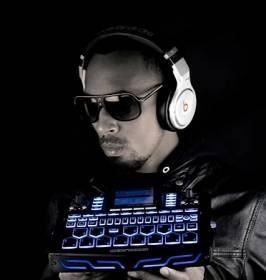
I controller midi sono sempre stati al centro delle attenzioni dei musicisti di tutti i generi. Sul palco o in studio salvano o complicano la vita! In questi ultimi anni si è assistito al passaggio dai controller hardware, pieni di tasti e pedali, difficili da programmare, spesso da modificare con chip di provenienza parallela per ottenere maggiori prestazioni, a sistemi misti hardware-software. Ora siamo alla release 2.0 dell’evoluzione: controller ibridi, sempre più software, che delegano al pc gran parte del loro calcolo. Softstep alza la posta in gioco: un controller con hardware minimo a programmazione software ma con struttura fisica modellabile. Non esiste più una base hardware predefinita, ora anche il tasto può trasformarsi in pedale o in switch trasformando una pedaliera a 10 tasti uguali in una struttura variabile in cui numero di tasti, pedali, toggle, trigger sono completamente da definire. Il concetto di “tasto” e “pedale” cambia la sua connotazione originale e si evolve in un oggetto esa-dimensionale (x-y-pressione-rotazione-on-off…).
 Trovandomi spesso a fare live con le mani sempre impegnate da qualche strumento musicale, sono costantemente alla ricerca di controller midi che mi agevolino il lavoro.
Mi sono imbattuto in SoftStep, il nuovo nato della Keith mcMillen (www.keithmcmillen.com).
Apparentemente è il solito controller, ma qui le promesse sono altre e mi hanno incuriosito.
Cominciamo col dire che la gestione è tutta via software, quindi addio alle notti spese con il Behringer FCB 1010 e simili, con sequenze di tasti che facevano impazzire: qui le cose sono più semplici ed intuitive… a patto che si legga il manuale però! C’è da studiare un pochino – anche se meno del solito -, ma bisogna familiarizzare con il linguaggio utilizzato dagli sviluppatori e con questo concetto dell’assegnamento multifunzionale dei tasti.
Ho provato il software su Windows 7 64bit SP1: lento e non proprio stabile. L’impressione è che sia nato per Mac, dove sicuramente funzionerà benissimo! Ultimamente sono un po’ sfortunato con i software multipiattaforma, scelgo sempre quella sbagliata (che sia ora di cedere alla tentazione della mela?!). Lo faccio funzionare in modalità compatibile Xp e sembra migliorare leggermente: almeno non si blocca. E’ una release 1.0, la prima “stabile” probabilmente.
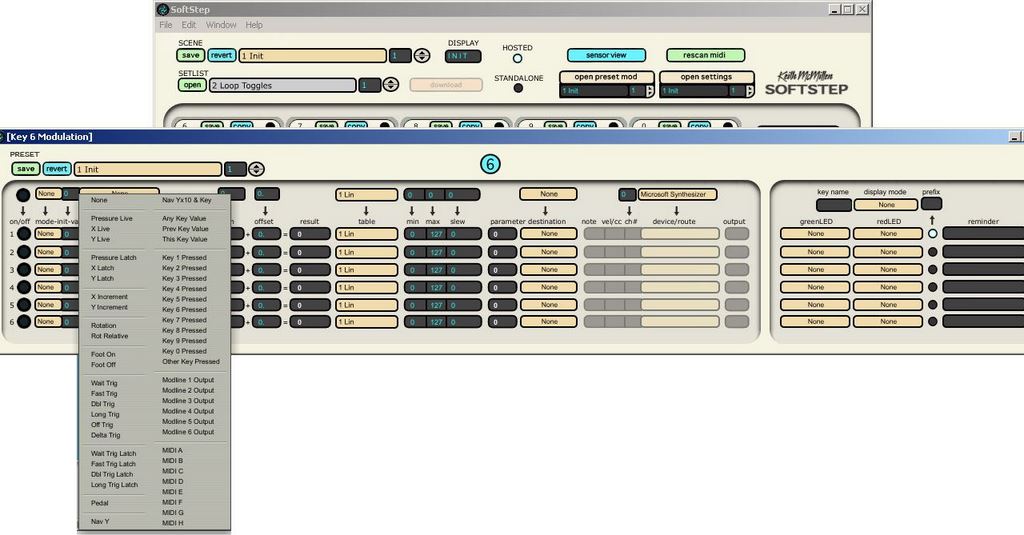
Ma lasciando da parte la stabilità, si può lavorare. Il sistema offre la possibilità di assegnare 6 eventi ad ogni tasto scegliendo tra on/off, trigger o pedale x-y e altre varianti.
Vediamo come lo descrive la casa produttrice:
- Pressione: ogni tasto è sensibile alla pressione per un controllo espressivo del suono
- Direzione: i movimenti verticali e orizzontali vengono trasformati in valori
- Portatilità: leggera 566gr e piccola come una tastiera di un pc
- Livelli: fino a 6 Note, CC, Pitch Bend, Program, MMC, o OSC per tasto
- Resistenza: materiale elastico con retro in fibra di carbonio… – cito testualmente – “resistente alla birra!”
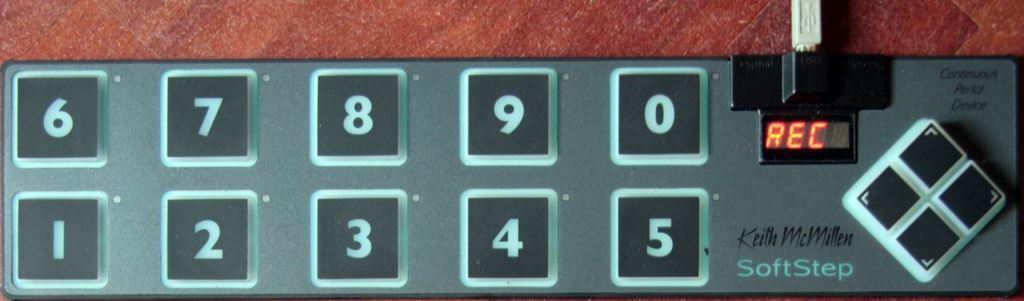
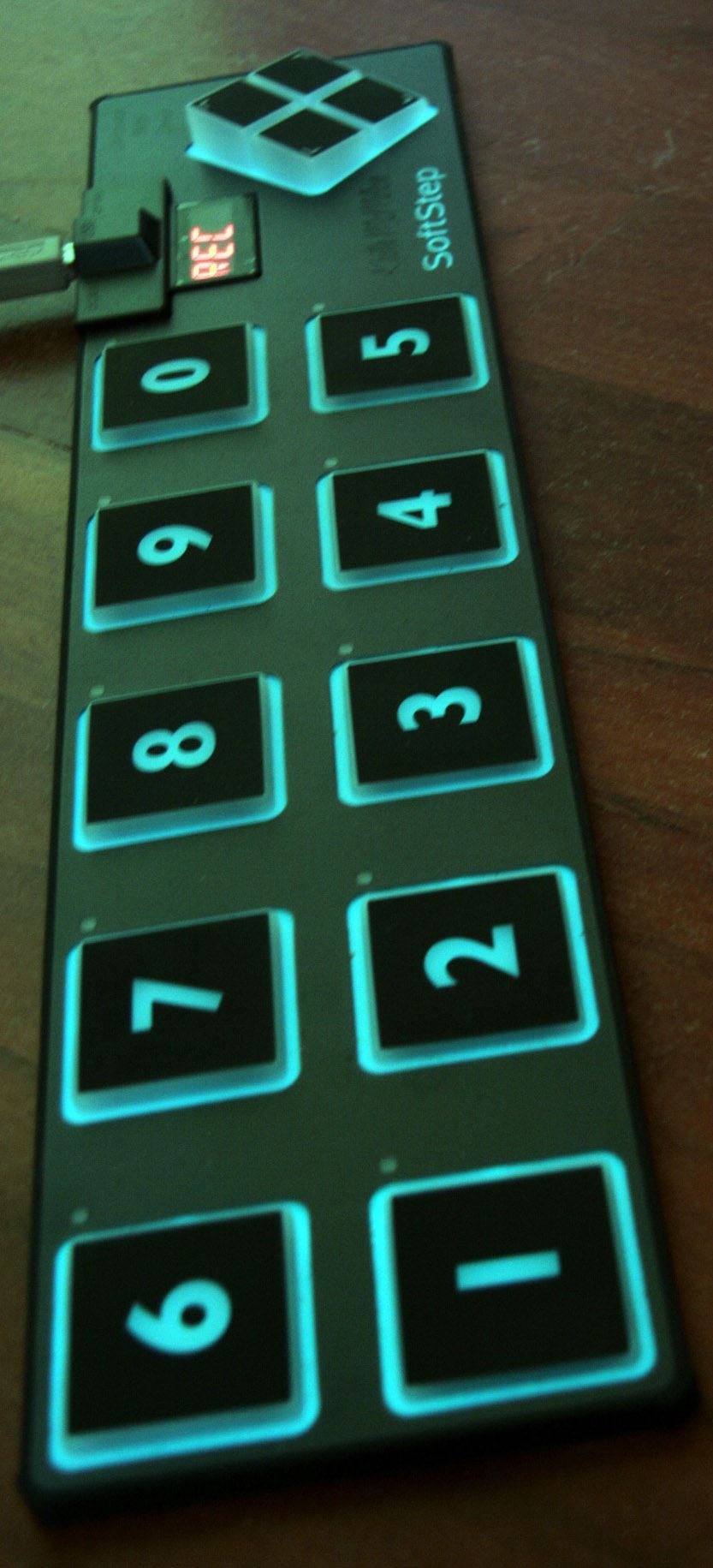
- Flashy: display a led 4 caratteri, 10 LEDs bicolori (rosso/verde) per chiave, retroilluminazione
- Controllo: può pilotare qualsiasi software o hardware midi compatibile compreso i controlli da studio mmc e Hui di Protools e Logic, pedalini Line6 e simili
E’ tutto vero ma ci sono alcuni particolari che vale la pena sottolineare.
– I tasti sono di una specie di gomma morbida, silicone, la pressione non restituisce una risposta al tatto, non è come premere un pedale di alluminio insomma. Se qualcuno di voi ha provato le tastiere pc di gomma o le tastiere musicali avvolgibili sa di cosa parlo. Morale della favola: bisogna dare una sbirciatina prima di agire sul tasto per non rischiare di ritrovarsi a premere sul pavimento.
– Con le mani e con i piedi scalzi (aaargh!!!) bisogna insistere molto sui tasti, soprattutto se usati come pedale.
– Se parliamo di trigger on/off le cose vanno bene ma se programmiamo un pedale lineare su un tasto quadrato 5cmx5cm, con valori 0-127 è veramente molto difficile fermarsi su quello giusto, anche se esiste la possibilità di rallentare il tempo con un parametro detto slew (che è comunque troppo veloce).
L’idea merita comunque considerazione. Una volta programmato il controller trasferendo i dati dal pc si può lavorare in più modalità:
- standalone USB per pilotare software o vst
- standalone midi, attraverso un suo accessorio midi (non in dotazione) diventa un controller midi pcless
- hosted, attraverso il suo software (che deve essere lasciato aperto) può utilizzare un numero di funzioni maggiore rispetto alla modalità standalone usb

Esempi di utilizzo
– La cosa più veloce che mi viene in mente per far comprendere le possibilità delle multifunzioni sui tasti è quella di programmare fino a 6 note per tasto creando accordi ad ogni pressione.
– controllo di loopstation (Guitar Rig, Ableton Live)
– controllo Pod e pedali (Line6 e simili)
– controllo parametri midi per pilotare synth (in modalità hosted ha anche il controllo di OSC)
– controllo di volumi su mixer virtuali e midi (qui ci andrei un po’ più cauto)
…
Si possono impostare azioni anche con il tasto off, una sorta di after touch. Se ad esempio si suonano accordi una delle azioni sul tasto off può essere una nota di basso per avere un effetto particolare.
Possono essere pilotati tutti i software e hardware midi compatibili. Particolare attenzione rivestono gli effetti per chitarra con il supporto delle impostazioni Toggle (che manda 0-1) e Toggle127 (che manda 0-127) e Ableton Live, che per sua natura si presta moltissimo.
Attenzione, dato il basso assorbimento funziona su IPAD. Ovviamente necessita dell’adattatore usb (camera connection kit per Ipad), ma l’idea di avere un prodotto PC/Mac/IPAD è sicuramente interessante.
Esperienza pratica con Guitar Rig
 Per fare un test ho programmato il controller per il mio Guitar Rig 4, sostituendo la pedaliera della Native con SoftStep. Innanzitutto ho ben 10 tasti. Ho scelto di utilizzare:
2 tasti per il looper (rec/play e stop)
1 tasto per la funzione overdub della loop
1 tasto per il mute
1 tasto redo
1 tasto undo
1 tasto come pedale volume loop
1 tasto come pedale volume generale
1 tasto come mandata effetto
Avrei voluto programmare un tasto come pedale in modo da poter variare i preset degli effetti ma la cosa ha avuto poco successo. A differenza degli altri pedali che ho creato (volume, effetto) dove si può andare ad occhio/orecchio, un pedale che modifichi il preset deve essere preciso e questo come dicevo è davvero improbabile!
Ho risolto creando un intero preset per modificare i program change, quindi se voglio il preset 4 premo il pedale n. 4. Per il 42 è un po’ più complicato ma si abilita la funzione a 2 cifre spostandosi sulla quarta decina e poi si preme il tasto 2.
Il bello di questo controller è che è facile passare da un preset all’altro avendo a disposizione ogni volta 10 tasti. Il brutto è che i preset si resettano ad ogni caricamento, quindi spostandosi da un preset all’altro si perdono i valori memorizzati dai pedali. Se si tocca il pedale dopo esserci tornati questo riparte da zero (non mi ha sorpreso questa cosa, ma trattandosi di piattaforma “innovativa” potevano anche pensarci!).
Luci e led
 A parte la retroilluminazione che fa la sua figura su un palco semi-illuminato, c’è un led bicolore su ogni tasto che è possibile programmare. Può essere fisso o lampeggiante (a 2 velocità slow/fast).
Si possono fare cose inusuali come ad esempio decidere l’azione di un tasto in base alla pressione di un altro tasto. Nel mio settaggio per Guitar Rig la luce Play lampeggia fino alla pressione del tasto di STOP.
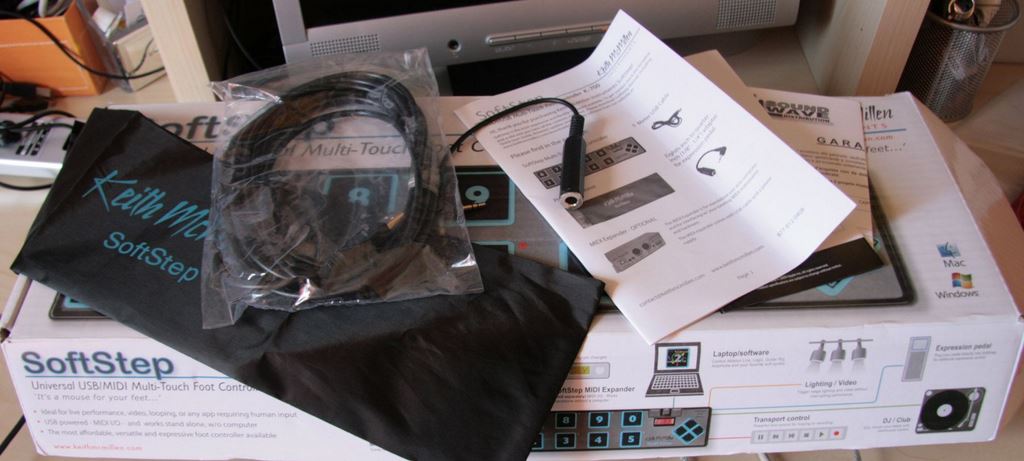
La dotazione hardware/software
La dotazione hardware è piuttosto essenziale, quella software è inesistente, o almeno va scaricata.
– cavo usb 3mt
– adattatore per pedale esterno
– mini-manuale cartaceo quasi inutile
– una custodia di stoffa impermeabile – veramente “cinese”!
– un indirizzo internet da cui scaricare i programmi * questo serve e ci sono anche i manuali veri.
Pro/contro Tiriamo le somme
Volendo fare un bilancio di pregi e difetti il prodotto risulta sicuramente utile a chi vuole in poco spazio qualcosa di veramente versatile e molto resistente. Lo consiglio dunque a tutti i musicisti che utilizzano software e hardware con 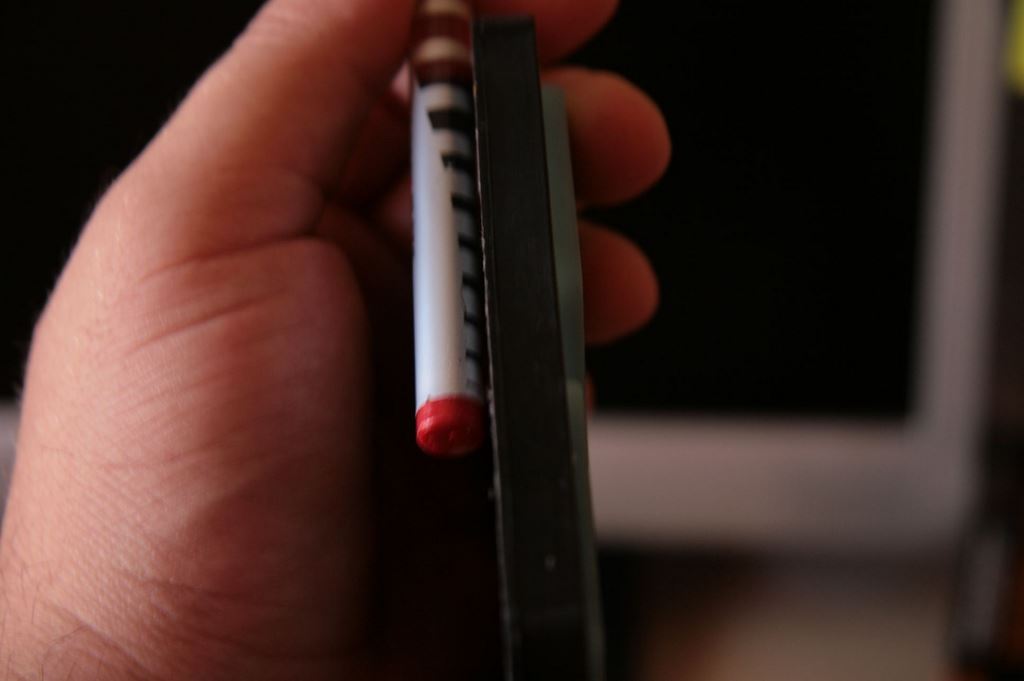 funzioni accessibili via midi e che hanno esigenza di passare con un tocco di piede dall’uno all’altro senza perdersi nei complicati processi dei controller midi classici. Data la “resistenza alla birra” dichiarata dalla casa immagino che il prodotto abbia una buona resistenza in ambienti difficili ed in effetti sembra abbastanza solida e compatta.
Anche se dubito che qualche tecnico del suono manovrerà mai il suo mixer con i piedi, invito alla prova chi vuole sperimentare l’utilizzo degli arti inferiori insieme a quello delle mani per operazioni di routine, on/off, volumi, etc.
Se però valutiamo il rapporto qualità/prezzo, si cade notevolmente: non costa poco e necessita comunque di un pc/mac. Se aggiungiamo che per l’autonomia totale ci vuole l’expander midi e un alimentatore usb, il quadro è completo.
Personalmente riesco ad utilizzarlo con le scarpe e in piedi (soprattutto per le funzioni dei pedali la posizione verticale mi risulta fondamentale).
Extra – Photoshop con i piedi

E’ possibile scaricare il software Keyworx che permette la programmazione con messaggi che il sistema operativo comprende. Si può quindi pilotare il mouse, fare un copia e incolla, ma anche utilizzare funzioni più complesse con Photoshop e con qualsiasi programma che permetta di legare una funzione ad una combinazione di tasti. Attenzione, perché Keyworks carica un suo firmware sovrascrivendo i preset musicali, quindi il controller è da utilizzarsi o con l’uno o con l’altro software.
INFORMAZIONI UTILI
Produttore: Keith McMillen (www.keithmcmillen.com)
Piattaforma: PC/MAC/IPAD
Prezzo di listino: 289.95 $ (in Italia intorno ai 250,00 euro)
Accessori non compresi:
- Midi box 49.95$
- Pedale esterno (un qualsiasi pedale volume)
- Alimentatore usb (per alimentazione senza pc)
tutte le foto – tranne la prima – di Fabio Pesce


Midi controllers have always been a priority subject for all kinds of musicians. On stage or in a studio they may save their lives or make it more complicated! In the last few years we’ve been witnessing the transition from the hardware controller, full of keys and pedals, hard to program, often needing a change with non-proprietary chips to achieve a higher performance, to mixed hardware-software systems. Up to now we have got to the 2.0 release of this evolution: hybrid controllers, more and more based on softwares, which have the pc making the most of their computational work. Softstep has been anteing up: a controller with a minimum hardware based on a software programming but with a modifiable physical structure. There is not an ultimate hardware basic structure, now they key can turn to a pedal or to a switch as well changing a ten-key pedal board into an adjustable and versatile where the amount of keys, pedals, toggles and triggers is absolutely programmable. The “key” and the “pedal” concept has been changing its natural connotation and it has been evolved to a six-dimensional device. (x-y-pressure-rotation-on-off…).
Finding myself always with my hand busy with some musical instruments during a live performance, I’ve always been in search of midi controllers which would make my work easier. I stumbled on Softstep, the new born from Keith mcMillen (www.keithmcmillen.com).
Apparently it looks like the usual controller but the expectations about it are rather high, and they have been arousing my curiosity.
Let’s start by saying that its control is completely via software, so we can say good bye to the nights we spent with Behringer FCB 1010 and the likes, with a sequence of keys which drove us mad, because here things are much more simple and intuitive…only on condition that you would read the manual! You must spend some time to studying it, though shorter than the usual but it needs a little acquaintance about the language used by the producers and about the whole multifunctional assignable key concept.
I tested the software on a 64bit Windows 7 SP1: slow and not stable at all. It seems that it’s been made for Mac where it would surely run perfectly! Lately I have not been so lucky with multifunctional softwares, I always choose the wrong system (or is it time to give in to the apple’s temptation?!). I had it run in Xp compatible mode and it seems to get slightly better, at least it doesn’t crush. It’s a 1.0 release, probably the first “stable” one.
But stability aside, it seems to work fine. The system gives the possibility to send each pad 6 messages by choosing on/off key, trigger or x-y pedal and other options.
Let’s see how the producer company describes it:
• Pressure: Every key is pressure sensitive for expressive sound control
• Direction: up/down and left/right movement translated into values
• Portable: it weighs just 1.3 pounds and stands as high as a computer keyboard
• Levels: Up to 6 Note, CC, Pitch Bend, Program, MMC, or OSC messages per key
• Durable: rubberize elastomeric fiber with carbon fiber backing and -quoting the source- “beer proof”
• Flashy: A 4-character LED display, 10 dual-color LEDs (red/green) per key, and backlit
• Control: It can control every compatible midi software and hardware including the mmc and hui controls for ProTools and Logic, Line6 pods and others
Everything that’s been said is true but there are some peculiar aspects which are worth a mention.
– Keys are made of some sort of soft rubber, silicone, and pressure doesn’t give any feedback to the touch, it’s not like pressing an aluminum pedal at all. If anyone of you has ever been dealing with rubberized pc keyboards or with flexible music keyboards you know what I mean. To cut a long story short, we have to take a look at it before working the key to avoid pressing our foot on the ground.
– With your hands and bare feet (aaargh!) you need to try hard on the pads, especially when used as pedals.
– When it comes to on/off trigger things seem to work just fine but if we program a linear pedal on a 5cmx5cm square pad, within values like 0 and 127 it is very hard to stop on the right one, even though there is a possibility to slow down tempo through a so called “slew” parameter (which is way too fast anyway).
This idea deserves some consideration though. Once the controller is programmed by loading data from your pc, you can work in several modes:
• Standalone usb to control softwares or vst
• Standalone midi, via a midi accessory (not provided) it becomes a midi controller without pc
• Hosted, via its software (which must be left open) can use a higher number of functions in comparison to the standalone usb mode
Examples of use
– The fastest way that comes to my mind to make you understand the multifunctional purposes of the pads is the possibility to program up to 6 notes per key creating chords at each pressure.
– Loopstation control (Guitar Rig, Ableton Live)
– Pods and pedals control (Line6 and the likes)
– Value control for synth (in hosted mode it can also control OSC)
– Volume control for virtual and midi mixers (I would tread carefully on that)
….
It is possible to set commands also with the off key, a kind of after touch. For example, if we are playing chords, one of the commands on the off key could be a bass note, to create a particular effect.
All the compatible midi software and hardware can be controlled. Very catching are the effects for guitar with the sustain of the Toggle (which sends values from 0 to 1) and Toggle127 (which sends values from 0 up to 127) and Ableton Live which, for its own nature, lends itself very easily. You must know that, due to its low power consumption, it is also working on the IPAD. Indeed it needs the usb adaptor (camera connection kit for IPAD), but the idea of dealing with a product that is PC/MAC/IPAD compatible is surely interesting.
Practical experience with Guitar Rig
In order to make a test, I programmed the controller for my Guitar Rig 4, replacing the Native pedal board with Softstep. First of all, I got a good ten keys: I chose to use:
2 keys for the looper (rec/play and stop)
1 key for the overdub loop function
1 key for the mute
1 key for redo
1 key for undo
1 key for the volume loop pedal
1 key for general volume pedal
1 key for the effect enable
I would have liked programming one key as a pedal in order to control and change the presets for the effects, but I was not successful. Differently from the other pedals I created (volume, effect) where you can go by eye and ear, a pedal that would modify the presets should be thorough, and as I said, this is not likely.
I settled it creating an entire new preset in order to modify the program change, therefore, if I need the preset 4 I am to press the pedal number 4. For the 42 it is a little bit more complicated, but you can enable the 2 digit number function moving to the fourth ten and then you have to press the key number 2. The good thing about this controller is that it is easy to changeover from a preset to another with the 10 keys provided every time. The bad thing is that the presets reset at each loading, so moving from a preset to another they lose the values that have been recorded by the pedals. If you touch a pedal after you’ve once preset it, this starts again from square one (this was not a surprise to me, but being it an “innovative” device, they should have thought better about it!).
Lights and Leds
Aside from the backlight, which looks good on a semi-lit stage, there is a two-colour led on each key that can be programmed. It can be constant or flashing (two-speed, slow and fast). You can do unusual things as deciding a key action based on the pressure of another key. In my setting for Guitar Rig the play light flashes until the STOP key is pressed.
The hardware/software provided
The hardware provided is rather basic, the software is non-existing, or at least it must be downloaded.
– a 3 meters usb cable
– an external pedal adaptor
– an almost useless paper mini-manual
– a waterproof cloth cover – original chinese!
– A url where you can download the programs * this is useful and the real manuals are also there.
Pros/cons – Let’s sum up
In order to make a closing balance between its pros and cons, the product turns out to be definitely useful to those who need something really versatile and highly resistant for a small space. I recommend it to all the musicians who use softwares and hardwares with midi connectable functions and need to change between the two with a touch of foot, without losing themselves inside the complicated standard midi processes. Being it “beer-proof” as the producer says, I would imagine that this product has a good durability for hard situations, and by the way it seems to be rather compact and solid.
Though I doubt that any sound engineer would ever work his mixer with his feet, I invite to test it to those who want to try the use of their lower arts together with their hands for the routine actions, on/off, volumes, and so on.
It is recommended if only we consider its price, the price/quality ratio gets very unbalanced: it is not cheap and it needs a pc/mac anyway. If we add that it needs the midi expander and a usb connector for its complete autonomy, the picture is complete.
Personally, I am able to use it wearing shoes and standing tall (mainly due to the pedals’ functions, the vertical position is essential to me).
Extras – Photoshop with your feet
It is possible to download the Keyworx software which allows to program through messages that the operation system includes. Hence you can use your mouse, copy and paste, and also use more complex functions for Photoshop and for whatever software which allows to match a function to a key combination. Pay attention that Keyworx has got its own firmware which overwrites the music presets, so the controller must be used with one software or another.
USEFUL INFORMATIONS
Producer: Keith McMillen ( www.keithmcmillen.com )
Platform: PC/MAC/IPAD
List price: 289.95 $ (around 250 euros for the italian market)
Accessories not provided:
•Midi box 49.95$
•External Pedal (any volume pedal)
•Usb bus power (for power without pc)
All the pictures made by Fabio Pesce except the first one
Italian to English translation: Umberto del Giudice