Alzi la mano ogni strumentista a corde che non ha almeno una volta sognato di utilizzare i suoni di un synth o di un piano, ma di essersi fermato per complicazioni tecniche o comunque pratiche.
Montaggio di un pickup esafonico (???), interfacciamento con un expander di suoni e poi problemi di tracking e quant’altro. Dimenticate tutto ciò, perché Guitar to Midi farà di voi dei perfetti chitarristi-tastieristi!
Dicevamo… ma quindi cosa fa MIDI GUITAR 2?

Trasforma quello che suonate con la chitarra in messaggi MIDI, permettendovi di pilotare con la vostra chitarra una tastiera, un synth o semplicemente un plugin su PC/MAC.
E lo fa in maniera polifonica, quindi potrete sbizzarrirvi a suonare le cose più complesse che vi vengono in mente, perché MIDI GUITAR 2 trasformerà ogni singola nota in un suono sulla tastiera.
La cosa formidabile è che la latenza, ossia il tempo che ci mette il software a capire che nota state suonando e il suono dalla tastiera, risulta davvero bassissimo.
Abbiamo a disposizione sia la versione plugin che standalone, inoltre per il basso è disponibile Bass To Midi, che come dice il nome è la versione bassistica.
Rack
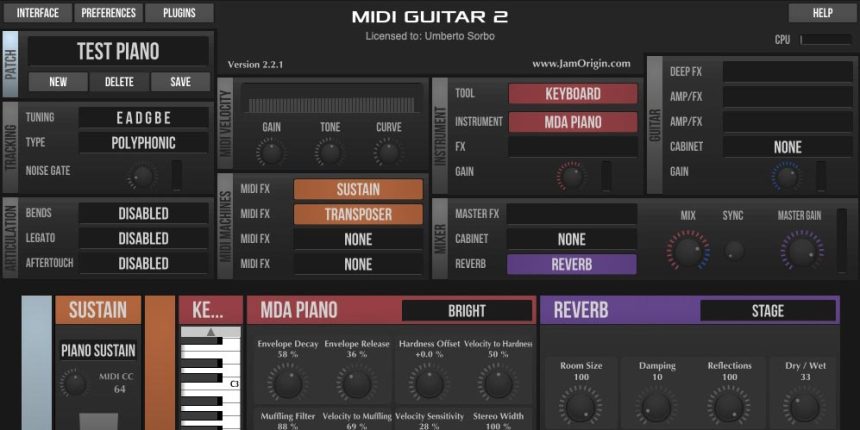
Il tutto si presenta sotto forma di un “rack”, ossia un pannello che racchiude tutti i plugin e i settaggi che ci servono per il nostro suono finale, perché sarà possibile mixare il suono della chitarra a quello processato.
Quindi il segnale in ingresso all’interfaccia audio, convertito in messaggi MIDI che andranno in ingresso al “Rack”.
Interfaccia Audio
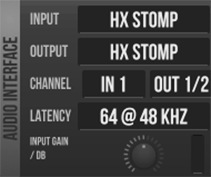
Qui andiamo ad impostare l’ingresso audio dal quale proviene la nostra chitarra e anche l’uscita audio. Inoltre, è possibile impostare la latenza del segnale, quale valore scegliere dipenderà dalla velocità del proprio computer.
Infine, è presente un potenziometro per impostare il guadagno del segnale in ingresso, indispensabile per avere un tracking ottimale del segnale dello strumento.
Midi Out
Se non si usa la versione plugin, è possibile specificare dove mandare l’output di MIDI Guitar, quindi potremo usare qualsiasi porta MIDI disponibile sul PC ( o sul MAC)
Patch

Nella patch andiamo a salvare le impostazioni di tutti i pannelli per richiamarle in un secondo momento. È possibile switchare tra le patch usando un controller esterno ed usando un Program Change MIDI
Tracking

Questo blocco trasforma il segnale audio in messaggi MIDI, ci sono poche cose da specificare: tuning e tipo di tracking (polifonico)
Tuning
Sono disponibili varie accordature ed possibile definire la propria.

Midi Velocity
In questo pannello andiamo a regolare come reagiscono le “note” MIDI al nostro modo di suonare, perché sebbene sarà il volume/tono di ingresso della nostra chitarra ad influenzare questo parametro, qua possiamo regolare guadagno e tono in modo regolare al massimo la dinamica che vogliamo ottenere.
È disponibile anche una manopola “curve” che serve a comprimere o ad espandere il range dinamico, quindi per esempio fare in modo che le note che suonano forte siano più soft.
Articulation
In questo pannello possiamo specificare se abilitare o meno 3 parametri: bend, legato e aftertouch. Per il legato possiamo anche specificare il tipo di sustain (se desiderato ) che può variare da 5 millisecondi a infinito (WOW).
Midi Machines
Vediamoli come dei “processori” MIDI da aggiungere, quindi per esempio un traspositore di note, un arpeggiatore, harmonizer, ecc.. Se ne possono aggiungere fino a 4 e sono messi serie.
Da notare la possibilità di crearne di custom con un editor che Guitar to Midi mette a disposizione ( si programma in LUA).
Instrument
In questo pannello si seleziona uno strumento, un synth o un VST. È possibile aggiungere un effetto (Delay, Chorus o di terze parti sempre tramite VST). Si può selezionare un “tool” che può essere un accordatore polifonico, una ruota degli accordi, wave o MIDI monitor.
Guitar
In questo blocco è possibile selezionare un simulatore di amp valvolare. Sono disponibili molte simulazioni ed inoltre è possibile caricare IR di terze parti.
Mixer
Qui viene miscelato il suono proveniente dallo strumento e dal modulo Guitar. Con la manopola Sync è possibile aggiungere un piccolo delay tra i due per aggiustare la latenza della parte Instrument.
MIDI Guitar dispone di un motore di reverbero a convoluzione al quale ancora una volta possiamo caricare IR di terze parte.
Master Gain invece serve a regolare il livello di uscita audio finale.
Test setup
Il mio setup di test ha cercato di mettere Jam Origin in una condizione abbastanza scomoda. Ho utilizzato un ultrabook Chuwi HI 10 Pro per capire se il software fosse in grado di mantenere le sue performance.
Come ingresso audio ho utilizzato un Hx Stomp Line6 per il quale è stato necessario utilizzare Asio4All, in quanto la versione del software per Windows supporta solo i driver ASIO (la versione Mac non ha bisogno di ASIO).

Ciò nonostante Guitar to Midi si comporta in maniera egregia e con grande stabilità, sia utilizzando virtual instruments che inviando esternamente le note MIDI (nel mio setup Yamaha Motif XS). Ho notato dei sovraccarichi solo quando ho attivato effetti o amp, qui probabilmente occorre un PX più potente di quello che ho utilizzato per il mio test.
La versione del software Bass to Midi offre solo un tracking di tipo monofonico.
Conclusioni
Guitar to Midi è una software che fa quello che deve senza nessun problema: dall’ audio della chitarra al MIDI in real time e senza latenza.
Se non si ha intenzione di utilizzare un pickup esafonico con relativo modulo, rappresenta forse una delle migliori soluzioni PC based.
Con un prezzo contenuto (circa 100 dollari ) ed un ottimo supporto (forum dedicato ) Midi to Guitar risulta un prodotto davvero interessante e valido.
Informazioni utili
Sito: Jam Origin
Hands up every string player who has not at least once dreamed of using the sounds of a synth or piano, but of having stopped due to technical complications or anyway practical ones.
Assembly of an hexaphonic pickup (???), interfacing with a sound expander and then tracking problems and more. Forget all this, because Guitar to Midi will make you perfect guitarist-keyboardists!
We were saying but then what does MIDI GUITAR 2 do?
It turns what you play on the guitar into MIDI messages, allowing you to drive a keyboard, a synth or just a PC/MAC plugin with your guitar.
And it does it in a polyphonic way, so you can play around with the most complex things that come to mind, because MIDI GUITAR 2 will transform every single note into a sound on the keyboard.
The terrific thing is that the latency, that is the time it takes the software to understand what note you are playing and the sound from the keyboard, is really very low.
We have both a plug-in and a standalone version available, and Bass To Midi is available for the bass, which as the name implies is the bass version.
Rack
Everything comes in the form of a “rack”, which is a panel that contains all the plugins and settings that we need for our final sound, because it will be possible to mix the guitar sound with the processed one.
Then the input signal to the audio interface, converted into MIDI messages that will go to the “Rack”.
Audio interface
Here we go to set the audio input from which our guitar comes and also the audio output. Also, you can set the latency of the signal, which value to choose will depend on the speed of your computer.
Finally, there is a potentiometer to set the gain of the input signal, which is essential for optimal tracking of the instrument signal.
Midi Out
If you do not use the plugin version, you can specify where to send the MIDI Guitar output, so we can use any MIDI port available on the PC (or on the MAC)
Patch
In the patch we are going to save the settings of all the panels to recall them later. It is possible to switch between patches using an external controller and using a MIDI Program Change
Tracking
This block transforms the audio signal into MIDI messages, there are few things to specify: tuning and type of tracking (polyphonic)
Tuning
Various tunings are available and it is possible to define your own.
Midi Velocity
In this panel we are going to adjust how the MIDI “notes” react to our way of playing, because although it will be the volume/tone of our guitar’s input that influences this parameter, here we can adjust gain and tone so as to regulate the dynamics to the maximum we want to get.
A “curves” knob is also available that serves to compress or expand the dynamic range, so for example make sure that the notes that sound loud are softer.
Articulation
In this panel we can specify whether to enable 3 parameters: bend, legato and aftertouch. For the legato we can also specify the type of sustain (if desired) which can vary from 5 milliseconds to infinity (WOW).
Midi Machines
Let’s see them as MIDI “processors” to add, so for example a note transposer, an arpeggiator, harmonizer, etc.
Up to 4 can be added and they are put in series.
Note the possibility of creating custom processors with an editor that Guitar to Midi makes available (programmed in LUA).
Instrument
In this panel you select an instrument, a synth or a VST. You can add an effect (Delay, Chorus or third party always via VST). You can select a “tool” which can be a polyphonic tuner, a chord wheel, wave or MIDI monitor.
Guitar
In this block it is possible to select a tube amp simulator. Many simulations are available and you can also upload third-party IR.
Mixer
Here the sound coming from the instrument and the Guitar module is mixed. With the Sync knob you can add a small delay between the two to adjust the latency of the Instrument part.
MIDI Guitar has a convolution reverb engine which we can once again load third-party IR.
Master Gain instead serves to adjust the final audio output level.
Test setup
My test setup tried to put Jam Origin in a rather uncomfortable condition. I used a Chuwi HI 10 Pro ultrabook to see if the software could maintain its performance.
As audio input I used an Hx Stomp Line6 for which it was necessary to use Asio4All, as the software version for Windows only supports ASIO drivers (the Mac version does not need ASIO).
Nevertheless Guitar to Midi behaves in an excellent manner and with great stability, both using virtual instruments and sending MIDI notes externally (in my Yamaha Motif XS setup). I noticed overloading only when I activated effects or amps, here you probably need a more powerful PC than the one I used for my test.
The Bass to Midi software version offers only monophonic tracking.
Conclusions
Guitar to Midi is a software that does what it needs without any problem: from guitar audio to MIDI in real time and without latency.
If you do not intend to use an hexafonic pickup with a corresponding module, it is perhaps one of the best PC based solutions.
With a low price (around 100 dollars) and excellent support (dedicated forum) Midi to Guitar is a really interesting and valid product.