



Da qualche mese la UVI, produttrice di librerie campionate, ha rilasciato Falcon, che la UVI stessa definisce “Creative Hybrid Instrument”, sotto il cui mantello nasconde un motore audio piuttosto performante e particolarmente appetibile per il Sound Designer moderno.

Se siete “differentemente” giovani, doveste ricordarvi la serie PlugSound di qualche anno fa, una suite di 6 SamplePlayer (Keyboards, Fretted, Drum & Percussion, Synth, Orchestral, General MIDI) che, a fronte di un’interfaccia minimalista, restituivano sonorità di tutto rispetto, per l’epoca, e ampiamente impiegate in molte produzioni audio di inizio millennio.
Il motore audio alla base di questi SamplePlayer era l’UVI Engine che, notevolmente migliorato e ampliato negli anni, ritroviamo oggi in Falcon.

È da precisare subito: Falcon non è l’ennesimo riproduttore di campioni alla stregua dei vari Kontakt (Native Instruments), Halion della Steinberg, MachFive della MOTU. Con 15 sistemi di sintesi diversi, Falcon vuole tentare di riscrivere il concetto di virtual instrument, offrendo all’utente un sistema modulare il cui limite può essere proprio la conoscenza dell’utente riguardo alle varie tecniche di sintesi fino ad oggi conosciute. Allo stesso modo, è doveroso rilevare che tanto il motore audio, quanto l’interfaccia di Falcon ricalcano appieno le peculiarità di MOTU MachFive3, il cui codice di base è proprio l’UVI Engine. Chi ha avuto a che fare quindi con MachFive 3, non troverà alcuna difficoltà ad operare su Falcon, seppure quest’ultimo presenta qualche features in più, come ad esempio 3 nuovi sistemi di sintesi (IRCAM Multi Granular, IRCAM Scrub e Wavetable). In più Falcon può leggere senza problemi le librerie di MOTU MachFive3, mentre non mi è stato possibile fare il contrario.
Falcon, oltre alla versione standalone, è disponibile per Windows e OSX, nei vari formati VST, AAX e Audio Unit (solo OSX).
Interfaccia Grafica (GUI)
Falcon si presenta con una grafica scura, con un buon contrasto delle scritte che richiamano menu e funzioni: alcune icone, attivando modalità operative ad esse correlate, si colorano di celeste migliorandone ulteriormente l’impatto visuale. Sempre di colore celeste sono anche le ghiere di qualsiasi parametro, a cui viene aggiunta una ghiera di colore rosa, casomai lo stesso venisse sottoposto ad azione modulante. Tutte le sfumature di colore sono utilizzate solo per alcuni FX (Dual Delay e SparkVerb) e, a discrezione dell’utente, l’identificazione delle “Parts”. Tutte le finestre di programmazione sono disposte con raziocinio, per cui l’utente esperto non avrà difficoltà a familiarizzarci, mentre il neofita avrà ovviamente bisogno di un necessario training per comprenderne la strutturazione completa. Ad ogni modo, la UVI a reso da subito disponibili alcuni video di Falcon, in inglese, sulla stessa pagina del prodotto, di cui riproponiamo quello introduttivo a fine articolo. Ciò dovrebbe consentirvi di avere un’idea ancora più chiara della struttura del software e del reale potenziale delle varie sintesi implementate.

Nell’area principale, Falcon presenta diverse sezioni operative a secondo se si opera nella modalità Main, Mixer o Performace, richiamabili nella parte superiore dell’interfaccia. Sempre su questa linea, oltre alla selezione delle “Multi”, a libera programmazione dell’utente, troviamo anche il menu generale per il salvataggio/download dei preset o, ancora, il richiamo delle Preferenze; alcuni pulsanti dediti al Timing, al Volume generale, completano questa sezione. Le tre modalità di visualizzazione sono ben definite e consentono all’utente di raggiungere con pochi click la sezione di programmazione desiderata.

Nell’ordine abbiamo:
MAIN: quella di default, presenta tre sottoaree che, ha loro volta, possono visualizzare più sezioni di programmazione, complementari tra loro.
1) Da sinistra verso destra, abbiamo un prima colonna, con 3 sottomenu, con cui definire i setup timbrici (Parts), l’albero gerarchico di com’è strutturato il suono selezionato (Tree), oppure la lista di tutti i livelli con i relativi parametri (List), che replica esattamente le impostazioni di programmazione dell’area Edit centrale (Tree e List consentono di operare in modo comodo ed in contemporanea su più livelli: aspetto questo che torna utile quando si ha a che fare con stratificazioni complesse del suono. ndr).
2) L’area centrale, destinata all’editing del suono, è strutturata in 5 sottosezioni (Info, Edit, Effects, Events e Mods). Edit, quella principale mostra i vari livelli in cui è strutturato il suono.
Ogni Preset, assegnato ad una “Part”, infatti è un sistema di scatole cinesi in cui l’elemento più esterno, chiamato “Program”, ingloba uno o più “Layer”, ognuno dei quali può avere uno o più “KeyGroup” che, a loro volta, possono gestire uno o più “Oscillatori”. A questo livello, l’utente può attingere a ben 15 sistemi di sintesi sonora, anche replicabili (ciò significa che l’utente, volendo, può sommare 3 “Analog Stack”, ognuno composto da fino ad 8 forme d’onda indipendenti, con 3 moduli FM e uno o più suoni campionati. ndr). A completare quest’area, disposti nella parte bassa, riscontriamo il modulo “Mapping” dove organizzare gli Osc sulla tastiera in layer/split, e il modulo “Modulation” che, come s’intuisce dal nome, aggrega quante modulazioni voglia attivare su qualsiasi dei parametri facenti parte dell’intera catena di sintesi. Si tenga conto, poi, che ad ogni livello è possibile assegnare uno o più FX tra gli oltre 80 a disposizione. Considerando infine che fino a 64 Parts, ognuna con il proprio canale Midi, possono far parte di una “Multi”, il limite di utilizzo di Falcon è dettato solo dalla potenza del computer e/o dalla pazienza/competenza dell’utente.
3) a destra, infine, troviamo l’area “Browser“, del tutto nuova rispetto a MachFive3, dove sono organizzati, su ben 6 sottomenu, tanto le librerie quanto gli elementi di programmazione che fanno parte del core di Falcon: Oscillator, FX, Multi FX, Event Processor (tra cui Arpeggiatori e Script) e Modulation Source (tra cui un Multi ed uno Step Envelope, oltre ai classici ADSR, DAHDSR e LFO). FX, Event Processor e Modulation Source possono essere applicati, a diverso modo, ai livelli previsti dalla catena di sintesi. Dal browser si opera con dei semplici drag and drop.
MIXER: ogni Parts ha in quest’area un proprio canale audio di stampo classico con tanto di Insert e Send FX. Il mixer prevede poi 4 canali Aux e il canale Master. La gestione è semplice ed immediata. Gli FX disponibili, replicati rispetto a quelli impiegati per le sezioni di programmazione, non sono da sottovalutare: Delay, Reverberi (tra cui SparkVerb), Filtri, Gate, Compressori, processori di analisi, Distorsori, ecc. sono tutti presenti con tanto di parametri di programmazione specifici e possibilità di sottoporre gli stessi a qualsiasi modulazione, così come avviene per i moduli di sintesi.

PERF: tutte le Parts vengono visualizzate in singole righe dove, per ognuna, è possibile fissare velocemente Volume, Pan, Intonazione generale (ottave e semitoni), uscita audio (Main o 16 individuali), il canale MIDI, Mute, Solo, Split e Layer di tastiera e gli eventuali KeySwitch. Riguardo questi ultimi, mi sarebbe piaciuto riscontrarli anche nelle altre aree. Si consideri, inoltre, che uniformando i canali MIDI di ricezione, cioè impostandoli tutti allo stesso modo, è possibile creare sovrapposizioni timbriche (layer) e divisioni di tastiera (split) molto potenti e, teoricamente, “senza limiti” alla stregua di quanto già avviene con le Combi, Multi, Performance presenti sulle workstation hardware. Tali programmazioni, utili soprattutto ad esibizioni dal vivo, possono essere salvate come MULTI.
Modelli di sintesi
Si diceva all’inizio che Falcon, seconda la UVI un “Creative Hybrid Instrument”, può essere considerato un vero e proprio “Virtual Modular Synth”. I 15 tipi di Oscillatori, suddivisi in Synthesis e Sampling, spaziano dal Virtual Analog alla FM, alla WaveTable, fino all’impiego della sintesi granulare o dello slicing, grazie ad un forte contributo dell’IRCAM, di fatto il centro più all’avanguardia per lo studio e la manipolazione del suono. Per tale motivo, Falcon, si candida a buon diritto ad essere valutabile anche come strumento per una didattica mirata alla musica elettronica, sia di livello liceale che conservatoriale.
Tralasciando gli aspetti più consueti, per quanto riguarda il Sampling, troviamo:
– IRCAM Granular e Multi Granular: moduli dedicati alla sintesi granulare in cui la forma d’onda viene spezzettata in brevissimi frammenti audio (chiamati grani), poi ricompilati tra loro per dar vita a sonorità del tutto diverse dall’originale. Con il modulo Multi si ha la possibilità di generare fino ad 8 voci, ognuna con un excursus diverso della lettura dei grani.
– IRCAM Scrub: simile per comportamento all’IRCAM granular, svolge una lettura casuale dei grani, con controllo della velocità e direzione. Per l’analisi, impiega gli stessi algoritmi dell’IRCAM Stretch.
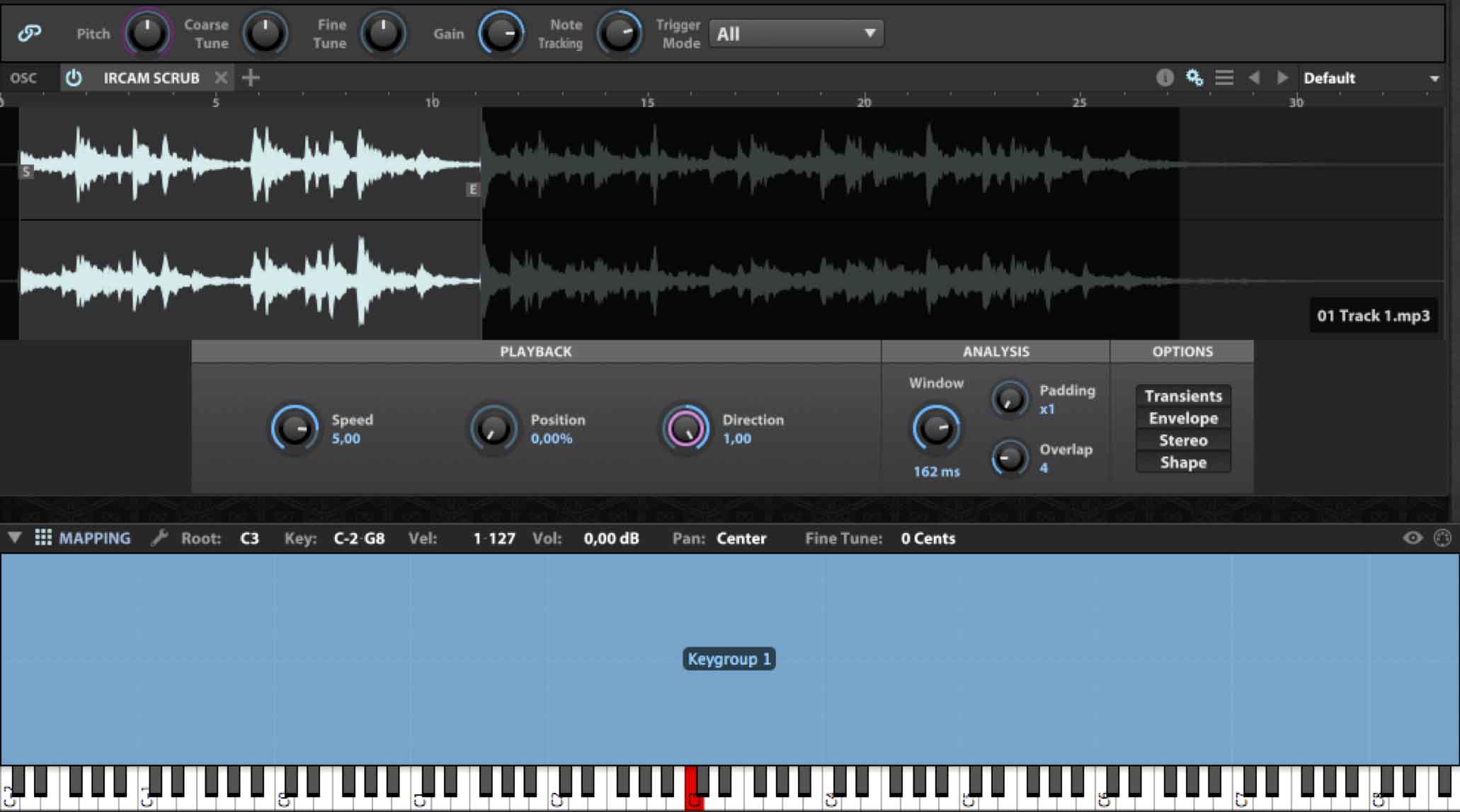
– IRCAM Stretch: rispetto all’altro modulo usa un PhaseVocoder ad alta performance per salvaguardare transienti ed inviluppi del segnale audio, con ovvia ricaduta sulla CPU del computer. È consigliato per materiali audio molto complessi dove tale tipo di calcolo ha senso di essere impiegato.
– Sampler: semplice riproduttore di campioni con diversi algoritmi di interpolazione del segnale audio finalizzati alla trasposizione dello stesso.
– Slice: com’è intuibile, consente la frammentazione di un loop o altra forma d’onda timing based per poi poterne esportare il risultato nella DAW oppure assegnando i singoli slice ad una tastiera.
– Stretch: simile al precedente, ma con algoritmi di analisi più leggeri.
Mentre per la Synthesis, abbiamo:
– Analog: classico oscillatore in stile analogico con 6 forme d’onda (Saw, Triangle, Square, Sine, Pulse, Noise), con tanto di PWM, HardSync e Unisono fino ad 8 voci.
– Analog stack: raggruppa 8 “mini” oscillatori, attivabili individualmente, chiaramente derivati dal modulo precedente, a cui manca l’HardSync, mentre l’Unisono, ovviamente, sarà possibile generarlo con opportuno detuning dei singoli oscillatori.
– Drum: mette insieme un’oscillatore intonato con un noise generator, con tanto di inviluppo AD dedicato e controllo di Balance fra i due. Una sezione Master, in cui è presente, tra l’altro un semplice controllo dell’EQ, completa questo modulo.
– FM: 4 operatori con 11 differenti algoritmi, con tanto di Feedback applicabile all’ultimo operatore, restituiscono i classici suoni in stile DX series.
– Noise: oscillatore contenente ben 15 noise sound diversi, compresi i classici White e Pink. Un parametro limitrofo e dinamico, che cambia significato a secondo del rumore richiamato, ne può modulare il contenuto sonoro.
– Organ: composto da 9 classiche drawbar, con Pan individuale, e modulo per aggiungere l’eventuale percussione iniziale.
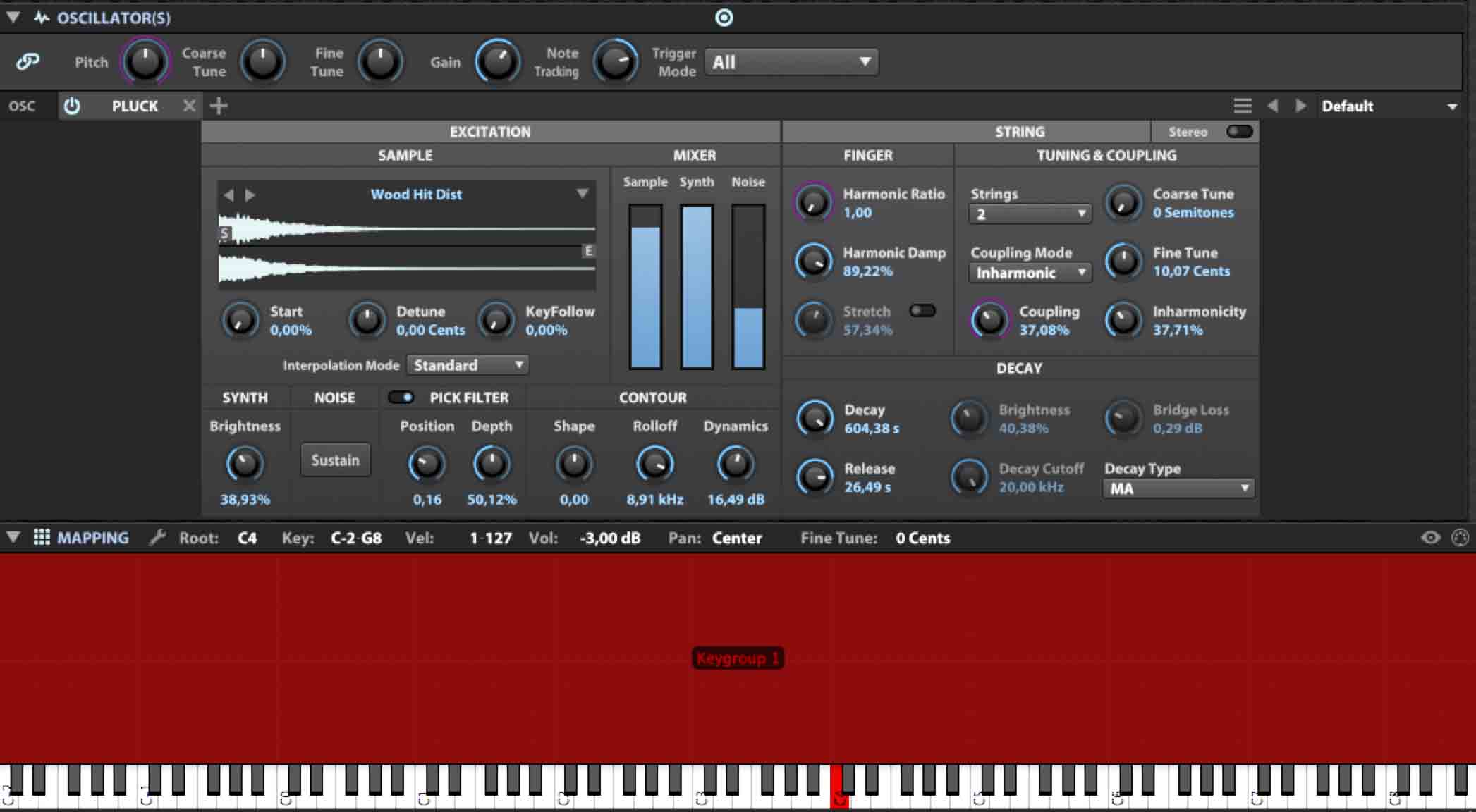
– Pluck: inspirato alla sintesi Karplus-Strong, è un modulo che impiega algoritmi ed eccitatori a base campionata, restituendo sonorità anche abbastanza inusuali. È possibile importare proprie forme d’onda.
– WaveTable: può gestire, oltre quelle interne, forme d’onda personali, singole o in sequenza, così come aggiungere un effetto unisono fino ad 8 voci. Ai più esperti risulta chiara che con una opportuna modulazione, LFO in primis, quest’oscillatore può restituire sonorità molto dinamiche e varie nel contenuto armonico.
In breve
Si potrebbe parlare ancora molto di Falcon, data la sua natura multi sintesi. Dovendo alleggerire questo articolo, val la pena accennare brevemente al fatto che:
– può importare diversi formati audio (tra cui AIFF, FLAC, MP3, REX1, REX2, SDII, WAV, WAV64, SFZ, SND, CAF);
– consente di personalizzare le proprie librerie con script specifici, casomai abbiate voglia di indirizzarvi all’attività di Sound Designer;
– gestisce diversi processori di eventi MIDI, tra cui un’elaboratissimo Arpeggiatore, un Harmonizer ed un Player di file MIDI
– consente la programmazione di Macro Controlli indirizzabili a qualsivoglia parametro;
– gestisce Frequenze di Campionamento fino 192KHz;
– consente di configurare le uscite audio dal Mono fino al Surround 10.2, sempre che la vostra scheda audio lo consenta;
Un articolo a parte, infine, potrebbe essere dedicato agli FX, con particolare riferimento allo SparkVerb, che la UVI sviluppa anche in versione separata come FX plug.in, o al Dual Delay, da cui prende spunto il plug.in ReLayer, anche questo sviluppato a parte.

Librerie e Bonus
Falcon comprende una libreria di circa 600 MegaByte di campioni, nel formato proprietario .ufs, che danno accesso a centinaia di suoni, quasi tutti elettronici ed EDM oriented. Nonostante la natura ibrida multisintesi (ricordo che il sound di Falcon non è per niente legato a suoni campionati), non mi sarebbe dispiaciuto avere qualche libreria campionata in più (mancano di fatto i suoni acustici e al momento non consente la conversione da altri formati), magari ridotta rispetto a quelle prodotte dalla stessa UVI, che potesse mettere in risalto le peculiarità di Falcon anche da questo punto di vista.
Tuttavia, con l’acquisto di Falcon, la UVI regala un Voucher di 100$ da utilizzare per l’acquisto di librerie. Tra questi, credo siano degne di nota soprattutto le librerie campionate che replicano strumenti vintage come il Synclavier, il Fairlight, gli EMU I e II, (tutti presenti nel bundle Vintage Vault. ndr).
Tirando le somme
Falcon nasce già maturo e con molte frecce al proprio arco. Anche se le librerie a corredo sono degne di nota, chiaramente non è uno strumento da limitare al semplice richiamo dei Preset. Con una sufficiente conoscenza dei sistemi di sintesi sonora, anche partendo da zero, si riescono ad ottenere velocemente tanto dei bassi acidi, grazie ai moduli analog, quanto dei sound campanosi nel pieno rispetto della FM, o ancora droni e soundscape avvolgenti piuttosto che sound in stile pizzicato o emulazioni di organi: senza considerare tutta la sezione Sample Player, da valutare come “alternativa sonora” ai vari EXS24, Kontakt, Halion, ecc. A riguardo, è bene ricordare che la stessa UVI produce librerie apposite, molte delle quali EDM oriented, oltre ovviamente a sezioni Orchestrali, emulazioni Mellotron, Rhodes, ecc come pure librerie inusuali come potrebbe essere il Prepared Piano, sviluppato dalla IRCAM. E se ciò non dovesse bastare, sullo stesso sito della UVI un ‘apposita pagina vi rimanda a tutte le terze parti che sviluppano strumenti specificatamente basati sull’UVI Engine.
Se proprio bisogna annotare delle discrepanze, ciò va ascritto al fatto che, attivando diverse modulazioni su diversi livelli, si inizia a confondere tutto l’insieme: basterebbe che le diverse sorgenti di modulazione abbiano dei colori diversi perché tutto possa funzionare meglio.
Ultim’ora
Da pochi giorni è stato rilasciata la versione 1.1 di Falcon, gratuita, che aggiunge nuove caratteristiche agli oscillatori FM e Pluck, nuovi effetti, tra cui un Chorus ad 8 voci, oltre un centinaio di nuovi Preset, e supporto per i controller Roli Seaboard e LinnStrument.

Chi pensa poi che fare il Sound Designer significa solo produrre suoni, si ricrederà con l’ultima novità gratuita della UVI: un geniale script ha consentito infatti ai programmatori UVI di riformulare in chiave Falcon, l’osannato Space Invaders degli anni ’80, qui rinominato Spark Invaders e disponibile nella home page del sito UVI.
Per conludere, Spark Invaders, come altre demo delle librerie campionate sono utilizzabili con UVIWS, player gratuito disponibile a fondo pagina dello stesso sito.
Video Introduttivo

*Sistema ibrido multisintesi (15 tipi di oscillatori);
*Ampie possibilità di Modulazione;
* Performance e Multi;
*Mixer ed FX.

*Nessuna libreria acustica;
*Gestione delle Modulazioni nella finestra Edit un po’ caotica;
* Costo un po’ elevato.
Link: www.uvi.net
Buona musica a tutti!
Alfredo CapozziUVI, sample library and software developer, has released Falcon over the past few months. UVI calls it “Creative Hybrid Instrument” and under its cloak it hides a pretty powerful audio engine and particularly attractive for the Modern Sound Designer.
If you are not so young, you should remind the PlugSound series a few years ago, a suite of 6 sample player (Keyboards, Fretted, Drum & Percussion, Synth, Orchestral, General MIDI) that, with a minimalist interface, provided sounds respectable, for its time, and were widely used in many audio productions of the millennium.
The audio engine behind these sample player was the UVI Engine that significantly improved and extended over the years, found today in Falcon.
Please note in advance that Falcon is not the another sample player like the various Kontakt (Native Instruments), Steinberg’s Halion, MOTU’s MachFive. With 15 different synthesis systems, Falcon rewrites the concept of virtual instrument, providing the user with a modular system whose limit may be just the user’s knowledge about the various synthesis techniques known until today.
Similarly, notice that both the audio engine and the interface of Falcon fully mimic the peculiarities of MOTU MachFive3, whose basic code is just the UVI Engine. If you had to deal with MachFive 3, you will find no difficulty in operating on Falcon, although the latter has some more features, such as 3 new synthetic systems (IRCAM Multi Granular, IRCAM Scrub and Wavetable). Moreover Falcon can easily read MOTU MachFive3 libraries, while it was not possible to do the opposite.
Falcon, in addition to the standalone version, is available for Windows and OSX, in the various VST, AAX and Audio Unit (OSX only) formats.
Graphical User Interface (GUI)
Falcon comes with a dark graphics, with a good text contrast that recall menus and functions: some icons, enabling operating modes, are light blue colored further enhancing the visual impact. Also the parameter rings are light blue, a pink ring is added in case the same parameter is subjected to modulation. Other colors are used only for some FX (Dual Delay and SparkVerb) and, at the user’s discretion, for the identification of “Parts”. All programming windows are arranged with common sense, the experienced user will have no difficulty to familiarize, while the novice will obviously need some practice to understand the complete structure. Anyway, the UVI made immediately available some videos of Falcon, in English, on the same page of the product. The introduction video is presented at the end of the article. This should allow you to have a clearer idea of the software structure and the real potential of the different implemented synthesis.
In the main area, Falcon has different operational sections depending on whether it operates in Main, Mixer or Performance mode, that can be recalled in the top of the interface. Always on this line, in addition to the selection of the “Multi”, freely programmable by user, we also find the general menu to save / download the presets or Preferences; some buttons, dedicated to the timing, the general volume, complete this section. The three display modes are well defined and allow the user to reach the desired programming section with a few clicks.
In the order we have:
MAIN: the default one, which has three sub-areas, that in turn can display more programming sections, complementary to each other.
1) From left to right, we have a first column, with 3 sub-menus, which define Parts (timbral setup), the hierarchical tree structure of the selected sound (Tree) or a list of levels with their parameters (List), which exactly replicates the programming settings of the central Edit area (Tree and List settings allow you to work comfortably and simultaneously on several levels: an aspect which comes in handy when dealing with complex layers)
2) The central area, destined to sound editing, is divided into 5 subsections (Info, Edit, Effects, Events and Mods). Edit, the main area, shows the various levels at which the sound is structured.
Each preset, assigned to a “Part”, is in fact a system of chinese boxes in which the outermost element, called “Program”, encompasses one or more “Layer”, each of which may have one or more “Keygroups” that, in turn, can manage one or more “Oscillators”. At this level, the user can tap into as many as 15 sound synthesis systems, also replicable (it means that the user can add 3 “Analog Stack”, each consisting of up to 8 independent waveforms, with 3 FM modules and one or more sample sounds). To complete this area, arranged at the bottom, we find the form “Mapping” to organize the Osc on the keyboard layer / split, and the “Modulation” module which, as the name hints at, aggregates as many modulations as you want to enable any parameters that are part of the entire synthesis chain. It should be taken into account, then, that at every level, you can assign one or more FX among more than 80 available. Finally, considering that up to 64 Parts, each with its own Midi channel, may be part of a “Multi”, Falcon use is limited only by the power of the computer and / or the user’s patience / competence.
3) To the right, finally, we find the “Browser” area, entirely new compared to MachFive3, where they are organized, on 6 submenus, both libraries and programming elements that are part of the core of Falcon: Oscillator, FX , Multi FX, Event Processor (including Arpeggiators and Script) and Modulation Source (including a Multi and a Step Envelope, besides the classical ADSR, LFO and DAHDSR). FX, Event Processor and Modulation Source can be applied in a different way, to the levels required by the synthesis chain. The browser will work with simple drag and drop.
MIXER: every Parts in this area has its own classical style audio channel with a Insert and Send FX. The mixer provides 4 Aux channels and Master channel. The management is simple and immediate. The FX available, similar to those used in the programming sections, are not to be underestimated: Delay, Reverb (including SparkVerb), Filters, Gate, Compressor, analysis processors, distortions, etc. They are all present with many specific programming parameters and the possibility of using the same with any modulation, as is the case for the synthesis modules.
PERF: all Parts are displayed in individual rows where, for each one, you can set quickly Volume, Pan, General Intonation (octaves and semitones), audio output (Main or 16 individual), MIDI channel, Mute, Solo, Split and Layer of keyboard and any keyswitch. Regarding the latter, I would have liked to find them also in the other areas. Consider also, that setting the MIDI reception channels with the same value, it is possible to create very powerful timbre overlaps (layers) and keyboard divisions (split) and, theoretically, “unlimited” the same way as already happens with the Combi, Multi, Performance present on the hardware workstation. Such programs, especially useful for live performances, can be saved as MULTI.
Synthesis models
I said earlier that Falcon, as UVI calls it “Creative Hybrid Instrument”, can be considered a real “Virtual Modular Synth”. The 15 types of oscillators, divided in Synthesis and Sampling, range from Virtual Analog to the FM, to the WaveTable, through to the use of granular synthesis or slicing, thanks to a strong contribution of IRCAM, the most advanced center for the study and manipulation of the sound. For this reason, Falcon, is a candidate with good reason to be evaluated
as a tool for teaching electronic music, both at high school and conservatoire level.
Leaving aside the more usual aspects, with regard to the Sampling, we find:
– IRCAM Granular and Multi Granular: modules dedicated to granular synthesis in which the waveform is broken up into short audio fragments (called grains), then recombined with each other to create sounds completely different from the original. With the Multi module you can generate up to 8 voices, each with a different overview of the grains reading.
– IRCAM Scrub: similar in behavior to IRCAM granular, it random plays grains, with speed and direction control. For the analysis, it uses the same IRCAM Stretch algorithms.
– IRCAM Stretch: respect to the other module it uses a high-performance PhaseVocoder to preserve transients and envelopes of the audio signal, with obvious consequences on the computer’s CPU. It is recommended for very complex audio material, where this type of calculation makes sense to be employed.
– Sampler: simple sample player with different interpolation algorithms of the audio signal aimed at the transposition of the same.
– Slice: allows the fragmentation of a loop or other form of timing based wave. The result can be exported to the DAW or assigned the individual slices of a keyboard.
–
– Stretch: similar to the previous, but with lighter analysis algorithms.
While for the Synthesis, we have:
– Analog: classic analog style oscillator with 6 waveforms (Saw, Triangle, Square, Sine, Pulse, Noise), complete with a PWM, and Unison HardSync up to 8 entries.
– Analog stack: group of 8 “mini” oscillators, which can be activated individually, clearly derived from the previous module, which lacks the HardSync, while the Unison, of course, can be created with the appropriate detuning of individual oscillators.
– Drum: puts together tuned oscillator with a noise generator, complete with a dedicated AD envelope and balance control between the two. A Master section, where it is present and a simple EQ control, complete this module.
– FM: 4 operators with 11 different algorithms, with lots of feedback applicable to the last operator, return the classic sounds in DX series style.
– Noise: noise oscillator contains as many as 15 different sounds including classic White and Pink. A modulation can be added with a dynamic parameter, that changes meaning depending on the selected noise.
– Organ: consists of 9 classic drawbars, with individual Pan, and module to add any initial percussion.
– Pluck: inspired to Karplus-Strong synthesis, is a module that employs algorithms and sample based exciters, returning quite unusual sounds. You can import your waveforms.
– WaveTable: can manage not only the internal, but also personal waveforms, single or in sequence,
And it can add an unison effect up to 8 entries. To experts it is clear that with a suitable modulation, LFO first, this oscillator can return dynamic and rich harmonic content sounds.
In short
I might tell you more about Falcon, given its multi synthesis nature. Having to lighten this article, it is worth briefly mentioning the fact that:
– You can import multiple audio formats (including AIFF, FLAC, MP3, Rex1, REX2, SDII, WAV, WAV64 SFZ, SND, CAF);
– It allows you to customize your own libraries with specific scripts, in case you want to do the activity of Sound Designer;
– Handles several processors of MIDI events, including a pretty Arpeggiator, a harmonizer and a MIDI File Player
– Allows programming of Macro Controls with any parameter;
– Manages up to 192KHz sampling rates;
– Allows you to configure the audio outputs from Mono to Surround 10.2, provided that your sound card allows;
A separate article, finally, could be dedicated to FX, with particular reference to SparkVerb, the UVI also develops a separate FX plugin version, or Dual Delay, that inspired the Relayer plugin, also developed separately.
Libraries and Bonus
Falcon includes a library of about 600 megabytes of samples, in the proprietary .ufs format, giving access to hundreds of sounds, almost all electronic and EDM oriented. Despite the hybrid multisynthesis nature (remember that the Falcon sound is not at all related to sampled sounds), I would not mind having some more sample libraries (lacking in fact acoustic sounds and at the moment does not allow conversion from other formats) maybe reduced compared to those produced by the same UVI, that could highlight the peculiarities of Falcon also from this point of view.
However, with the purchase of Falcon, the UVI offers a voucher of $ 100 to be used to purchase additional libraries. Among them, I think they are worthy of note above all sample libraries that replicate vintage instruments like Synclavier, the Fairlight, EMU I and II, (all present in the bundle Vintage Vault. Ed).
Summary
Falcon is born already mature, with many arrows to his bow. Although the supplied libraries are notable, of course, is not a tool to be limited to simple recall of presets. With sufficient knowledge of sound synthesis systems, even starting from scratch, you can achieve in short time as many acid basses, thanks to the analog modules, as bell FM sound, or drones and soundscape rather than “pizzicato” sound or organ emulations without considering the whole section Sample Player, to be assessed as “sound alternative” to the various EXS24, Kontakt, Halion, etc. It is worth remembering that the same UVI produces special libraries, many of which EDM oriented, and of course Orchestral sections, Mellotron emulations, Rhodes, etc. as well as unusual libraries could be the Prepared Piano, developed by the IRCAM. And if this were not enough, on the same UVI web site, a special page will refer to all third parties who develop tools specifically based on the UVI Engine.
If you really need to make a note of the discrepancies, this should be ascribed to the fact that, by activating different modulations on different levels, you start to confuse the whole: it would be enough that the different modulation sources have different colors so that everything can work better breaking news.
A few days ago it was released the 1.1 version of the Falcon, free, which adds new features to oscillators FM and Pluck, new effects, including an 8 voice Chorus, over a hundred new presets, and support for Roli Seaboard and LinnStrument controllers.
Who then thinks that being a Sound Designer means only produce sound, will change their mind with the latest news of the free UVI: a brilliant script has in fact allowed the UVI programmers to reformulate the acclaimed Space Invaders 80s, here renamed Spark Invaders, and available on the home page UVI.
To conclude, Spark Invaders, like other demos of the sample libraries can be used with UVIWS, free player available at the bottom side of the same site.
Introduction video
* System Multi synthesis (15 types of oscillators);
*Wide range of modulation;
Section Performance and Multi;
*Mixer and FX.
*Nothing acoustic sound’s library;
*Management of modulations in the Edit window a little chaotic;
*
A little expensive.
Link: www.uvi.net
Italian to English translation:Umberto Sorbo


