



Cantabile è un software che ricade nella categoria “live” e che ha delle caratteristiche specializzate per la gestione delle performance.
Per chi è in cerca di soluzioni da adottare in un contesto di musica dal vivo, dove spesso c’è l’esigenza di Live Electronics, tracce ausiliari, gestione midi di tastiere, Virtual Instrument e moduli sonori, questo prodotto potrebbe risultare di grande aiuto nell’organizzazione e nella gestione dell’intera scaletta del live.
Non dispone di editing di tracce MIDI, ma probabilmente non sarà un gran problema, per chi come me, è affezionato ai propri strumenti per la creazione e l’editing delle tracce. Cantabile nasce come VST host (qualcuno ricorderà Brainspawn Forte), ma ha poi aggiunto tantissime altre funzioni.
È dotato di un player Audio/Midi che permette di sincronizzare tracce audio e midi tra di loro. Vediamole nel dettaglio tutte le sue caratteristiche.

VST
Cantabile permette di utilizzare plugin VST perché funziona da host, in questo modo potremo utilizzare i plugin sia per suonare con una tastiera MIDI master che come suoni per le nostre song. Ogni volta che viene inserito un plugin, Cantabile crea delle “route”, ossia un collegamento tra le porte MIDI e le uscite audio. Questa funzione risulta molto comoda, in quanto avendo definito nelle preferenze la nostra configurazione del sistema (porte MIDI, scheda audio, ecc…), sarà molto veloce inserire e modificare i plugin che vogliamo usare.
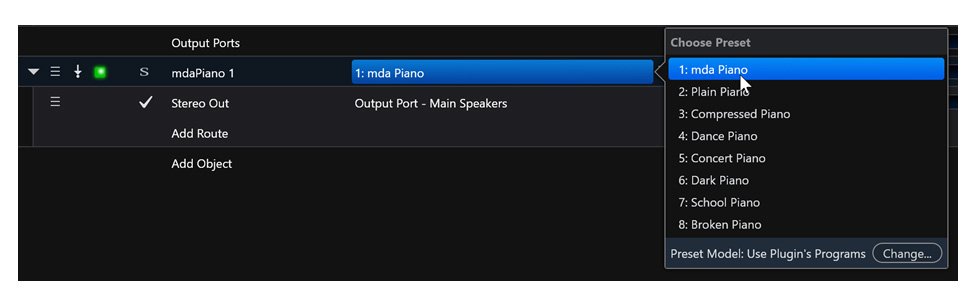
Infatti, Cantabile lavora con il concetto di porte “Porte Virtuali“, ossia le porte fisiche di Audio e Midi vengono associate a delle porte virtuali e le configurazioni fanno riferimento a quest’ultime. I collegamenti (“routes”) sono modificabili con dei menu a tendina o anche graficamente e tutto è ben guidato, cosa essenziale in quanto spesso questo tipo di impostazioni possono subito diventare molto complesse da gestire.
Media Player
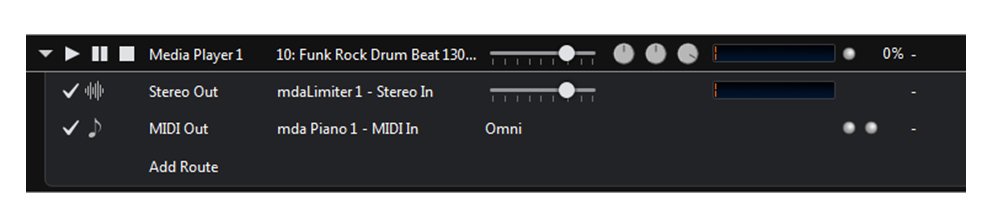
Cantabile supporta la riproduzione di file audio e midi (il tipo di file supportati sono: mp3, wave, flac e midifile). È possibile utilizzare uno o più “media player” ognuno con il suo tipo di file.

Inoltre è presente una “timeline” che ci permette di selezionare quale parte del file riprodurre. Una delle cose che più mi ha colpito sono i meccanismi di sincronizzazione, che ho trovato davvero ben fatti. Ogni media player può essere sincronizzato con un master control che può essere un altro medio player, il metronomo o un MIDI Clock esterno. Quindi ogni file sincronizzato parte o si ferma quando il suo controllo master parte o si ferma. In questo modo abbiamo moltissimi meccanismi di sincronizzazione tra file audio e midi.
Bindings
Questa è una delle più potenti caratteristiche di Cantabile. Con i binding è possibile definire il comportamento di Cantabile all’accadere di determinati eventi. Con un editor è quindi possibile definire come il software deve comportarsi nel caso di eventi MIDI, Audio, interni (Song caricata, eventi del player, ecc..).
Molto utile anche una funzione di autoapprendimento, che permette di creare un binding al volo sull’evento MIDI in ingresso a Cantabile.
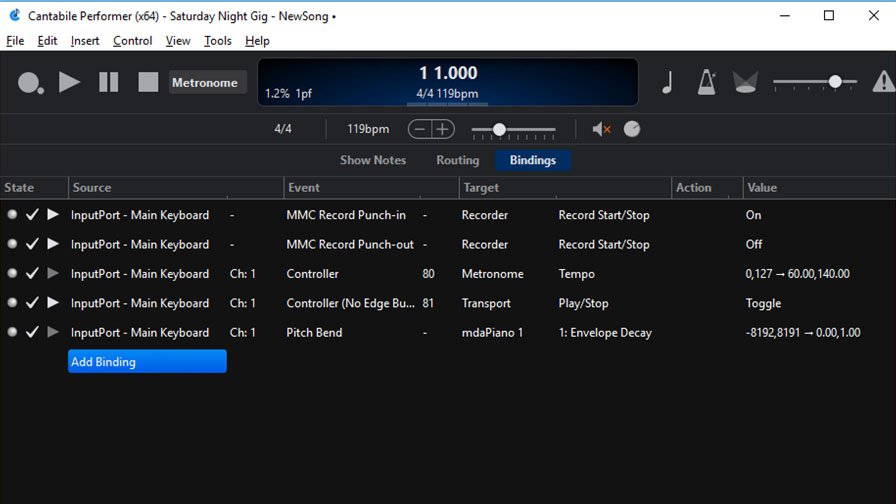
Con i binding è possibile controllare praticamente qualsiasi funzione Audio/Midi, lanciare eventi esterni al software Cantabile, ricevere eventi in ingresso e regolare di conseguenza i plugin.
Rack
Un “Rack” permette di raggruppare plugin VST ed effetti, collegarli tra loro e vederli esternamente come un unico blocco. I rack possono essere utilizzati nelle Song come delle unità sonore già connesse e configurate.
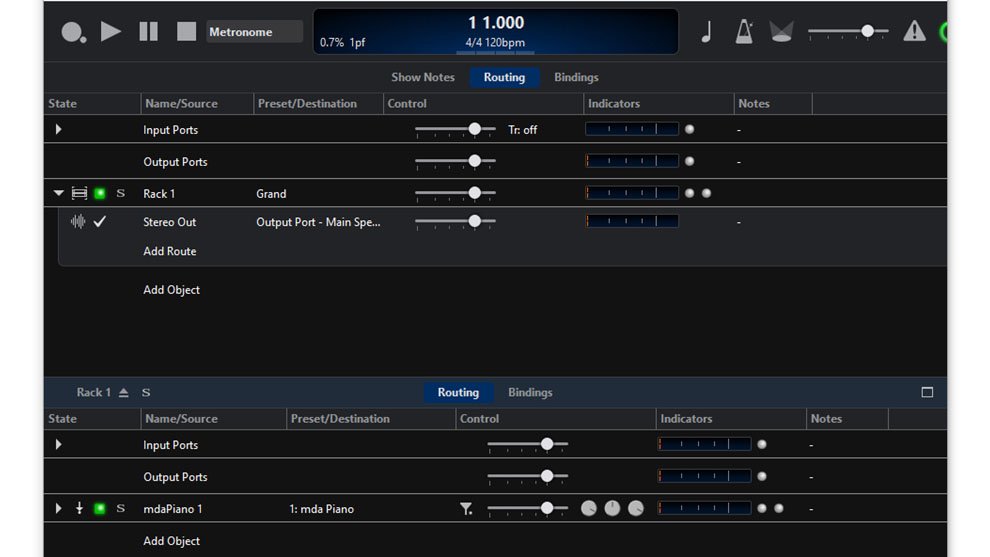
Una volta definito un rack non sarà più necessario ripetere l’operazione per ogni Song ma potremo richiamare un Rack specifico già utilizzato in un’altra Song. Anche per i rack è possibile lavorare con le funzioni di Routing descritte sopra, inoltre esiste uno speciale rack detto “Background Rack” nel quale è possibile caricare plugin ed effetti, che saranno sempre presenti in tutte le Song della nostra performance.
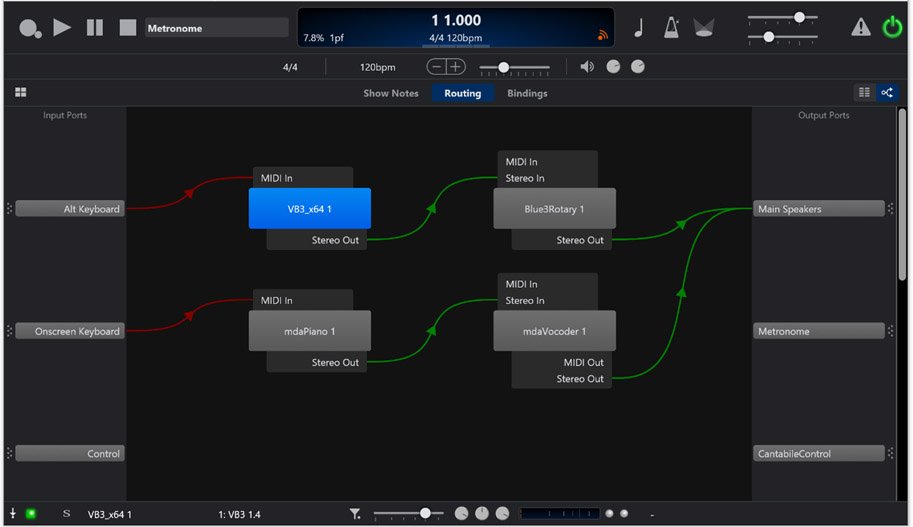
Quindi in caso di plugin che necessitano di tempi lunghi per il caricamento, un rack permette di azzerare questi tempi. In maniera visuale è possibile vedere ed editare i collegamenti in una song o un rack. A sinistra troviamo le porte di Ingresso, a destra le uscite, mentre nel mezzo gli oggetti da collegare (rack, plugin e media player)
Recording
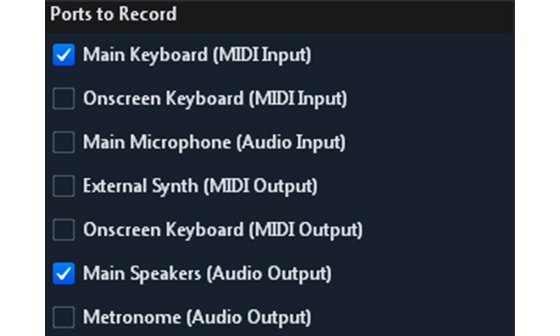
Questa funzione permette di registrare sia l’audio che il MIDI, anche in maniera automatica, mentre si sta suonando. È possibile specificare quali fonti registrare, siano esse fisiche o virtuali, quindi ad esempio: un synth esterno, l’audio da un certo microfono. Per la gestione della performance live sono disponibili diversi strumenti. Vediamoli!
Stato di Song e Rack
Gli stati forniscono un modo di salvare lo stato di una Song o di un rack e richiamarlo successivamente. Uno stato quindi permette di cambiare il routing, i preset e parametri di un plugin e molto altro. Il suo principale scopo è quello di fornire un meccanismo per passare velocemente da un settaggio all’altro tra le song o tra parti di esse. Quindi può essere usato per cambiare le patch in una song ( ad esempio quelle per passare da una Intro ad un Verse).
Set Lists
Una Set List è una lista di song che possiamo richiamare in qualsiasi momento. È qui che elenchiamo le song di una performance live. Ogni song può essere richiamata anche con un MIDI program change. Esiste una funziona di verifica della Set List, che permette di controllare che tutto sia al suo posto e non aver sorprese durante la performance live (Set list verification).

Live Mode
Sono disponibili due layout distinti: uno per editare le song e i rack e l’altro durante una performance live. Live mode è solo una questione di layout, qui è possibile scegliere cosa visualizzare e creare dei pulsanti con delle azioni associate. La time line ed il metronomo non sono visibili.
Conclusioni
Cantabile risulta un valido strumento per la gestione della complessità di un live. Tra le cose che mi sarebbe piaciuto trovare, un editor della schermata live mode più flessibile, che al momento risulta troppo poco personalizzabile a livello grafico. La possibilità di definire tantissimi tipi di “binding” rende questo software veramente versatile.
Cantabile viene fornito in tre versioni: Lite (Free!), Solo (69 $) e Performer ($ 199 ) solo per PC Windows Per una comparazione dettagliata delle versioni vi rimando al link sul sito: Cantabile
Cantabile is a software which belongs to the “live” category and which has specialized features for it.
For those looking for solutions to be adopted in a context of live music, where there is often a need for Live Electronics, auxiliary tracks, midi management of keyboards, Virtual Instruments and sound modules, this product could be of great help in the organization and management of the entire show.
It does not have MIDI track editing, but it probably will not be a big problem for each of us who are fond of their own tools for creating and editing tracks. Cantabile was born as a VST host (someone will remember Brainspawn Forte), but then added many other functions.
It is equipped with an Audio/Midi player that allows you to synchronize audio and midi tracks between them. Let’s see in detail all its features.
VST
Cantabile allows you to use VST plugins because it works as a host, in this way we can use the plugins both to play with a MIDI master keyboard and as sounds for our songs. Whenever a plugin is inserted, Cantabile creates “routes”, ie a connection between the MIDI ports and the audio outputs. This function is very convenient, as having defined our system configuration (MIDI ports, sound card, etc …) in the preferences, it will be very quick to insert and modify the plugins we want to use. In fact, Cantabile works with the concept of Virtual Ports ports, i.e. the physical ports of Audio and Midi are associated with virtual ports and the configurations refer to the latter. The connections (“routes”) can be modified with drop-down menus or even graphically and everything is well guided, which is essential as often this type of settings can immediately become very complex to manage. Media Player Cantabile supports the playback of audio and midi files (the type of supported files are: mp3, Wav, flac and midifile). You can use one or more “media players” each with its type of file, there is also a timeline that allows us to select which part of the file to play. One of the things that struck me most are the synchronization mechanisms, which I found really well done. Each media player can be synchronized with a master control which can be another media player, the metronome or an external MIDI Clock. Then each synchronized file starts or stops when its master control starts or stops. In this way we have many synchronization mechanisms between audio and midi files. Bindings This is one of the most powerful features of Cantabile. With bindings it is possible to define Cantabile’s behavior when certain events occur. With an editor it is therefore possible to define how the software should behave in the case of MIDI, Audio, internal events (Song loaded, player events, etc.). A self-learning function is also very useful, which allows you to create a binding on the fly on the MIDI event entering Cantabile. With the bindings it is possible to control practically any Audio / Midi function, launch events external to the Cantabile software, receive input events and adjust the plugins accordingly. Rack A “Rack” allows you to group VST plugins and effects, connect them together and view them externally as a single block. Racks can be used in Songs as already connected and configured sound units. Once a rack has been defined, it will no longer be necessary to repeat the operation for each Song but we will be able to recall a specific Rack already used in another Song. Even for the racks it is possible to work with the Routing functions described above, in addition there is a special rack called “Background Rack” in which you can load plugins and effects, which will always be present in all the Songs of our performance. So in case of plugins that need long loading times, a rack allows you to reset these times. In a visual way it is possible to see and edit the connections in a song or a rack. On the left we find the entrance doors, on the right the outputs, while in the middle the objects to be connected (rack, plugin and media player) Recording This function allows you to record both audio and MIDI, even automatically, while you are playing. It is possible to specify which sources to record, whether physical or virtual, therefore for example: an external synth, audio from a certain microphone. Various tools are available for managing live performances, let’s see them Song and Rack status States provide a way to save the state of a Song or rack and recall it later. A state therefore allows you to change the routing, the presets and parameters of a plugin and much more. Its main purpose is to provide a mechanism to quickly switch from one setting to another between the songs or between parts of them. So it can be used to change the patches in a song (for example those to switch from an Intro to a Verse) Set Lists A Set List is a list of songs that we can recall at any time. This is where we list the songs of a live performance. Each song can also be called up with a MIDI program change. There is a Set List verification function, which allows you to check that everything is in place and not have surprises during the live performance (Set list verification). Live Mode Two distinct layouts are available: one for editing songs and racks and the other during a live performance. Live mode is only a matter of layout, here you can choose what to display and create buttons with associated actions. The time line and metronome are not visible. Conclusions Cantabile is a valid tool for managing the complexity of a live Among the things that I would have liked to find, a more flexible live mode screen editor, which at the moment is too little customizable on a graphic level. The ability to define many types of bindings makes this software truly versatile. Cantabile comes in three versions: Lite (Free!), Solo ($ 69) and Performer ($ 199) for Windows PC only For a detailed comparison of the versions, I refer you to the link on the site https://www.cantabilesoftware.com/compare


