HX Stomp è la versione ultracompatta della pedaliera Helix di Line6 ed utilizza lo stesso DSP e tecnologia di modellazione di effetti, amplificatori e cabinet.
- Costruzione
- Effetti
- Connessioni
- Midi
- Interfaccia Audio
- EDITOR
- MODALITÀ OPERATIVE
- SNAPSHOT
- IR Block
- Conclusioni
- Construction
- Effects
- With the Midi function it is possible to control the HX Stomp with both the USB MIDI and the traditional 5-pin DIN connector.
- In particular, it is possible:
- • Recall a preset
- • Recall a snapshot
- • Bypassing a block in the chain of effects
- • Check the effects parameters
- Note that the Midi management of HX Stomp is much more limited than Helix, so the latter’s MIDI Commander is not present.
- Audio interface
- Editor
- For two reasons:
- Fig.10- Editor
- Fig.11 – HxEdit
- HELIX FREE GUITAR PATCHES
- Operating modes
- Conclusions
Personalmente ero molto interessato a questo tipo di formato, perché in cerca di un pedale versatile ma dall’ingombro limitato. Questa sua caratteristica rende HX Stomp perfetto per l’integrazione in una pedalboard anche più estesa. Questa versione ridotta, avrà la versatilità e la grana sonora della versione Helix che utilizzo abitualmente per i miei lavori?
Riuscirà a competere anche con prodotti alternativi di altre case costruttrici? O ci lascerà, come spesso accade nei modelli “light” un poco di amaro in bocca?
Costruzione
La qualità complessiva di HX Stomp è di buona fattura. Ha un robusto involucro metallico e lo schermo ha un buon contrasto ed una buona nitidezza.
Altrettanto robusti e precisi i potenziometri e gli switch capacitivi, ognuno con il suo anello colorato. Si presta quindi bene al classico utilizzo a terra oppure ad un utilizzo “desktop” ( accanto ad un synth per esempio).
Effetti
HX Stomp offre più di 300 effetti (compreso un looper) tutti provenienti dalla famiglia Helix e dalla serie M ed inoltre sono presenti tutti i preset del Delay DL4.
Ci sono 20 nuovi effetti di delay della famiglia Helix, usabili sia in mono che stereo, che comprendono dal semplice delay alle variazioni Multitap.
I modelli su cui sono basati sono: TC Electronic 2290, Maestro Echoplex EP-3, Roland RE-201 Space Echo, Boss DM-2 ed Electro-Harmonix Deluxe Memory Man.
Molto belli i 5 nuovi riverberi: Glitz, Ganimede, Searchlights, Plateux e Double Tank che suonano davvero bene e sono molto simili allo Strymon BigSky e al Boss RV-6.
Come termine di paragone ho elencato in una tabella le relative equivalenze.

Qualche considerazione sul motore audio di HX Stomp:
essendo basato su DSP, alcuni modelli richiedono più potenza elaborativa di altri e quindi può succedere che alcuni preset possano contenere meno modelli.
Quindi sebbene sia possibile inserire fino a 6 effetti contemporanei, alcuni modelli potrebbero diventare non disponibili per il preset che stiamo costruendo. Questa è una delle principali differenze con Helix, che può vantare ben 2 DSP!
Mentre scrivo questa recensione, Il firmware di HX Stomp è stato aggiornato alla versione 2.81, una milestone importante perché Line6 ha unificato il firmware delle sue pedaliere, rendendo così disponibili nuove feature e miglioramenti a tutta la linea dei prodotti Helix. Quindi il motore audio dell’HX Stomp ad oggi funziona con lo stesso software della sorellona Helix senza però avere la potenza di calcolo dei 2 DSP!
Con l’ultimo aggiornamento firmware 2.81 sono stati aggiunti nuovi modelli amp:

e nuovi effetti:
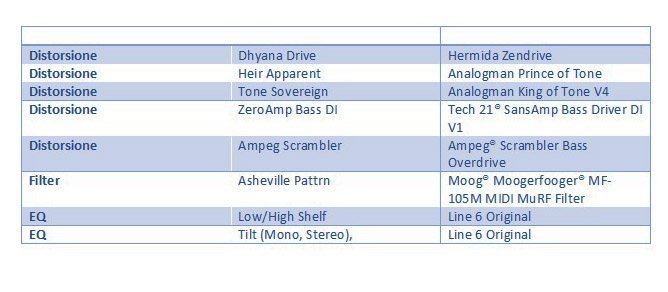
Distorsione, Overdrive e Fuzz
Troviamo tutti i modelli del DM4, inoltre sono presenti nuovi modelli di qualità Helix, che migliorano alcuni effetti. Tra questi occorre citare: Klon Centaur, Xotic EP Booster, Z.Vex Fuzz Factory, Paul Cochrane Timmy e altro ancora.
Per i bassisti troviamo un Microtubes Darkglass Electronics B7K Ultra.
Nell’ultimo aggiornamento del firmware è presente il King of Tone della Analog Man.
L’effetto che ricordiamo costa più di 300 dollari e richiede la registrazione in una lista di attesa, è stato davvero una sorpresa e suona praticamente uguale al pedale originale.
Questa categoria, storicamente, è sempre stata la più discussa tra gli effetti Helix. Spesso il suono degli overdrive può risultare non troppo corposo o differire in piccola parte dalla versione analogica, quindi in generale potrebbero non piacere all’orecchio di tutti.
Non sto dicendo che non sono validi e specialmente live, le differenze non sono apprezzabili, tuttavia un buon rimedio è usare un Overdrive analogico accoppiato a HX Stomp. In questo modo risparmiamo anche qualche slot di DSP che possiamo usare per eventuali altri effetti.

Modulazioni e altro
Veramente tantissimi effetti: riverberi, modulazioni, wah, pitch e synth.
Nella sezione modulazioni ci sono molti modelli che a mio avviso sono di qualità Helix basati su Fender, Vox, Boss CE-1, MXR, Leslie ed Electro-Harmonix.
Gli effetti di pitch/synth hanno dimostrato un buon tracking ed una bassissima latenza.
Sono utilizzabili non solo con la chitarra, io li ho usati anche con il mio violoncello e con poche modifiche dei parametri sono riuscito a trovare delle combinazioni veramente interessanti e utilizzabili per le mie produzioni musicali!

Amp e Cab
Questa è la categoria che rende davvero potente HX Stomp. Abbiamo a disposizione un archivio enorme di amp e cab, con una scelta davvero completa per suonare in ogni situazione. Gli amplificatori hanno lo stesso nome del modello che emulano, basta guardare la lista per farsi un’ idea.
Nel test ho avuto l’impressione di suono molto dinamico, molto sensibile al tocco. Ancora come gli overdrive non riusciremo ad emulare tutte le micro nuance del suono originale, ma trovare la differenza specialmente a una persona che non è un musicista, sarà un compito molto arduo.
Connessioni
Altro punto di forza di Hx Stomp sono le connessioni.
HX Stomp ha a disposizione:
- Ingressi L / R (mono o stereo)
- Uscite L / R (bilanciate o sbilanciate)
- Return (o aux in) L / R
- Uscita send stereo
- Uscita cuffie
C’è un ingresso pedale di espressione con jack e con un cavo a Y si possono collegare fino a 2 pedali o 2 switch (o uno switch ed un pedale).
È importante notare che sull’unità sono presenti anche MIDI IN e OUT a 5 pin, che consentono di richiamare i preset e controllare i blocchi di effetti con un controller midi esterno.
Essendo così compatto, l’HX Stomp è inevitabilmente limitato in termini di controlli, ma con questi accorgimenti tali limitazioni possono essere facilmente superate.
Send e Return possono essere utilizzati per inserire ulteriori pedali esterni ( fx loop ) e si può decidere in quale punto del preset inserire il loop esterno.
Midi
Con la funzione Midi è possibile controllare l’HX Stomp sia con il MIDI USB che con il tradizionale connettore DIN a 5 poli.
In particolare, è possibile:
- Richiamare un preset
- Richiamare uno snapshot
- Bypassare un blocco della catena di effetti
- Controllare i parametri degli effetti

Da notare che la gestione Midi di HX Stomp è molto più limitata rispetto a Helix, quindi non è presente il MIDI Commander di quest’ultima.
Interfaccia Audio
Hx Stomp può essere usato anche come scheda audio e lavora fino a 24bit/96KHz. È compatibile con Mac, iOS e Windows. Dispone di un “Hardware monitoring”, che permette di ascoltare il segnale in ingresso, indipendentemente dal software della DAW.

Quando si registra si può usare il canale USB 5/6 come ingresso alla DAW, in questo modo registreremo il segnale in maniera con e senza effetti che potremo aggiungere successivamente.

Successivamente possiamo utilizzare la traccia non effettata per un ”re-amp”, ossia facciamo riprocessare con gli effetti dall’HX Stomp per ottenere la traccia finale con gli effetti.

EDITOR
Non mi stancherò mai di dire che è impossibile usare a pieno una pedaliera moderna senza un buon editor.
Molto spesso ci concentriamo (giustamente) sull’acquisto della pedaliera e trascuriamo questo aspetto, scoprendo dopo la poco praticità dell’oggetto.
Per due motivi:
il primo è per la miriade di parametri disponibili, il secondo è per la possibilità di caricare/salvare le patch o di comprarle da esperti del settore.
A questo proposito, come per tutti i prodotti Helix, Hx Stomp è supportato da HxEdit, un potente editor, librarian e gestore di IR, che permette di caricare/salvare/customizzare facilmente i preset.
HxEdit rende facilissimo l’editing delle patch, tutto è visuale e abbiamo sotto controllo tutti i parametri degli effetti.


E’ disponibile la pagina line6.com/customtone per poter scaricare patch già pronte gratuitamente.
Vi segnalo le seguenti pagine con patch gratuite e a pagamento.
www.choptones.com/line6-patches/line6-hx-stomp
www.3sigmaaudio.com/helix-collection/
MODALITÀ OPERATIVE
Hx Stomp ha due modalità operative: Play view e Edit View.
La prima, come dice il nome, da utilizzare quando si suona, la seconda per creare/modificare le patch
Play View
La view riporta sinteticamente nella parte alta numero e nome del preset, nella parte bassa è possibile scegliere tra diverse sub-view : Stomp, Scroll , Preset e Snapshot.

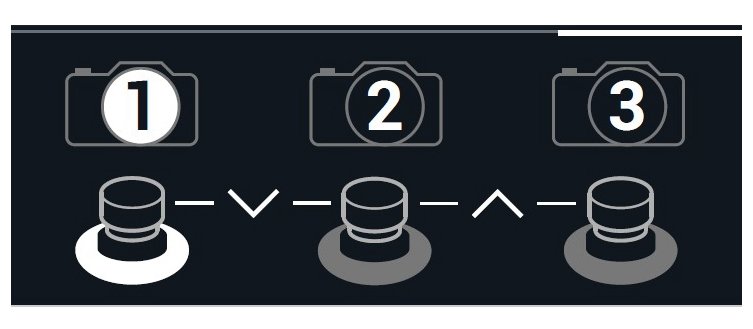
Stomp: viene mostrato su ogni switch un effetto del preset che si può accendere o spegnere, più un controllo per il tap tempo e l’accordatore.

Scroll: su e giù nella lista dei preset

Preset: selezione del preset da bank A, B e C

Snapshot: serve per la gestione degli snapshot, che vedremo tra breve.
Preset List: lista di tutti i preset in maniera testuale.

Edit View
La Edit view offre è una rappresentazione del preset mediante un diagramma a blocchi.
Selezionando un singolo blocco è possibile editare tutti i suoi parametri che compariranno in una sub-view
Nella Edit view è possibile anche impostare il percorso del suono (serie/parallelo).

SNAPSHOT
Il meccanismo di snapshot permette di controllare qualsiasi parametro presente in una patch che può essere anche molto complessa. È pensato per evitare di dover schiacciare uno o più pulsanti per abilitare/disabilitare/modificare una patch mentre si sta suonando. Basterà memorizzare tutte le modifiche alla patch per poi richiamarle premendo un solo switch.
IR Block
Il blocco IR o Impulse Response (Risposta impulsiva) è stata una sorpresa in HX Stomp.
Come molti sapranno una IR permette di catturare il comportamento di un sistema (sia esso una chitarra, il riverbero di un ambiente, un microfono) e successivamente di replicare tale comportamento su un altro sistema.
È un concetto generale non solo applicabile al mondo audio, mediante il quale si produce un file di dati (molto spesso codificato come file Wave) che caricato a bordo di un “convolutore” permette di riprodurre con la nostra chitarra (o qualsiasi altro strumento) quel sistema che abbiamo “catturato”.
Tra gli effetti troviamo un blocco IR che permette di selezionare fino a 128 IR da caricare con HX Edit.
Sono disponibile molti IR di terze parti ed anche librerie gratuite di utenti per microfoni, amplificatori, reverberi, ecc…
HX Stomp permette di caricare IR fino a 2048 punti, una caratteristica che spesso si trova solo nelle pedalboard più costose.

Avevo in programma di aggiungere un pedale dedicato agli IR al mio setup e la scelta era divisa tra Tone Dexter della Audiosprockets ed il VSound2, due prodotti con un costo tra i 400 e 500 euro.
Ebbene ho “risparmiato” questi soldi dopo aver effettuato un test con HxStomp, sul quale ho caricato un file IR di violoncello acustico che ho poi provato con il mio violoncello elettrico NS Design.
Questa esigenza può essere tipica di chi vuole migliorare il suono della propria chitarra o simulare il suono acustico di un altro strumento (la mia Ibanez che suona simile ad una Martin wow!).
Conclusioni
HX Stomp è un prodotto completo di tutte le funzionalità in un involucro veramente mini e quando arriva qualcosa del genere nel proprio setup, cambia tutto.
E’ ottimo come pedale unico, facile da usare con la sua interfaccia grafica, ha effetti fantastici con modelli di amplificazione realistici.
Il suo ingombro limitato permette di utilizzarlo anche in pedalboard già esistenti, ovviamente ha solo 3 interruttori, ma utilizzando un controller MIDI è possibile accedere a tante altre funzioni.
Infine, la possibilità di utilizzare HX Stomp come scheda audio rende questo prodotto adatto ad un utilizzo sia in studio che live.
Ringrazio la Casa Musicale Cav. Quinto Fabio (SA), per avermi dato la possibilità di utilizzare il Line 6 HX Stomp, per tutto il tempo necessario per poter eseguire un test approfondito del prodotto.
Informazioni Utili
Produttore: Line6
Distributore: Yamaha guitar group
Modello: HX Stomp
Prezzo consigliato: 500 Euro iva inclusa
Umberto Sorbo
HX Stomp is the ultra-compact version of Line6’s Helix pedalboard and uses the same DSP and effects modeling technology, amplifiers and cabinets.
Personally, I was very interested in this type of format, because I was looking for a versatile pedal with limited overall dimensions. This characteristic makes HX Stomp perfect for integration into a more extended pedalboard. Will this reduced version have the versatility and the sound texture of the Helix version that I usually use for my works?
Will he also be able to compete with alternative products from other manufacturers? Or will he leave us, as often happens in “light” models, with a little bitter taste?
Construction
The overall quality of HX Stomp is of good quality. It has a robust metal casing and the screen has good contrast and good sharpness.
Equally robust and precise are the potentiometers and capacitive switches, each with its own colored ring. It therefore lends itself well to the classic use on the ground or to a “desktop” use (next to a synth for example).
Effects
HX Stomp offers more than 300 effects (including a looper), all coming from the Helix family and the M series, as well as all the Delay DL4 presets.
There are 20 new Helix family delay effects, usable in both mono and stereo, which include simple delay to Multitap variations.
The models they are based on are: TC Electronic 2290, Maestro Echoplex EP-3, Roland RE-201 Space Echo, Boss DM-2 and Electro-Harmonix Deluxe Memory Man.
The 5 new reverbs are very beautiful: Glitz, Ganimede, Searchlights, Plateux and Double Tank that sound really good and are very similar to the Strymon BigSky and the Boss RV-6.
As a term of comparison I have listed the relative equivalences in a table.
Some considerations on the HX Stomp audio engine:
being based on DSP, some models require more processing power than others and so it may happen that some presets may contain fewer models.
So although it is possible to insert up to 6 simultaneous effects, some models may become unavailable for the preset we are building. This is one of the main differences with Helix, who can boast 2 DSPs!
As I write this review, the HX Stomp firmware has been updated to version 2.81, an important milestone because Line6 has unified the firmware of its pedals, making new features and improvements to the entire Helix product line available. So the audio engine of the HX Stomp now works with the same software as the big sister Helix without having the computing power of the 2 DSPs!
With the latest firmware update 2.81 new amp models have been added:
and new effects:
Fig.3 – New effects
Distortion, Overdrive and Fuzz
We find all the DM4 models, there are also new Helix quality models, which improve some effects. Among these we should mention: Klon Centaur, Xotic EP Booster, Z.Vex Fuzz Factory, Paul Cochrane Timmy and more.
For bass players we find a Microtubes Darkglass Electronics B7K Ultra.
The last update of the firmware includes the King of Tone by Analog Man.
The effect we remember costs more than $ 300 and requires registration on a waiting list, it was really a surprise and it sounds almost the same as the original pedal.
Historically, this category has always been the most discussed of the Helix effects. Often the sound of the overdrive may not be too full-bodied or may differ slightly from the analogue version, so in general they may not appeal to everyone.
I am not saying that they are not valid and especially live, the differences are not appreciable, however a good remedy is to use an analogue Overdrive coupled to HX Stomp. In this way we also save some DSP slots that we can use for any other effects.
Fig.4 – Table section distortion, overdrive and fuzz
Modulations and more
Really lots of effects: reverbs, modulations, wah, pitch and synth.
In the modulations section there are many Helix quality models that are based on Fender, Vox, Boss CE-1, MXR, Leslie and Electro-Harmonix.
The pitch / synth effects showed good tracking and very low latency.
They are usable not only with the guitar, I have also used them with my cello and with a few modifications of the parameters I have managed to find really interesting and usable combinations for my musical productions!
Fig.5 – Table Modulations and more
Amp and Cab
This is the category that makes the HX Stomp really powerful. We have a huge archive of amp and cabs available, with a truly complete choice to play in any situation. The amplifiers have the same name as the model they emulate, just look at the list to get an idea.
In the test I had the impression of a very dynamic, very sensitive touch. Again like overdrive we will not be able to emulate all the micro nuances of the original sound, but find the difference especially to a person who is not a musician, will be a very challenging task!
Connections
Another strength of Hx Stomp is its connections.
HX Stomp has:
• L / R inputs (mono or stereo)
• L / R outputs (balanced or unbalanced)
• Return (or aux in) L / R
• Stereo send output
• Headphone output
There is an expression pedal input with a jack and with a Y cable you can connect up to 2 pedals or 2 switches (or a switch and a pedal).
It is important to note that there are also 5-pin MIDI INs and OUTs on the unit, which allow you to recall presets and control effect blocks with an external midi controller.
Being so compact, the HX Stomp is inevitably limited in terms of controls, but with these devices these limitations can easily be overcome.
Midi
With the Midi function it is
possible to control the HX Stomp with both the USB MIDI and the traditional
5-pin DIN connector.
In particular, it is possible:
• Recall a preset
• Recall a snapshot
• Bypassing a block in the
chain of effects
• Check the effects parameters
Note that the Midi management
of HX Stomp is much more limited than Helix, so the latter’s MIDI Commander is
not present.
Audio interface
Hx Stomp can also be used as a sound card and works up to 24bit / 96KHz. It is compatible with Mac, iOS and Windows. It has a “Hardware monitoring”, which allows you to listen to the input signal, regardless of the DAW software.
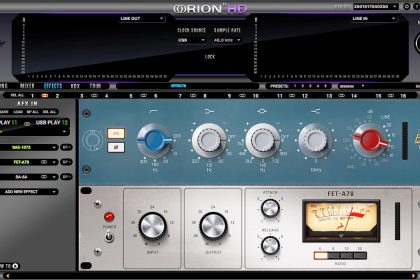
Fig.7 – Hardware monitoring
When recording, you can use the USB 5/6 channel as an input to the DAW, in this way we will record the signal with and without effects that we can add later.
Fig.8
Then we can use the track without effects for a “re-amp”, that is we have the HX Stomp reprocess to get the final track with the effects.
Fig.9 – re-amp
Editor
I will never tire of saying that it is impossible to fully utilize a modern pedal board without a good editor.
Very often we focus (rightly) on the purchase of the pedal board and neglect this aspect, discovering after the little practicality of the object.
For two reasons:
the first is for the myriad of parameters available, the second is for the ability to load / save patches or buy them from industry experts.
In this regard, as with all Helix products, Hx Stomp is supported by HxEdit, a powerful editor, librarian and IR manager, which allows you to easily load / save / customize presets.
HxEdit makes it easy to edit patches, everything is visual and we have all the effects parameters under control.
Fig.10- Editor
Fig.11 – HxEdit
The line6.com/customtone page is available to download ready-made patches for free.
I point out the following pages with free and paid patches.
HELIX FREE GUITAR PATCHES
www.choptones.com/line6-patches/line6-hx-stomp
www.3sigmaaudio.com/helix-collection/
Operating modes
Hx Stomp has two operating modes: Play view and Edit View.
The first, as the name implies, to use when playing, the second to create / modify patches
Play View
The view summarizes in the upper part number and name of the preset, in the lower part it is possible to choose between different sub-views: Stomp, Scroll, Preset and Snapshot.
Fig.12
Stomp: an effect of the preset that can be turned on or off, plus a tap tempo and tuner control is shown on each switch.
Fig.13 – Stomp
Scroll: up and down in the preset list
Fig.14 – HX Stomp – Section Scroll
Preset: selection of the preset from bank A, B and C
Fig.15 – HX Stomp – Section Preset
Snapshot: used for managing snapshots, which we will see shortly.
Fig.16 – HX Stomp – Section Snapshot
Preset List: list of all presets in text mode.
Fig.17 – HX Stomp – Section Preset List
Edit View
The Edit view offers is a representation of the preset using a block diagram.
By selecting a single block it is possible to edit all its parameters which will appear in a sub-view
In Edit view it is also possible to set the sound path (series / parallel).
Fig.18 – HX Stomp – Section View Edit
Snapshot
The snapshot mechanism allows you to check any parameter in a patch that can be very complex. It is designed to avoid having to press one or more buttons to enable / disable / edit a patch while you are playing. It will be enough to memorize all the changes to the patch and then recall them by pressing a single switch.
IR Block
The IR or Impulse Response block was a surprise in HX Stomp.
As many will know an IR allows you to capture the behavior of a system (be it a guitar, the reverberation of an environment, a microphone) and then to replicate this behavior on another system.
It is a general concept not only applicable to the audio world, through which a data file is produced (very often encoded as a Wave file) which, loaded on a “convolution”, allows you to play with our guitar (or any other instrument) that system that we “captured”.
Among the effects we find an IR block that allows you to select up to 128 IRs to load with HX Edit.
Many third-party IRs are available as well as free user libraries for microphones, amplifiers, reverbs, etc.
HX Stomp allows you to charge IR up to 2048 points, a feature that is often found only on the most expensive pedalboards.
Fig.19 – HX Stomp – IR Section
I was planning to add a dedicated IR pedal to my setup and the choice was divided between Tone Dexter from Audiosprockets and VSound2, two products with a cost between 400 and 500 euros.
Well I have “saved” this money after having performed a test with HxStomp, on which I loaded an acoustic cello IR file which I then tested with my NS Design electric cello.
This need may be typical of those who want to improve the sound of their guitar or simulate the acoustic sound of another instrument (my Ibanez that sounds similar to a Martin wow!).
Conclusions
HX Stomp is a complete product with all the features in a really mini enclosure and when something like that arrives in your setup, it changes everything.
It is excellent as a single pedal, easy to use with its graphical interface, has fantastic effects with realistic amplification models.
Its limited dimensions allows it to be used even in existing pedalboards, obviously it has only 3 switches, but using a MIDI controller you can access many other functions.
Finally, the possibility of using HX Stomp as a sound card makes this product suitable for both studio and live use.