



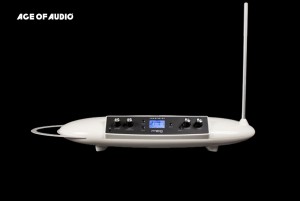
 Il Theremini è l’ultimo theremin prodotto dalla Moog Music. Ne abbiamo già parlato al momento della sua presentazione al NAMM 2014, in questo articolo.
Non tratteremo qui il theremini come theremin nel senso stretto, vedremo invece come utilizzarlo come midi e/o CV controller.
Questo articolo interessa a chiunque suoni uno strumento musicale con effettistica hardware o software e voglia esplorare una nuova modalità di interazione.
Dopo varie considerazioni a riguardo e le prime negative impressioni iniziali, credo che si debba considerare il theremini non come un nuovo theremin ma piuttosto come un altro tipo di strumento, non indirizzato necessariamente ai thereministi classici alla ricerca di prodotti migliori dell’Etherwave. Mike Adams, di Moog Music, ha tentato di spiegare qualcosa di simile alla comunità dei thereministi in rivolta dopo la presentazione dello strumento, forse senza troppo successo. (Moog Music ha aggiornato il firmware con la versione 1.1 introducendo il “theremin mode”, una modalità più vicina ai gusti dei thereministi classici.)
In ogni caso Theremini è un prodotto digitale, esattamente quello che un theremin NON dovrebbe essere! Probabilmente se nel nome non comparisse la parola theremin, sarebbe un synth che si suona senza contatto e un originalissimo controller midi/cv e non un theremin transgender come è stato da qualcuno definito!
In ogni caso non sono qui a sindacare scelte aziendali ma piuttosto a testare un prodotto che credo, se inquadrato bene, abbia molte possibilità nell’ambito della sperimentazione. Vogliamo esplorare l’aspetto del controlling, modificando i parametri di un software o di un hardware, senza sporcarci le mani!
In questa direzione, da sperimentatore e anche da thereminista non posso che essere un utilizzatore entusiasta!
MIDI CONTROLLER
Il Theremini ha una porta mini USB che permette la connessione ad un computer e il riconoscimento della periferica come midi controller.
 Diciamo subito che non si tratta di suonare uno strumento slave attraverso la tecnica del theremin.
Theremini invia messaggi midi CC di controllo, in grado di interagire con qualsiasi periferica compatibile. Con 2 antenner, una di volume e una di pitch, è possibile utilizzare 2 controller in maniera indipendente.
Ho realizzato un video che trovate alla fine di questo articolo, per mostrare alcune delle infinite possibilità.
Per dare un’idea, muovendosi nei paraggi delle antenne con una chitarra, un flauto o anche col solo corpo, è possibile accendere o spegnere un effetto, controllare un wah-wah, aumentare un volume, aggiungere una distorsione regolando la quantità… tutto!
Penso anche ad applicazioni nell’ambito del lighting, della danza, del teatro…



 …
…
Software come Propellerheads Reason, Ableton Live, Apple Logic Audio, Steinberg Cubase, vst instruments, stand alone virtual instruments… offrono parametri regolabili via midi con un semplice tasto destro su uno slider o una manopola (nel video, a questo proposito, si parla di Reason e Guitar Rig).
Di default i numeri di controllo CC sono il CC 20 per l’antenna di pitch e il CC 2 per il volume. I valori sono modificabili nella finestra di setting (nel video si vede dove).
CV CONTROLLER
 Il controllo di CV, control voltage, è in grado di pilotare un gran numero di periferiche hardware e di synth (nel video Moogerfooger mf-101).
Basta connettere l’uscita jack da 1/4 del theremini nel CV IN di uno dei parametri dell’effetto, filtro o dello strumento che si vuole pilotare.
Il gioco è fatto. Una volta assegnato all’antenna di volume o di pitch basta muoversi!
ALTRE NOTE SUL CONTROLLING
Le antenne di volume e pitch hanno diversa sensibilità al movimento. E’ possibile fare tarature o variare i settaggi ma restano antenne diverse. Il volume è in genere più rapido nel coprire il suo range. Il pitch è invece scalato e può saltare da un valore all’altro seguendo una delle scale impostate (o nessuna).
CV e MIDI posso essere usati anche contemporaneamente. Quindi si possono agganciare i midi controller alle due antenne ed usare una delle due per una doppia funzione di CV controllando contemporaneamente – con le difficoltà del caso – 2 parametri midi e uno hardware.
Pur essendo controller indipendenti, è bene tener presente che non sono indicate per settaggi precisi. Muovendosi nello spazio intorno ad una delle antenne è infatti probabile che il movimento possa parzialmente avere effetti anche sull’altra antenna.
Il video
Questo video è una panoramica delle possibilità di controllo del theremini.
Viene illustrato il controllo di alcuni parametri del synth Malstrom in Reason , di Guitar Rig e di un Moogerfooger mf-101. Tutto quello che viene mostrato è facilmente applicabile ad altri software/hardware.
 Mi permetto di citare anche un secondo video che non è propriamente del theremini ma è comunque sull’utilizzo del CV out di un theremin tradizionale. Il video è visibile qui (già posizionato nel punto di interesse)
- Pitch correction con selezione di scale e note base
- Tuner integrato
- 32 Wavetable preset
- Speaker integrato
- Uscita cuffia
- 2 1/4″ audio outputs
- Uscita Single Pitch CV con range selezionabile
- USB jack per connettività MIDI
- Range selezionabile con scelta della nota minima e massima
- Ping-Pong Delay stereo integrato
- Antenna pitch rimovibile con comparto inferiore per riporla
- 3/8” Mic stand e adattatore Camera stand
- Piedini antiscivolo di alta qualità
Pannello anteriore
- schermo LCO 128×64 pixel con retro illuminazione bianca
- jack per l’uscita cuffia, in formato mini jack ⅛” TRS; inserendo il jack, si disabilita lo speaker incorporato
- volume knob per la regolazione del livello d’ascolto in cuffia e sullo speaker incorporato
- pitch bias knob, per la regolazione di correzione sull’intonazione (da 0 a 100% di auto correzione)
- scale button, per la selezione della scala desiderata
- root button, per la specific della root note necessaria all’esecuzione
- setup button, per l’accesso alle funzioni di calibrazione/shift key
- delay length button, per la selezione (ciclica) die valori short, medium, long o off
- delay amount knob, per dosare il bilanciamento wet/dry dell’effetto
- preset knob, per la selezione delle 32 locazioni di preset disponibili
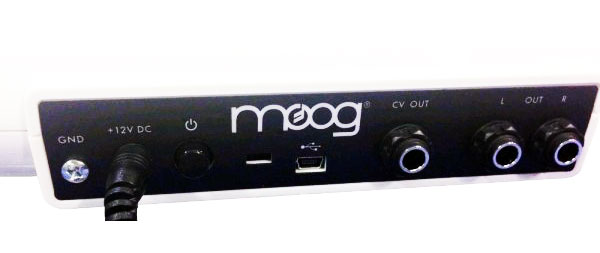
Pannello posteriore
- left e right output, su coppia di connettori ¼” sbilanciati
- pitch CV out, su connettore di linea ¼” sbilanciato, con range selezionabile 0-5 o 0-10 volt
- mini connettore USB 2.0 per la trasmissione MIDI over USB
- Kensington lock slot (non si sa mai…)
- power switch on/off
- power jack, per il collegamento con l’alimentatore in dotazione, 12VDC/1.2A, auto configurante 100-240VAC
- Tasto accensione ON / OFF
- Alimentatore esterno incluso 12VDC/1.2A da 100–240VAC
- Dimensioni: 57,79cm L x 16,51cm D x 38cm H con antenna (10 cm senza)
- Peso: 1,36Kg
INFORMAZIONI UTILI
Prezzo: 299,00 euro
Website: MOOG MUSIC
Ti potrebbe anche interessare


The Theremini is the new theremin by Moog. We presented it in a previous review when it was revealed at Namm 2014 here.
We don’t want to discuss here about the quality of the theremini as theremin itself. So this review if written for any musician who uses hardware/software effects and want to discover a new way to interact with.
I think theremini as a different kind of musical instrument, maybe not done for classical thereminists, looking for a more accurate theremin than the Etherwave – as Mike Adams, of Moog Music, somehow tried to explain/apology/justify after many critics coming from the theremin community. (Moog Music released the firmware update 1.1 adding the “theremin” mode that seems to go in the right direction for classical players.)
It’s a digital stuff, exactly what a theremin it’s not! If the name would have not included the word “theremin” it would have been a funny contactless synth/sound box and a promising original controller, not a transgender theremin as somebody called it. But that’s not the point.
We want to explore here the midi and cv capabilities because as a contactless controller it opens new ways to any kind of musician using software/hardware effects. In this case, my opinion as experimental musician (and thereminist) is absolutely positive!
MIDI CONTROLLER
Theremini has a mini usb connection to be used as Midi controller on a computer.
First let’s say that you would not be able to play digital instruments in the theremin way or not as you can imagine.
What you can do is sending Midi CC signals to control every midi compliant software. Theremini has two antennas so you can have 2 independent controllers.
We realized a video – you find at the bottom of this review – to show the incredible possibilities you have.
To give an idea, just moving with your guitar/flute/body trough the antennas, you can switch effects on/off or control an aerial wah-wah or pump up a volume without touching anything… infinite ways!
Just think in what you can do with lighting application, dancers interacting with midi devices, theatre.
…
Software like Propellerheads Reason, Ableton Live, Apple Logic Pro, Steinberg Cubase, vst instruments, stand alone virtual instruments… all offer assignable midi controllers just right-clicking on sliders and knobs (you can see in the video how does it works with Reason and Guitar Rig).
By default, CC numbers are CC 20 for the Pitch Antenna and CC 2 for the Volume but you can easily change them in the Theremini settings section (you can see in the video where).
CV CONTROLLER
Control voltage is a 1/4 jack out capable of interacting with parameters of many hardware effects like Moogerfooger (in the video) and many hardware synths.
Just connect the CV OUT to one of the CV IN of your hardware to modify the desired filter/parameter. (in the video you see mf-101)
The CV control can be assigned to the pitch or the volume antenna (not both at the same time).
MORE ABOUT CONTROLLING
Volume Antenna and Pitch antennas have different sensibility to the movement. In the setting you can modify a little or calibrate. In particular, the volume antenna is faster and with a shorter range; the pitch antenna has scaled values so it can jump from a value to another according to the musical scale you choose (you can switch the scale off).
CV and MIDI controllers can be used at the same time so you could control 2 software effects and one hardware at the same time (with 2 independent controllers).
The Antennas are independent controllers even if acting in the air, one movement can easily effect both the antennas. If you control by hand you can me more accurate but i.e. moving with the body around the volume antenna can slightly change the pitch too.
The video
This video explores some of the possibilities of the Theremini as controller.
You’ll see the synth Malstrom and Reason midi controlled, Moogerfooger mf-101 CV controlled playing the guitar, Native Instruments Guitar Rig…
It can be of some interest an older video about the use of a theremin Pro CV to control a Moogerfooger. It’s not a Theremini but the meaning is the same. You can watch here (directly from where the theremin is)
FEATURES
- Pitch correction w/ selectable scales and root note
- Built in tuner allows you to learn pitch and scales
- 32 Wavetable based presets
- Built in speaker
- Headphone output
- Two 1/4″ audio outputs
- Single Pitch CV output w/ selectable range
- User selectable scale and root note (stored per preset)
- User selectable range: highest note and lowest note (stored per preset)
- Adjustable Stereo Ping-Pong Delay
- Removable pitch antenna – built in storage compartment on bottom-side
- Built in 3/8” Mic stand and Camera stand adaptor
- High quality rubberized feet
DIMENSIONS:
- 22.75”L x 6.5”D x 15”H w/antenna (4”H without)
- WEIGHT: 3lbs
FRONT PANEL
- LCD SCREEN: 128 X 64 pixel LCD with white backlight.
- HEADPHONE JACK: 1/8” (3.5mm)
- TRS headphone jack. Inserting a headphone plug will disable the internal speaker
- VOLUME KNOB: Controls headphone volume and built in speaker volume.
- PITCH BIAS KNOB: Determines the amount of pitch correction from 0% to 100%
- SCALE BUTTON: Select from a list of built in scales
- ROOT BUTTON: Select the root note to be used by the scale
- SETUP BUTTON: Provides access the setup and calibration functions – also acts as a shift key.
- DELAY LENGTH BUTTON: Selects the length of delay: SHORT, MEDIUM, LONG, or OFF
- DELAY AMOUNT KNOB: Controls the amount of delay mixed with the dry signal.
- PRESET KNOB: Selects the preset played from a built in list of 32 presets
REAR PANEL
- LEFT OUTPUT: Line Level 1/4” unbalanced
- TS RIGHT OUTPUT: Line Level 1/4” unbalanced
- TS CV OUTPUT: 1/4” TS – 0-5V or 0-10V selectable
- USB: MiniB USB2.0 High Speed for USB MIDI
- KENSINGTON LOCK SLOT
- POWER SWITCH: Push ON / Push OFF
- POWER JACK: 12VDC/1.2A from 100–240VAC external supply(included)
PRICE: 299,00 euros
Website: MOOG MUSIC
You could be interested in


