Ormai le APP musicali per dispositivi mobili come iPad ed iPhone si moltiplicano a vista d’occhio. Ho quindi deciso di iniziare a recensire anche questa categoria di programmi che ormai dilagano sempre più… tanto da creare imbarazzo nella scelta dell’applicazione migliore per il nostro setup.
Questa volta però non andremo in America o in giro per l’Europa ma resteremo in Italia. Infatti sulla costa occidentale della Toscana troviamo la MAAGO, ditta creata da Marzio Aricò e Giulio Andreini che ha deciso, avendo già esperienza nel campo djing e della produzione di musica elettronica, di trasferire questo know how in ambito software e hardware, creando controller che colmassero le lacune presenti in quelli già in circolazione.
Istallazione e configurazione
Ho testato l’APP con Traktor della Native Instruments (ver. 2.5.1) ed una volta scaricato Maago 4×4 Virtual da Apple Store, la prima cosa da fare è sincronizzare l’iPad o l’iPhone al Mac dove avremo istallato il software da controllare.
Niente di più semplice: Bisogna creare una rete wireless tra Mac ed iPad/iPhone, stabilire una connessione midi tra la periferica di controllo e traktor ed infine creare una mappatura MIDI.
Starete pensando… ma costui è pazzo? Mica tanto… gli sviluppatori della Maago hanno pensato tutto loro, infatti sul sito ufficiale troverete le istruzioni dettagliate sul come collegare in pochissimi passaggi il vostro setup. In più vi sarà data la possibilità di scaricare la mappatura midi standard in formato .TSI (formato proprietario del Traktor), un supporto davvero con i fiocchi.
Tempo stimato per iniziare a smanettare sul vostro Virtual 4×4… cinque minuti circa.
Il Software
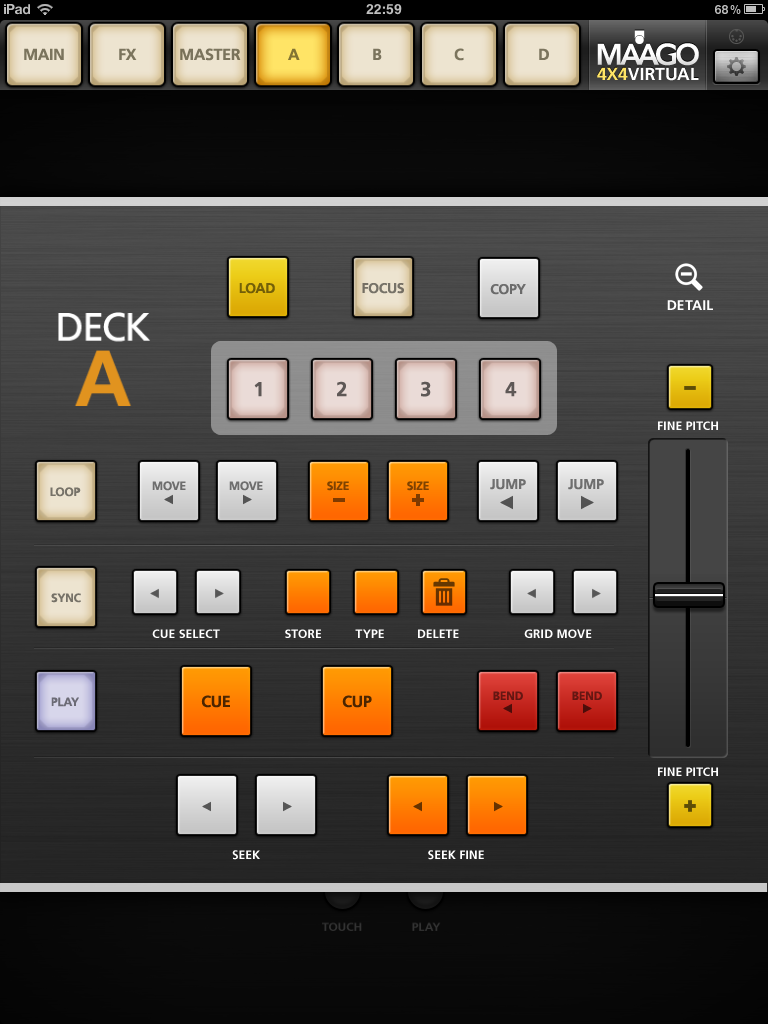
Graficamente l’APP riproduce la versione hardware del 4×4, è molto curata e sembra realmente di poter girare i vari knobs e cliccare su tasti reali che si illuminano ad ogni sfioramento.
La rapidità di utilizzo del software si apprezza sopratutto durante i live; avremo sempre tutto sotto controllo ed sulla parte alta del controller troveremo bottoni di grande dimensione che ci faranno accedere alle schermate di dettaglio delle varie funzioni MAIN, FX, MASTER, A,B,C,D nonché “all’ingranaggio” delle preferenze. In Alto a Destra troviamo ancora un indicatore a forma di terminale MIDI DIN a 5 punte che, illuminandosi, ci farà capire che l’ipad è sincronizzato con il software del nostro laptop, quindi regolarmente collegato.
Nel MAIN troviamo un po’ tutti i principali controlli “veloci”, gli effetti, i 4 Deck , nonché i comandi Browser, Master e Layout.
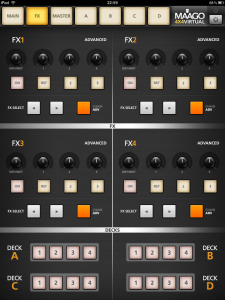
Utile il collegamento veloce “Detail” che troviamo alla destra di ogni deck: La relativa lente d’ingrandimento ci porterà direttamente ad aprire i comandi avanzati dei deck A/B/C/D (ma lo stesso risultato si ha cliccando sui tasti in alto contrassegnati dalle stesse lettere). Nella sezione FX abbiamo in dettaglio i 4 effetti che possono passare dalla modalità Advanced a quella Chain e viceversa, nonché un piccolo decks in basso che ci farà gestire e capire quale effetto (e su quale deck) è attivo in quel momento.
Sezione Master
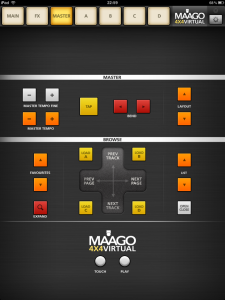
La sezione MASTER oltre ad avere le opzioni avanzate di browsing con una gigantesca crossbar per la gestione di pagine e tracce porta nel riquadro master in dettaglio anche un TAP tempo e un controller di Tempo Master di precisione “FINE”. Il Dettaglio dei deck A/B/C/D è veramente costruito bene, il fader del fine pitch a destra è molto preciso e per niente scattoso come mi è capitato su altri software.Nella versione per Iphone che ho testato i comandi sono simili e variano solo poche cose, in realtà non c’è un master generico ma BR (browser) e M (Master) sono separati.
Considerazioni finali
La cosa che mi ha principalmente colpito di questo software è il modo in cui è stato progettato graficamente. Sia sulla versione per iPad che su quella dedicata all’iPhone, il mio ditone non ha avuto difficoltà ad interagire con i vari comandi, riuscendo tranquillamente a fare quello che normalmente si riesce a fare con controller esterni. Ed il tutto senza entrare in crisi o nel panico per aver digitato più funzioni contemporaneamente.
Certo la versione per Ipad è più confortevole e, dopo averla testata, visto anche il prezzo, questa metterebbe in crisi i migliori controller hardware.
Non rilevati bug (la versione testata è stata la 1.0.2 aggiornata all’8 Agosto).
A mio parere questo software ha le carte in regola per dare del filo da torcere sia ad altre APP del settore che, come detto, a controller hardware.
A questo punto non resta che attivare il wireless sul nostro Ipad e, perché no, fare un po’ di scena con il nostro pubblico.
Pro:
- Prezzo buono
- Facile da configurare
- Intuitivo
- Preciso nei controlli
- Conpatibile con vari software
- Ottima grafica
Contra:
- Bisogna possedere un Ipad / Iphone Apple
INFORMAZIONI UTILI
Produttore: Maago
Modello: Maago 4×4 Virtual
Website:www.maago.eu
Prezzo:16,99 $
Nowadays music APPs for mobile devices as iPad or iPhone multiply very fast. So I’ve decided to start to review even this category of programs that are now spreading more and more … so much to embarrass about the best choice for our application setup.
This time, however, we won’t go to America or around Europe, but we will remain in Italy. In fact, on the west coast of Tuscany there’s the MAAGO, company created by Marzio Aricò and Giulio Andreini. They decided, having experience in the field of DJing and electronic music production, to transfer this know-how in the field of software and hardware, creating controllers able to fill the weaknesses in those already in circulation.
Installation and configuration
I tested the APP with Native Instruments Traktor (ver. 2.5.1). Once downloaded Maago 4 × 4 Virtual from the Apple Store, the first thing to do is to sync your iPad or iPhone with the Mac where we installed the software to control.
Nothing could be easier: You have to create a wireless network between Mac and iPad / iPhone, establish a midi connection between the control device and traktor, and then create a MIDI mapping.
You’re probably thinking: “Is he crazy?”
Not really … The developers of Maago they thought of everything. In fact, on the official website you will find detailed instructions about how to connect your setup in a few steps. In addition you will be given the option to download the midi mapping in standard format .TSI (Traktor’s proprietary format), a support with really all the trimmings.
Estimated time to start hacking on your Virtual 4 × 4 … about five minutes.
The Software
Graphically the APP imitates the hardware version of the 4 × 4, is very accurate and it really seems to be able to turn all the knobs or click on real keys that light up each time you touch them.
The rapid use of the software can be appreciated especially during live performances: we’ll always have everything under control and on top of the controller we can find big-sized buttons that will make us access to the detail screens of various functions: MAIN, FX, MASTER, A, B, C, D, as well as “the gear” preferences. On the top right there’s a marker with the shape of a MIDI DIN 5-pointed terminal that, brightening, will make us understand that the iPad is synchronized with the software of our laptop, then regularly connected.
In MAIN there’re a bit all the main “fast” controls: effects, 4 Decks, as well as the Browser, Master and Layout commands.
Really useful is the link “Detail” on the right of each deck: Its magnifying glass will take us directly to open the Advanced commands of decks A / B / C / D (but we can have the same result by clicking on the buttons on the top marked by the same letters). In the FX section we detail the four effects, that can switch from Advanced mode to the Chain one and vice versa, and a small deck on the bottom that will let us manage and understand which effect (and on which deck) is active at that time.
Master Section
The MASTER section as well as having the browsing advanced options with a giant crossbar for the management of pages and tracks, has in the master panel in detail a TAP time and Time Master controller “FINE”. The Detail of decks A / B / C / D is really well built, the fine-pitch’s fader on the right is very precise and not at all jerky as I found on other softwares. On the Iphone version I tested, controls are similar and just a few things really change: There’s not a generic master, but BR (browser) and M (Master) are separated.
Concluding Remarks
The thing that struck me about this software is mainly the way it has been designed graphically. Both on the iPad version and on the one dedicated to the iPhone, my big finger had no difficulty to interact with the various commands, being able to easily do what you normally can do with external controllers. And all without going into crisis or panic for entering multiple functions simultaneously.
Of course, the iPad version is more comfortable and after testing it, also for the price, I’m pretty sure It would put in crisis the best hardware controllers.
Undetected bugs (version tested was 1.0.2 updated on 8th of August).
In my opinion this software has what it takes to give a hard time both to other APPs of the same field and, as mentioned, to hardware controllers.
At this point we just have to activate the wireless connection on our Ipad and, why not, do a little scene with our audience.
Pros:
- Good price
- Easy to set up
- intuitive
- Precise controls
- Conpatibile with various software
- Great graphic
Cons:
- You have to have an Ipad / Iphone Apple
USEFUL INFORMATIONS
Manufacturer: Maago
Model: Maago 4 × 4 Virtual
Website: www.maago.eu
Price: $ 16.99
Ahora las APP musicales para dispositivos móviles como el iPad y el iPhone se multiplican. Entonces tomè la decision de empezar a revisar esta categoría de programas que se están extendiendo más y más … suficientes para confundirnos para la elección de la mejor app para nuestra configuración.
Esta vez, en lugar de ver lo què hay en los Stados Unidos o en Europa, vamos a descubrir lo que pasa en Italia.
De hecho, en la costa oeste de la Toscana hay la MAAGO, empresa fundada por Marzio Aricò y Giulio Andreini que han decidido, basàndose en la experiencia en el campo musical y producción de música electrónica, de transferir este “know-how” en materia de software y hardware, creando controller que compensan las deficiencias de los què son en circulación.
Instalación y configuración
Despues què probè la APP con Traktor, de Native Instruments (ver. 2.5.1) y despues de haber descargado Virtual Maago 4 × 4 desde el Apple Store, en primero tines què sincronizar tu iPad o iPhone a tu Mac donde habemos instalado el software que tenemos que controlar.
Nada podría ser más fácil: Tienes que crear una red inalámbrica entre Mac y iPad / iPhone, establecer una conexión midi entre el dispositivo de control y Traktor y luego crear un mapeo MIDI.
Estás pensando … “está loco?” En realidad no … los desarrolladores de Maago nos han ayudado mucho. De hecho, en la página oficial podrás encontrar instrucciones detalladas sobre cómo conectar tu configuración en unos pocos pasos. Además habrás la opción de descargar el mapeo midi en formato estándar. TSI (formato propietario de Traktor), un soporte realmente perfecto.
Tiempo estimado para empezar a jugar en tu Virtual 4 × 4 …cerca cinco minutos.
El Software
Gráficamente el APP imita la versión del hardware de la 4 × 4, es muy preciso y parece realmente capaz de girar los distintos botónes y de utilizar las teclas reales, que se encienden cada vez que se tocan.
El rápido uso del software se puede apreciar especialmente durante los conciertos en vivo: siempre tendremos todo a mano y en la parte superior del controlador habremos botones muy grandes que nos dará acceso a las pantallas de detalle de las varias funciones MAIN, FX, MASTER, A, B, C, D, así como “al engranaje” de las preferencias.
En la parte superior derecha hay un marcador en la forma de MIDI DIN de 5 puntas. Cuando se ilumina, nos sabremos que el iPad está sincronizado con el software de nuestro ordenador, y que se conecte con regularidad. En MAIN estan todos los principales controles “rápides”: efectos, los 4 Deck, así como los comandos Browser, Master y Layout.
Mucho útil es la conexión rapida “Detail” que está en la derecha de cada deck: La lupa nos llevará directamente a abrir los comandos avanzados de los Deck A / B / C / D (pero el mismo resultado se produce utilizando los botones marcados por las mismas letras en la parte superior).
En la sección FX están cuatro efectos que pueden cambiar desde el modo Advanced a la Chain y viceversa, y un pequeño deck, abajo, que nos hará manejar y entender qué efecto (y en el que Deck) está activo.
La sección Master
En la sección MASTER, así como están las opciones avanzadas de navegación con una CROSSBAR muy grande para la gestión de páginas y pistas, habemos (en el panel master) en detalle un tiempo TAP y un controlador de precisión de tiempo Master “FINE”. El detalle de los Deck A / B / C / D está muy bien construido, el fader del fine pitch a la derecha es muy preciso y no asì brusco como me pasò a mi en en otros software. En la versión para iPhone que yo he probado, los controles son similares y cambian sólo algunas cosas: en realidad no hay un master genérico, pero BR (navegador) y M (master) están separados.
Considerationes finales
Lo que más me llamó la atención acerca de este software es principalmente la forma en que fue diseñado gráficamente. Tanto en la versión iPad de aquel dedicada al iPhone, el mi dedo gordo no tuvo ninguna dificultad para interactuar con los distintos comandos, haciendo fácilmente todo lo que normalmente se puede hacer con los controladores externos, y todo ello sin crisis o pánico para haber introducido múltiples funciones al mismo tiempo.
Claro, la versión iPad es más cómoda y después de la prueba, por el precio, creo que esta app podría poner en crisis los mejores controladores de hardware.
Errores no detectados (he probado la versión 1.0.2, actualizada al 8 de agosto).
En mi opinión, este software tiene todo el necesario para dar problemas sea a las otras aplicaciónes del sector sea, como se ha mencionado, a controladores de hardware.
Ahora, sólo tenemos que activar la conexión inalámbrica en nuestro Ipad y, porqué no, dar un poco de espectáculo con nuestra audiencia.
Pros:
- Buen precio
- Fácil de instalar
- intuitivo
- Preciso en los controles
- Conpatibile con varios programas
- Buena gráfica
Contra:
- Tienes que tener un iPad / iPhone Apple
INFO:
Fabricante: Maago
Modelo: Maago 4 × 4 Virtual
Página web: www.maago.eu
Precio: $ 16.99