



Nel 1970 Moog realizza il Mini Moog, pietra miliare nella storia della musica contemporanea per lunghissimi anni. Nel 2003 Robert Moog collabora con Arturia per la realizzazione di una versione software del Mini Moog dando vita al MiniMoog V., un’emulazione ben riuscita sia in termini di comandi, sia in termini di pasta sonora (manca naturalmente il corpo e la profondità del suono originale).
Grazie a questa collaborazione oggi il Mini Moog prosegue il suo lungo viaggio verso la modernità sbarcando persino su iPad. Il suo nome è iMini e cercheremo di capire se l’app è solo una trasposizione della versione in VST, oppure offre nuove funzionalità che ne permettono un utilizzo differente rispetto al suo predecessore.
Sulle pagine dell’ Apple Store scopriamo che l’app è basata sulla tecnologia TAE (True Analog Emulation), già usata da Arturia per la creazione del MiniMoog V (VST). Per questa ragione, riferisce Arturia, la qualità audio delle sonorità prodotte da iMini “è quanto di meglio sia stato fino ad oggi ascoltato su un iPad.”

Nella porzione superiore troviamo un menù per la gestione dei Preset. Ne sono disponibili oltre 500 tutti di ottima qualità, con firme degne di nota come ad esempio quella di Klaus Shulze dei Tangerine Dreams e di Geoff Downes degli Asia. Tutti i preset sono opportunamente divisi in categorie e facilmente personalizzabili. Un aspetto molto interessante di questo menù è la possibilità di scambiare (import/export tramite iTunes) i preset con la versione VST.
La qualità e la fattura dei preset è sicuramente molto alta. Disponendo di un’opportuna scheda audio da collegare all’iPad, il confronto con le sonorità della versione VST (confronto effettuato utilizzando gli stessi preset) fornisce ottimi risultati.
Le sonorità appaiono caratterizzate dalla stessa pasta e dallo stesso colore di quelle della versione VST, e solo in rarissimi casi si possono notare impercettibili differenze a discapito della versione app.
Alla destra del menù dei preset, seguono tre pulsanti rossi Mode che permettono di avere accesso rispettivamente a:

- Main: il pannello frontale classico del Minimoog;
- Perform: un pannello strutturato per arricchire le possibilità di modulazione durante le esibizioni;
- FX: un pannello per la gestione di effetti.
Pannello MAIN

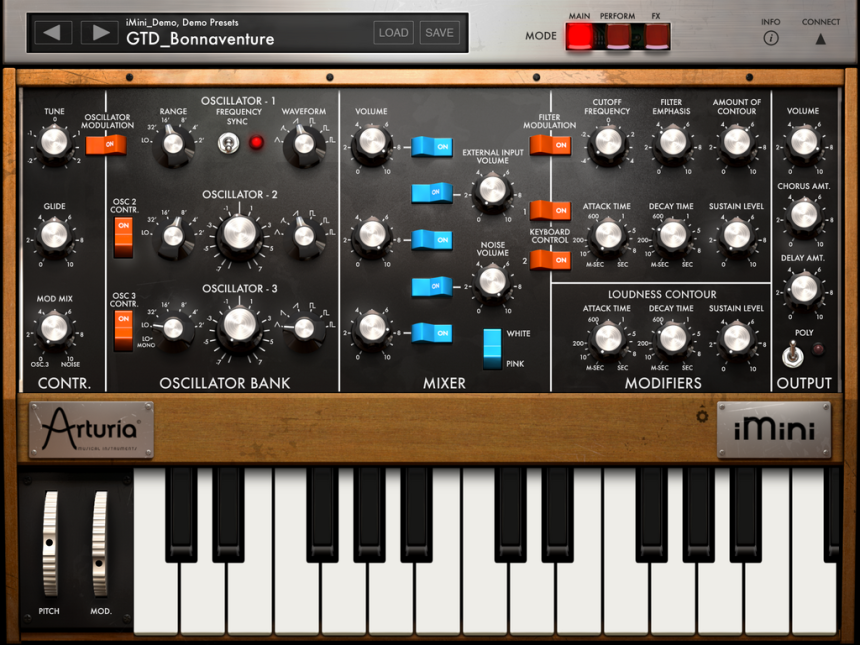
È il pannello classico del Mini Moog, fedelmente riportato nella versione VST ed ora anche nell’app. Al suo interno troviamo le seguenti sezioni:
- Contr – regolazione del Tune, quantità di Glide, Mod Mix per il regolare la modulazione dell’ osc 3 (utilizzato come LFO) o del noise;
- Oscillator Bank – tre oscillatori regolabili in frequenza per piedaggi di ottava e semitoni;
- Mixer – dosaggio del volume degli oscillatori, dell’external input, del noise (white o pink);
- Modifiers – generatori di inviluppo per Filter e Amp (entrambi regolabili in ADS), e gestione del Filter in termini di Cutoff, Emphasis e Amount;
- Output – Volume master, regolazione del Chorus, regolazione del Delay, pulsante per attivare la polifonia.
Anche in questo caso possiamo affermare che Arturia ha fatto davvero un ottimo lavoro: le sensibilità dei controlli, come nel caso del Cutoff Frequency e del Filter Emphasis, sono assolutamente pari a quelli della versione VST, a conferma che alle spalle di iMini, è presente la medesima tecnologia di emulazione (TAE). Coma già accaduto in precedenti emulazioni software di synth Moog, si nota però una leggera perdita di qualità delle sonorità quando si apre molto l’Emphasis portando il suono a frequenze molto alte. Questa situazione si verifica sopratutto con alcuni suoni lead molto acuti.
Inoltre, come già successo in passato per la versione VST, anche nell’app iMini, Arturia ha introdotto un interruttore di polifonia (diversamente dal Mini Moog originale esclusivamente monofonico). Nonostante si tratti di una possibilità aggiuntiva di arricchire le sonorità dei preset, questa caratteristica suscita oggi, come al lancio del VST, diverse polemiche da parte di chi avrebbe gradito una versione software rigorosamente fedele all’originale hardware.
Pannello PERFORM

In questo pannello troviamo un arpeggiatore con i relativi controlli (modalità di arpeggio, numero di ripetizioni, ottave, velocità e bpm sync), e due X/Y Pad programmabili.
Mentre una versione semplificata di arpeggiatore era presente nella versione VST, la presenza dei Pad X/Y costituisce sicuramente la principale novità dell’app. Risulta evidente che la tecnologia touch screen si presta enormemente a questo tipo di soluzioni, offrendo quindi nuovi spunti per una modulazione sonora più ricca e dinamica, difficilmente realizzabile con il solo VST.
Pannello FX

Alle estremità sinistra e destra, troviamo le stesse sezioni presenti nel pannello Main, rispettivamente Contr. e Output.
Al centro invece troviamo i controlli per regolare gli effetti di Chours (depth e rate), e Delay (feedback e time). Anche in questo caso si tratta di controlli che, seppur in versione semplificata, esistevano già nel VST.
Lateralmente ai tasti Mode appena descritti, troviamo un interruttore Connect che apre una sezione con diverse opzioni di connessione:

- Wist – (wireless sync-start tecnology) un protocollo nativo della Korg che sfrutta le connessioni bluetooth per collegare device (iPhone e iPad) e definire Master e Slave tra le app coinvolte nella connessione. In questo menù si ha anche un rapido accesso all’elenco di app compatibili con questa teconologia. Di fianco alle opzioni delle connessioni Wist, troviamo il menù per la gestione del Global Tempo.
- Midi – connessioni midi tramite wifi, o tramite Usb+iPad Camera Connection Kit. In questa maniera è possibile pilotare l’app attraverso un qualsiasi controller midi e/o DAW (iMini consente un Midi Learn per tutti i suoi controlli). È da sottolineare l’assenza della gestione dei canali midi. Risulta quasi impraticabile un utilizzo di iMini all’interno di un setup in cui sono presenti più synth da pilotare via midi.
- Tabletop Ready – un protocollo di connessione audio per registrare e comunicare con altre app e vst compatibili. Questo protocollo richiede l’installazione di Tabletop (disponibile gratuitamente sull’apple store), un’applicazione che consente di creare un setup con più strumenti virtuali direttamente sull’iPad.
Nella porzione inferiore dell’app troviamo le Pitch e Modulation Wheel, e la Tastiera. Attraverso un’impercettibile rotellina posizionata di fianco alla targa iMini, questa sezione è personalizzabile in termini di:
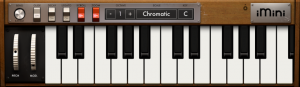
- tonalità, scale, ed estenzione della tastiera;
- range del Pitch;
- Glide, Decay, Legato.
Qualità audio
iMini è un app molto interessante il cui punto di forza è sicuramente la qualità audio dei preset. La premessa da fare in questi contesti è sempre la medesima: per apprezzare le sonorità di queste applicazioni è necessario disporre di una scheda audio che sia iPad-compatibile. Contrariamente, la sola uscita jack dell’iPad, non consente di poter sfruttare pienamente le potenzialità offerte da iMini e da un mondo costituito da sintetizzatori in formato app in continua e rapidissima espansione.
I suoni appaiono tutti ben fatti e la scelta è sicuramente molto ampia. All’interno del menù, i preset sono organizzati sia per compositori e poi per strumenti, sia direttamente per strumenti (Keyboards, Percussives, EFX, Leads, Pads, Horns, Strings, Arpeggio, Chords,Synth,Basses). I preset che ritengo più interessanti appartengono alla categoria degli Arpeggio. Con l’arpeggiatore attivo (nella sezione Perform è possibile regolarne tutte le opzioni) è possibile sfruttare a pieno le potenzialità di iMini ed usarlo in maniera creativa per ottenere sonorità che non si possono avere con l’originale. Posizionando la Latch Mode su HOLD, e lasciando una nota o un accordo in arpeggio, si possono utilizzare i due X/Y Pad e usare entrambe le mani per realizzare fantastiche evoluzioni sonore modulando 4 parametri simultaneamente.
A tal proposito è opportuno ricordare che di default, tutti i preset hanno i due Pad configurati per controllare rispettivamente Emphasis/Cutoff e Contour/VCF Attack, ma possono essere personalizzati per controllare uno qualunque dei parametri presenti nel pannello Main.
Connettività
Ciò in cui iMini è parso molto carente è la gestione delle connessioni. Pur disponendo del framework CoreMIDI, manca la gestione dei canali midi, e risulta quindi complicato inserirlo in un contesto di una DAW che pilota molteplici synth. Va inoltre sottolineata la mancanza di VirtualMidi, e quindi l’impossibilità di pilotare iMini con apposite app sequencer.
Spostandosi invece sul tema delle connessioni audio, va sottolineata la scelta di Arturia di utilizzare il protocollo Tabletop a discapito del sicuramente più diffuso AudioBus.
L’utilizzo della tecnologia Tabletop riesce a però a sopperire ad un’altra mancanza di iMini: non è possibile lasciare l’app in esecuzione in background.
La difficoltà di combinare iMini con altre applicazioni, potrebbe rilevarsi una spinta ad utilizzarlo in combinazione con pedali ed altri effetti hardware, trovandogli quindi una collocazione più professionale, sicuramente degna della qualità audio dei suoi preset.
Costi ed info generali
Il costo di iMini è sicuramente molto contenuto, è acquistabile sull’app Store per 8,89€ e per questa cifra sarebbe una follia non avere sul proprio iPad le sue sonorità, così estremamente fedeli a quelle MiniMoog V.
Siamo consapevoli che iMini è appena sbarcato sull’iPad, e che le carenze evidenziate nella versione 1.0 saranno certamente prese in considerazione da Arturia per futuri aggiornamenti.
Segnaliamo infine che parte del guadagno ricavato dalla vendita di iMini, finirà alla Bob Moog Foundation, una no-profit a sfondo didattico-musicale e che si occupa, inoltre, della gestione degli archivi di Robert Moog.
Specifiche
- 3 oscillatori;
- Filtro 24 dB per ottava;
- Jack per cuffie simulato/feedback ingresso esterno;
- 2 X/Y Pad assegnabili;
- Tastiera con modalità cromatiche o intonate;
- Modalità polifonica;
- Arpeggiatore;
- Controlli di sincronizzazione e velocità;
- Virtual Analog Chorus;
- Virtual Analog Delay;
- Supporta la sincronizzazione con altri dispositivi WIST (per iOS);
- Supporto CoreMidi (via wireless e iPad Camera Connection Kit);
- Possibilità di esportare registrazioni su Soundcloud (attraverso Tabletop);
- Renderizzazione su file WAV (attraverso Tabletop);
- Audiocopy per incollare file audio audio in altre applicazioni iPad (attraverso Tabletop).
PRO
Buona qualità audio;
Stabilità dell’app;
Costo contenuto.
CONTRO
Impossibilità di di selezionare il canale midi;
Non supporta il protocollo AudioBus;
Non funziona in background.
INFORMAZIONI UTILI
Produttore: Arturia
Modello: iMini 1.0
Sito web: Arturia iMini
Costo: 8.89 €
Piattaforma: IOSIn 1970, Moog produces the Mini Moog, a milestone in the history of contemporary music. In 2003, Robert Moog collaborates with Arturia to realize Mini Moog software version, the MiniMoog V: a successful emulation both in commands, and sound quality (of course without the body and the depth of the the original sound). Thanks to this collaboration, today the Mini Moog continues its long journey towards modernity; even landing on the iPad. The app’s name is iMini, and we are trying to figure out if the app is just a transposition of the VST version, or provides new features allowing a different use comprared to its predecessor.
On the apple Store pages we discovered that the app is based on the TAE technology (True Analog Emulation), already used by Arturia for the creation of MiniMoog V (VST). For this reason, reports Arturia, the audio quality produced by iMini “is as good as it has been until now heard on an iPad.”
In the upper section of the app, we find a Preset management menu. It offers over 500 presets, all of excellent quality, with signatures of note such as Klaus Schulze from Tangerine Dreams and Geoff Downes from Asia.
All presets are divided into categories and are easily customizable. A very interesting aspect of this menu is the possibility to exchange (import / export via iTunes) presets with the VST version.
The presets quality is certainly very high. By using an appropriate audio interface to connect to the iPad, the comparison with the sounds of the VST version (comparison made using the same preset) provides excellent results.
The sounds appear characterized by the same grain and the same color as the VST version, and only in very rare cases you may notice little differences to the detriment of the app version.
To the right of the Preset menu, there are three red buttons Mode, allowing the user to access respectively to:
- Main: The Minimoog classic front panel;
- Perform: a panel designed to encrease the modulation features during performances;
- FX: a panel for the effects management.
MAIN Pannel
It’s the Mini Moog classic panel, already reported in the VST version, and also in the app. Inside the pannel we find the following sections:
- Contr – Tune adjustment, amount of Glide, Mod Mix for the regular modulation of the ‘osc 3 (used as LFO) or noise;
- Oscillator Bank – three oscillators adjustable in frequency by octave footages and semitones;
- Mixer – oscillators, external input, and noise (white or pink) volume management;
- Modifiers – Filter and Amp envelope generator (both adjustable in ADS), and Filter management (Cutoff, Emphasis and Amount);
- Output – Master volume, Chorus and Delay management, polyphony button.
Arturia has done a great job: the controls for sensitivity, such as the Filter Cutoff Frequency and Emphasis, are absolutely identical to the VST version, confirming that iMini is based on the same emulation technology (TAE) of the VST. As in the case with previous software emulations of Moog synth, there is a slight sound quality loss when Emphasis is very opened, bringing the sound to very high frequencies. This situation occurs especially with some very acute lead sounds.
Another similarity with the VST version, in the iMini app Arturia introduced a polyphony switch (unlike the original Mini Moog, exclusively monophonic). Although this is an additional option to enrich the sound of the presets, this feature gives rise today to several controversies by those who would have liked a software version closely corresponding to the original hardware (simular complaints were raised at the launch of the VST version).
PERFORM Pannel
In this panel there is an arpeggiator (arpeggio mode, number of repetitions, octaves, speed and BPM sync), and two X / Y Pad programmable.
A simplified arpeggiator version was present in the VST version. However, the Pad X/Y is the main new feature of the app. The touch screen technology is perfect for this kind of approach, providing new sound modulation opportunity, richer and more dynamic, difficult to achieve with the VST version.
FX Pannel
To the left and right ends, we find the same sections of the Main panel, respectively Contr. and Output.
At the center we find the controls to adjust the effects of Chours (depth and rate), and Delay (feedback and time). As in previous cases, these controls were already present in the VST version.
Laterally to the mode button, there is a Connect section switch, with different connection options:
- Wist – (wireless sync-start technology), a Korg native protocol that uses bluetooth technology to connect devices (iPhone and iPad) and defines master and slave within the apps involved in the connection. In this menu, we also have a quick access to the list of compatible apps sharing the same technology. Near to the Wist connections options, we find the menu for the Global Tempo managing.
- Midi – MIDI connections via wifi, or via USB + iPad Camera Connection Kit. In this way it is possible to control the app via any MIDI controller and/or DAW (iMini allows a MIDI Learn for all its controls). It’s almost impossible to use iMini in a setup where there are more synths controlled via midi, because the management of midi channels is not supported.
- Tabletop Ready – a connection protocol for audio recording and communicating with other compatible apps and VST. This protocol requires the installation of Tabletop (available for free at the Apple Store), an application that allows you to create a setup with multiple virtual instruments directly on the iPad.
In the lower portion of the app there are the Pitch and Modulation Wheel, and the Keyboard.
- tonality, scales, and extension of the keyboard;
- range of the Pitch;
- Glide, Decay, Legato.
Audio Quality
iMini is a very interesting app whose peculiarity is the presets sound quality. The premise is always the same: to appreciate these application’s sound, you must have an iPad-compatible audio interface. At contrary, the iPad output jack, does not allow to fully exploit the potential offered by iMini and other app.
All the sounds seem well made and the choice is certainly very wide. In the menu, the presets are organized for both composers and then for instruments, both directly to instruments (Keyboards, Percussives, EFX, Leads, Pads, Horns, Strings, Arpeggio, Chords, Synths, Basses). The presets that i think are most interesting belong to the Arpeggio category. With the arpeggiator switched on (in the Perform section you can adjust all options) it is possible to fully exploit the potential of iMini and use it in a creative way to get sounds that you can not have with the original. Positioning the Latch Mode to HOLD, and leaving a note or chord in arpeggio, you can use the two X/Y Pad and use both hands to make great sound evolutions, modulating 4 parameters simultaneously.
It should be noted that by default, all the presets have the two pad configured to control respectively Emphasis / Cutoff and Contour / VCF Attack, but they can be customized to control any other parameters in the Main panel.
Connectivity
What we found to be very deficient in iMini is the connections management. Even it supports the CoreMIDI framework, the midi channels management is not supported. For this reason is complicated place the app inside a setup where a DAW drives multiple synths. It should also be underlined the lack of VirtualMidi, and therefore the impossibility of controlling iMini with appropriate app sequencer.
Moving instead on the issue of audio connections, it is worth highlighting the choice of Arturia to use the Tabletop protocol instead of the more widespread AudioBus.
The use of Tabletop technology can, however, to make up for another lack of iMini: You can not leave the app running in the background.
The difficulty of using iMini with other applications, could be a way to use it in combination with other hardware effects, finding him a more professional place, definitely worthy of the sound quality of its presets.
General info
The cost of iMini is not so much expensive, it’s available on the App Store for 8.89 € and it would be crazy not to have it for this price
We are aware that iMini has just landed on the iPad, and that the deficiencies noted in the 1.0 version will certainly be considered by Arturia for future updates.
Finally we report that part of the profit made from the sale of iMini, will be devolved to the Bob Moog Foundation, a musical educational non-profit that also manage the Robert Moog’s archives.
Main features:
- 3 Oscillators;
- 24db per octave filter;
- Simulated headphone jack/external input feedback;
- 2 Assignable XY pads;
- Chromatic or tuned scale keyboard modes;
- Polyphonic mode;
- Full featured arpeggiator;
- Speed and sync controls;
- Virtual Analog Chorus;
- Virtual Analog Delay;
- Owners of both the iMini and Mini V software apps can transfer sounds from one platform to the other via iTunes;
- Full user MIDI mapping of panel controls;
- Supports WIST sync with other iOS devices;
- ‘Tabletop Ready’;
- Soundcloud seeder (via Tabletop);
- Render to .wav file (via Tabletop);
- ‘Audiocopy’ to paste your audio into another iPAD application (via Tabletop).
PRO
Good audio quality;
Stability of the app;
Cost.
CONTRO
It does not support MIDI channel selection;
It does not support the protocol AudioBus;
It does not work in the background.
INFORMATION:
Productor: Arturia
Model: iMini 1.0
Web site: Arturia iMini
Price: 8.89 €
Plattform: IOS


