



Come già accennato in precedenti articoli, le grandi case produttrici – oramai quasi per obbligo più che per scelta – affiancano ai propri software professionali controller ed apparecchiature che in qualche modo aiutino il dj a gestire la serata live o la performance in maniera unica, creativa e semplice. La Native Instruments ha da tempo messo a disposizione degli utenti il controller X1, studiato per i possessori (ma anche per i non possessori!) del software TRAKTOR.
Prima impressione
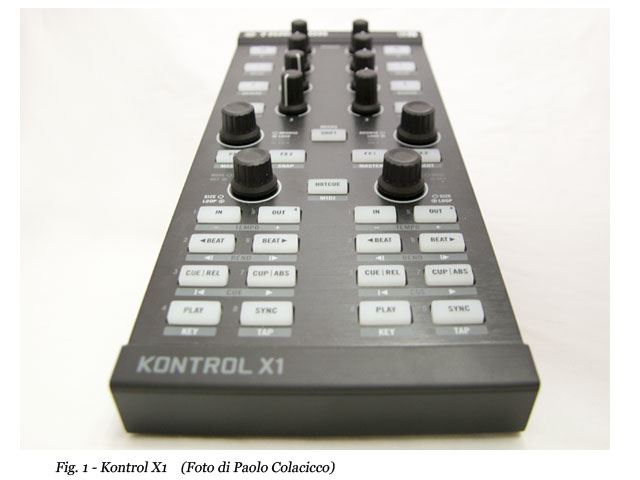
Come al solito, la Native Instruments non finisce mai di stupirci. Già la confezione è stata “progettata” per introdurci al controller e farci emozionare ancor prima di mettere le mani sul nostro giocattolo. Infatti, sulla scatola è presente una sorta di “aletta” pieghevole a strappo, dov’è raffigurato a grandezza naturale l’X1 diviso in sezioni: con un unico colpo d’occhio ci viene così fornito un assaggio delle funzioni e delle varie soluzioni di lavoro, nonché delle modalità di collegamento del controller nelle diverse situazioni di setup. All’apertura della scatola ho davanti ai miei occhi, in pratica, il fratello minore del Maschine (Fig.1), stessa fattura, stesso stile. Dalla confezione escono in dotazione – oltre al controller, ovviamente – il cavo USB per il collegamento al PC/MAC, un manuale di setup in varie lingue (non illudetevi: la lingua italiana, come sempre, è assente) ed un DVD con i drivers per l’istallazione, una versione di TRAKTOR LE, KORE PLAYER e KORE SELECTION.
Installazione
Installare il controller X1 è semplicissimo: basta collegare la periferica tramite porta USB (Fig.2) al PC/Mac, lanciare i drivers, installare e mandare in esecuzione Traktor LE e automaticamente la periferica viene riconosciuta dal software proprietario. Io ho testato il controller con Traktor Scratch PRO su Mac e non ho dovuto neanche installare i driver perché riconosciuta in automatico. La mappatura è di “default” quella stabilita dalla Native Instruments, che poi sfrutta in pieno l’usabilità del controller.

Il Controller
Il controller è davvero di ottima fattura, come anticipato: la plastica rigida e la mascherina di alluminio, simile del resto a quella del Maschine, dà al controller X1 un aspetto solido e robusto, ma nel contempo leggero e trasportabile anche per le ridotte dimensioni. I tasti in plastica dura si schiacciano in maniera decisa, e nonostante siano retro illuminati (Fig.3), si può udire facilmente il “click” del contatto alla pressione del tasto.

Anche i Knobs con un grip gommato sono di primissima qualità, al tatto risultano molto sensibili e precisi nello stesso tempo grazie ad un potenziometro a scatti ed ad una tacca centrale che ci aiuta sempre a posizionare la rotellina verso le ore 12. Sia i tasti che le manopole hanno una funzione primaria e secondaria, i tasti si retro illuminano in tre colori a diverse delle funzioni ( Blu, bianco e rosso) . Da segnalare che tramite il software di Traktor è possibile gestire sia la luminosità dei tasti “on” che la backlight quando i tasti non sono attivi. Ad un primo colpo d’occhio i comandi dell’X1 sono stati progettati e suddivisi sul controller in maniera semplice ed intuitiva. In un primo gruppo di tasti a partire dall’alto la sezione “EFFECTS “ 8 potenziometri e 8 tasti che ci danno diretto accesso agli effetti (Fig.4), ovviamente l’utente può controllare simultaneamente questi ultimi sui due deck separati avendo anche la possibilità di cambiare in tempo reale l’effetto, infatti tenendo premuto il tasto ( SHIFT ) si può accedere velocemente ai preset effetti (DELAY, REVERB, FILTER) o addirittura il tasto freccia (ON) per selezionare l’effetto che all’istante vogliamo utilizzare, e con i tasti 1, 2 e 3 attivare i knobs per regolare in percentuale i parametri di questi ultimi (Fig. 5).


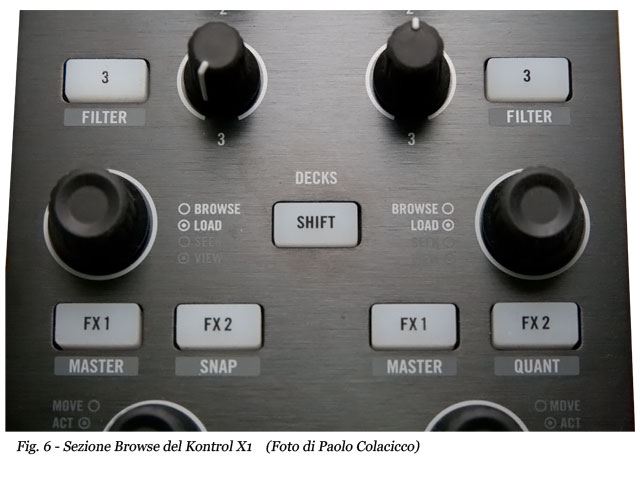
Subito sotto la sezione “Effetti” troviamo l’utilissima sezione “BROWSE” (Fig. 6). Certo, utilissima, perché dà la possibilità al dj di non toccare per nessuna ragione il laptop, sfogliando tramite i due rotori/Knobs la directory dei brani e cliccando sullo stesso rotore per caricare sul deck corrispondente il brano. Tenendo premuto il tasto SHIFT, anche in questo caso, si accede ad una doppia funzione che dà la possibilità di estendere la lista brani a pieno schermo e viceversa (cliccando sul rotore), mentre ruotando lo stesso si ha la possibilità di decidere velocemente il punto di partenza del brano.
Nella sezione “LOOP” dell’X1 possiamo, in maniera molto pratica, decidere – con i tasti IN e OUT (Fig.7) – il segmento del loop, mentre con il rotore/knobs sceglieremo la misura. In realtà si può utilizzare anche una sorta di scorciatoia, selezionando con il rotore prima la misura del loop e poi schiacciando quest’ultimo per attivare i segmenti.

Infine, la sezione “TRANSPORT”, suddivisa in 6 pulsanti per deck (BEAT-CUE/REL, CUE/ABS – PLAY e SYNC), rispecchia in maniera precisa i comandi base per la gestione della traccia in Traktor come in qualsiasi altro software di gestione per dj. Ovviamente anche qui, selezionando shift, si accede ad altre funzioni avanzate (Tempo -/+, KEY e TAP) per la gestione certosina della session (Fig.8).

La prova
Personalmente ho provato Traktor Kontrol X1 posizionandolo tra il mixer Vestax PMC-05 Pro IV e i miei due Technics 1210. Il risultato è una consolle ottimamente integrata per la gestione dello spazio, l’estetica e la comodità di utilizzo. Utilissima è anche la Traktor Kontrol x1 Bag (non inclusa nella confezione) (Fig. 9) che vi permette, dopo averla posizionata sotto il controller, di avere ad altezza mixer tutti i comandi sotto mano.

Il termine “latenza” in questo controller è inesistente. Anzi, l’interazione con il software è immediata e la robustezza del controller fa intendere che vi trovate di fronte ad un prodotto altamente professionale, ben lontano da un semplice telecomando per consolle. Al primo approccio l’interfaccia può sembrare ostica, ma dopo una mezz’ora di utilizzo tutto diventa più chiaro e “slanciato”. Come tutti i controller midi, anche l’X1 è interamente mappabile con software di altre case produttrici, tra cui Serato. A questo link potete scaricare e importare la mappatura per questo controller.
Considerazioni
E’ scontato dire che il controller, così com’è stato progettato, è indispensabile per chi usa i sistemi DVS con time-code. Il controller, inoltre, rispetto alla tastiera del laptop, possiede una semplicità di utilizzo senza paragoni: il dj non dovrà pensare ad altro che a passare del buon sound ed in particolare i dj tecno e house avranno molto da divertirsi, dando sfogo alla loro destrezza e fantasia, stravolgendo i live set. Anche i turtablist potranno avere la loro performance sotto controllo, abbinando uno scratch ed un cut con il controller sempre e comunque ad un palmo dal mixer. In definitiva, parliamo di un prodotto in grado di soddisfare, per una modica cifra, anche i palati più raffinati ed ambiziosi. D’altronde, quando il collega Mariano de Vita (in arte Dj Marv) ci ha passato questo bel giocattolo per la prova, già sapevamo, in verità, a cosa andavamo incontro.
Alla prossima recensione Dj Fresella …..
Pro:
- Prezzo eccellente
- La qualità dei componenti è elevata
- Facile da installare
- Work-flow intuitivo
- Luminazione tasti regolabile
Contro:
- Manuale non dettagliato.
INFORMAZIONI UTILI:
Produttore: Native Instruments
Modello: Kontrol X1
Website: www.native-instruments.com
Distributore: www.midimusic.it
Prezzo: Euro199 +Iva
Alla prossima,
DJ Fresella
As mentioned in previous reviews, the big manufacturers – now forced rather than by choice – are combining their professional softwares with controllers and devices which somehow would help the dj manage a live set or his performance in a unique, creative and easy way. For a long time now, Native Instruments has made available for users the X1 controller, aimed to those who own the TRAKTOR software (but also for those who don’t!).
First impression
As usual, Native Instruments never ceases to amaze us. Yet the package has been “planned” in order to introduce us the controller and get excited even before getting our hands on this toy. In fact, on the box there is some sort of pliable “little pull-wing”, where the X1 writing is pictured, divided into sections: so just one glance offers us a sample of the functions and of the various work solutions, as well as the possibilities to connect controllers within different settings. Once opened the box, before my eyes is, basically, the Maschine controller’s little brother (Pic.1), same workmanship, same style. The package provides – besides the controller, obviously – the USB cable to connect it to the PC/MAC, a set-up guide translated in different languages (don’t raise your hopes: as usual, the italian one is missing) and a DVD for drivers installation, a version of TRAKTOR LE, KORE PLAYER and KORE SELECTION softwares.
Installation
Installing the X1 controller is very easy: all you have to do is connect the device to the PC/MAC via the USB port (Pic.2), launch the drivers, install and start Traktor LE and the device is immediately recognized by the proprietary software. I tested the controller with Traktor Scratch PRO on a MAC device and I didn’t even have to install drivers for it was recognized right away. The default mapping is set by Native Instruments and takes advantage of the controller’s full usability.

The Controller
The controller, as said, stands out with really good workmanship. The rigid molded plastic and the aluminum top plate, yet similar to the Maschine’s one, gives the Kontrol X1 a solid and compact shape, as well as light and easy to carry around thanks to its reduced dimesions. The rigid-plastic keys must be pressed sharply, and though they are backlit (Pic.3), you can easily hear the click sound when you press them.

The rubberized knobs are high-quality manufactures, providing a soft grippy feeling and, at the same time, easy on the finger tips thanks to a potentiometer with a snap function and a middle bar that helps us to position the knob at 12 o’ clock. Both keys and knobs have a primary and secondary function, keys are backlit in three different colors (Blue, white and red) depending on the function. It is worth pointing out that, via the Traktor software, it is possible to control both the brightness of the buttons that are “on” and their backlighting when they aren’t. At a first glance, the X1 controls have been designed and placed on the controller in a simple ad intuitive way. In the first upper group there is the “EFFECTS” section with 8 potentiometers and 8 buttons with direct access to the effects (Pic.4), allowing the user to control them simultaneously on the two separate decks and to change effect in real time, in fact keeping the SHIFT button pressed, you can easily select preset effects (DELAY, REVERB, FILTER) or even, the arrow button (ON) to select the effect we want to use, while with the 1, 2 and 3 buttons you can set the knob parameters by percentage (Pic. 5).


Right below the “Effects” section there is the “BROWSE” one (Pic. 6). Indeed very useful, for it gives the dj no reason to touch the laptop, browsing the track library via the two knobs and pushing the knob to load the track on the corresponding deck. Just holding the SHIFT button, in this case too, a double function which allows to expand the track library to full screen and reverse it (clicking the knob again), while, twisting it, you can easily chose the starting point of the track.
In the “LOOP” section, in a very practical way, we can decide and choose the loop segment – via the IN and OUT buttons (Pic.7) -, while, with the rotary knob we can choose its size. Actually you could even take a shortcut, selecting the loop size first by the knob and then pushing it to select its segments.

Lastly, the “TRANPORT” section, within 6 buttons per deck (BEAT-CUE/REL, CUE/ABS – PLAY e SYNC), provides the same basic playback controls within Traktor, as in any other dj software. Indeed here too, pushing the shift button takes on other advanced functions (Tempo -/+, KEY e TAP) for a painstaking session work (Pic.8).

The test
I tested the Traktor Kontrol X1 myself placing it between Vestax PMC-05 Pro IV and my two Technics 1210. The result is a perfectly integrated consolle in terms of space, design and ease of use. Very useful is also the Traktor Kontrol X1 bag (not supplied) (Pic. 9) allowing you to, once placed under the controller, elevate all the controls at hand to standard mixer height.

The term “latency” is missing in this controller. On the contrary, the interaction with its software is immediate and the controller’s compact design makes you understand that what you have in your hands is a highly professional product, quite far from a simple consolle remote control. At first the interface may result a little difficult but, after half an hour of use everything gets clearer and faster. Like any midi controller, the X1 can be entirely mapped too within other manufacturers’ softwares, such as Serato. Here is the link where you can download and import this controller mapping.
Considerations
Saying that this controller, as it has been designed, is essential for those who use DVS systems with time-code control disks, is too obvious. Besides, in comparison to using the laptop keyboard, its ease of use is beyond compare. The dj will only worry to play some good sound and the techno and house djs in particular will have lots of fun, expressing all their skills and fantasies, reinventing the live set. Also Turntablists will be able to have their performance under control, combining a scratch and a cut to the controller which is a few inches away from the mixer, no matter where or when. To sum up, we’re talking about a product that is able to satisfy, at an affordable price, also the ones who have champagne taste. Actually, when our colleague Mariano de Vita (stage name Dj Marv ) lent us this nice toy in order to test it, to be honest with you, we already knew what we were going to deal with.
To the next review Dj Fresella …..
Italian to English translation: Umberto del Giudice
Pros:
Excellent price
High-quality components
Easy to install
Intuitive work-flow
Adjustable LED brightness
Cons:
Not detailed manual
USEFUL INFORMATIUONS:
Manufacturer: Native Instruments
Model: Kontrol X1
Website:www.native-instruments.com
Distributor: www.midimusic.it
Price: 199 Euros VAT not included


