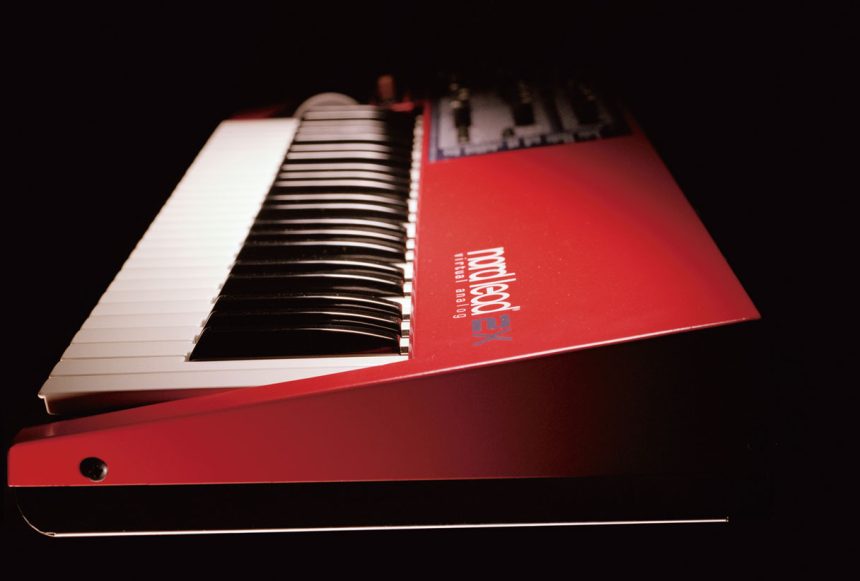
Quale possessore di una Clavia Nord Lead/Rack 2X non ha mai desiderato modificarne gli innumerevoli parametri di sintesi sonora tramite un editor grafico per computer? Questo tipo di funzionalità, la nota casa svedese, l’ha sempre e esoltanto offerta ai possessori di Nord Wave e Nord Electro 3, attraverso il Nord Sample Editor. Noi amanti della serie Lead abbiamo sempre patito la mancanza di un editor grafico. Spulciando tra la rete sembra proprio che qualcuno abbia trovato un’interessante soluzione.
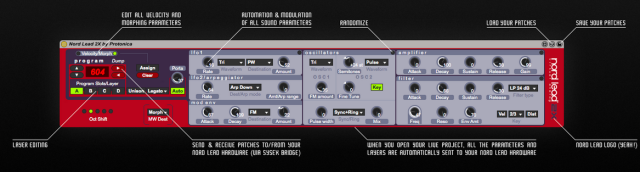
Lo sviluppatore Piet Kaempfer, in arte Protonica, utente della sempre più grande famiglia di Max for Live, ha realizzato un plugin denominato Nord Lead 2X Remote (versione 1.3) che permette appunto di controllare modificare, e gestire tutto il motore di sintesi sonora del famigerato synth svedese attraverso un’interfaccia grafica da caricare all’interno di Ableton live.
Max for Live è un’ambiente di sviluppo, basato su una tecnologia denominata MAX 6, che offre l’opportunità di realizzare strumenti midi, device per l’analisi del suono ed effetti.
All’interno di di Ableton Live 8.3 era già stata introdotta la piattaforma di sviluppo di Max, ribattezzata Max for Live. Con la release 9 di Ableton Live, Max è stato integrato all’interno del programma, offrendo quindi un supporto nativo.
Premesso quindi che dobbiamo aver installata sul nostro computer una versione di Ableton (possibilmente dalla versione 9 in su), ci basterà scaricare dal sito Max for Live il plugin sviluppato da Protonica, e potremmo divertirci a modificare tutti i parametri del Nord Lead/Rack 2X tramite un’interfaccia grafica che offre anche un pratico import/export, salvataggio in patch per ableton, automazioni e modulazioni di tutti i parametri di sintesi sonora.
Per alcune funzionalità di questo plugin, lo sviluppatore fa presente che è necessario installare il SysEx Bridge di cui fornisce il link nella guida all’installazione pubblicata sul sito Max for Live.
Recapitolando…
- Versione 9 di Ableton live (con versioni precedenti sarà necessario un’installazione di Max for Live)
- SysEx Bridge
- NordLead 2x Remote plugin
E il gioco è fatto…
Caratteristiche principali:
- Possibilità di collegare il Nord Lead / Rack 2X direttamente alla vostra DAW
- Modificare tutti i parametri audio del synth dal plug-in
- Caricare e salvare patch in Ableton
- Import ed Export di patch da e verso il Nord lead (SysEx Bridge richiesto)
- Automazione e modulazione di tutti i parametri del suono
- Visualizzare e modificare tutti i parametri Morph/Velocity (SysEx Bridge richiesto)
- Utilizzare fino a 4 layer per il multi-sequencing o stacking (caricare e pilotare 4 tracce a MIDI su differenti canali)
- Se si modifica una qualsiasi manopola dal synth, è possibile vederne il movimento direttamente nel plugin
- Inviare patch dal plugin verso il sintetizzatore, modificare il buffer e salvare direttamente dal plugin
- Total recall: quando si apre il progetto con il plugin, tutti i parametri vengono inviati automaticamente al synth
- Randomizzazione delle patch per trovare nuovi spunti e idee per sonorità innovative
- Accesso al filtro “nascosto” (Notch)
- Basso utilizzo della CPU
alla prossima news
Andrea Genito
Who from the Clavia Nord Lead/Rack 2X owner has never wanted to change the many sound synthesis parameters by a graphical editor for computer? This type of functionality has been always offered by the well-known Swedish brand only to the Nord Wave and Nord Electro 3 holders, through the Nord Sample Editor. The Lead series fans have always felt the lack of a graphical editor. Looking up on the web it seems that someone has found an interesting solution.
The developer Piet Kaempfer, aka Proton, a member of the even more large of Max for Live family, has created a plugin called Nord Lead 2X Remote (version 1.3) that allows us to precisely control, modify, and manage the entire engine sound synthesis of the famous Swedish synth through a graphical interface to be loaded in Ableton live.
Max for Live is a development environment, based on a technology called MAX 6, which provides the opportunity to create midi instruments, devices for the sound analysis, and effects.
Within Ableton Live 8.3 it was already introduced the development platform of Max, renamed Max for Live. With the Ableton Live release 9, Max has been integrated into the program, providing thus native support.
Given then that we need an Ableton installation (possibly from version 9 and newer are better), we can just download the plugin developed by Proton from the Max for Live website, and start to change all the Nord Lead/Rack 2X parameters through a graphical interface that also allows us to import/export, save patch for ableton, automate and modulate all the of sound synthesis parameters.
In order to use some features of this plugin, the developer points out that it is necessary to install the SysEx Bridge of which he provides the link in the installation guide published on the Max for Live web-site
Summarizing…
- Ableton live release 9 (with older version you need to install Max for Live)
- SysEx Bridge
- NordLead 2x Remote plugin
That’s all…
Features:
- Connect your Nord Lead/Rack 2X directly into your DAW
- Edit all sound parameters of your synth from the plug-in
- Load and save patches in Ableton
- Import & Export patches from/to your Nord Lead hardware (SysEx Bridge required)
- Automation & modulation of all sound parameters
- View and edit all Morph/Velocity parameters (SysEx Bridge required)
- Use up to 4 Layers for multi-sequencing or stacking (you have to load and route 4 instances to different MIDI tracks)
- If you edit any knob from your Nord Lead hardware, you can see it moving directly from the plugin
- Send patches from the plugin to your synthesizers edit buffer and save them from there
- Total recall: when you open the project with the plugin, all the parameters are automatically sent to the Nord Lead hardware
- Randomize your patches to find freaky sounds and new ideas
- Access to the “Secret” filter type (Notch)
- Low CPU usage
to the next news
Andrea Genito