



The HX Stomp is the ultra-compact version of Line6's Helix pedalboard and uses the same DSP and modeling technology for effects, amps and cabinets.
- Construction
- Effects
- Connections
- Midi
- Audio interface
- EDITOR
- OPERATING MODES
- SNAPSHOT
- IR block
- Conclusions
- Construction Sector
- Effects
- With the Midi function it is possible to control the HX Stomp with both the USB MIDI and the traditional 5-pin DIN connector.
- In particular, it is possible:
- • Recall a preset
- • Recall a snapshot
- • Bypassing a block in the chain of effects
- • Check the effects parameters
- Note that the Midi management of HX Stomp is much more limited than Helix, so the latter's MIDI Commander is not present.
- Audio interface
- Editor
- For two reasons:
- Fig. 10 - Editor
- Fig. 11 - HxEdit
- HELIX FREE GUITAR PATCHES
- Operating modes
- Conclusion
Personally I was very interested in this type of format, because I was looking for a versatile pedal with a limited footprint. This feature makes HX Stomp perfect for integration into one pedalboards even more extensive. Will this reduced version have the versatility and sonic texture of the Helix version I usually use for my works?
Will it also be able to compete with alternative products from other manufacturers? Or will it leave us, as often happens in “light” models, a little bitter taste in the mouth?
Construction
The overall quality of the HX Stomp is well made. It has a sturdy metal casing and the screen has good contrast and good sharpness.
Equally robust and precise are the potentiometers and capacitive switches, each with its own colored ring. It therefore lends itself well to the classic use on the ground or to a "desktop" use (next to a synth for example).
Effects
HX Stomp offers more than 300 effects (including a looper) all from the Helix family and from the series M and also all the presets of the Delay DL4.
There are 20 new delay effects from the Helix family, usable in both mono and stereo, ranging from simple delay to Multitap variations.
The models on which they are based are: TC Electronic 2290, Maestro Echoplex EP-3, Roland RE-201 Space Echo, Boss DM-2 and Electro-Harmonix Deluxe Memory Man.
Very beautiful are the 5 new reverbs: Glitz, Ganymede, Searchlights, Plateux and Double Tank that sound really good and are very similar to the Strymon BigSkyand Boss RV-6.
As a term of comparison, I have listed their equivalences in a table.

A few thoughts on the HX Stomp audio engine:
being based on DSP, some models require more processing power than others and therefore it may happen that some presets may contain fewer models.
So although you can enter up to 6 simultaneous effects, some models may become unavailable for the preset we are building. This is one of the main differences with Helix, which it can boast of well 2 DSP!
As I write this review, the HX Stomp firmware has been updated to version 2.81, an important milestone because Line6 has unified the firmware of its pedalboards, thus making available new features and improvements to the entire line of Helix products. So the HX Stomp's audio engine now runs on the same software as the big sister Helix without having the computing power of 2 DSPs!
With the latest firmware update 2.81 new amp models have been added:

and new effects:
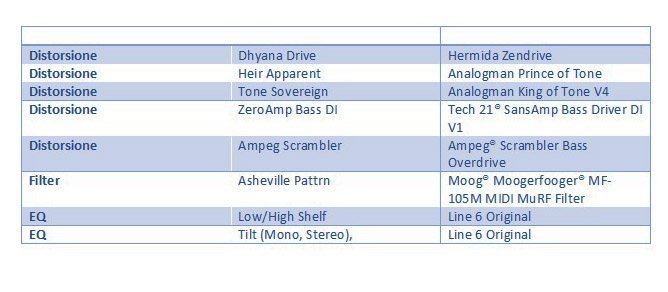
Distortion, Overdrive and Fuzz
We find all models of the DM4, also there are new Helix quality models, which improve some effects. Among these it is necessary to mention: Klon Centaur, Xotic EP Booster, Z.Vex Fuzz Factory, Paul Cochrane Timmy and more.
For bass players we find a Microtubes Darkglass Electronics B7K Ultra.
In the latest firmware update, the King of Tone of Analog Man.
The effect that we remember costs more than $ 300 and requires registration on a waiting list, it was really a surprise and sounds practically the same as the original pedal.
This category has historically always been the most talked about of the Helix effects. Often the sound of the overdrives can be not too full-bodied or differ in a small part from the analog version, so in general they may not please everyone's ear.
I am not saying that they are not valid and especially live, the differences are not noticeable, however a good remedy is to use an analog Overdrive coupled to HX Stomp. This way we also save some DSP slots that we can use for any other effects.

Modulations and more
Really many effects: reverbs, modulations, wah, pitch and synth.
In the modulations section there are many models which in my opinion are of Helix quality based on Fender, Vox, Boss CE-1, MXR, Leslie ed Electro Harmonix.
The effects of pitch/synth showed good tracking and very low latency.
They can be used not only with the guitar, I have also used them with my cello and with a few modifications of the parameters I was able to find really interesting and usable combinations for my musical productions!

Amp and Cab
This is the category that makes HX Stomp really powerful. We have a huge archive of amps and cabs available, with a truly comprehensive choice for playing in any situation. The amps have the same name as the model they emulate, just look at the list to get an idea.
In the test I got the impression of very dynamic sound, very sensitive to the touch. Again like overdrives we will not be able to emulate all the micro nuances of the original sound, but finding the difference especially to a person who is not a musician will be a very difficult task.
Connections
Another strong point of Hx Stomp are the connections.
HX Stomp has available:
- L / R inputs (mono or stereo)
- L / R outputs (balanced or unbalanced)
- Return (or aux in) L / R
- Stereo send output
- Headphone output
There is an expression pedal input with jack and with a Y cable you can connect up to 2 pedals or 2 switches (or a switch and a pedal).
It is important to note that the unit also has 5-pin MIDI IN and OUT, allowing you to recall presets and control effect blocks with an external midi controller.
Being so compact, the HX Stomp is inevitably limited in terms of controls, but these limitations can easily be overcome with these tweaks.
Sendand Return can be used to insert additional external pedals (fx loop) and you can decide at which point in the preset to insert the external loop.
Midi
With the Midi function it is possible to control the HX Stomp both with USB MIDI and with the traditional 5-pole DIN connector.
In particular, it is possible:
- Call up a preset
- Recall a snapshot
- Bypassing a block in the effect chain
- Check the effect parameters

Note that the Midi management of HX Stomp is much more limited than Helix, so the latter's MIDI Commander is not present.
Audio interface
Hx Stomp can also be used as a sound card and works up to 24bit/96KHz KHz. It is compatible with Mac, iOS and Windows. It has a “Hardware monitoring”, which allows you to listen to the input signal, regardless of the DAW software.

When recording you can use the USB channel 5/6 as input to the DAW, in this way we will record the signal in a way with and without effects that we can add later.

We can then use the uneffected track for a re-amp, ie we have the HX Stomp reprocess the effects to get the final effects track.

EDITOR
I will never tire of saying that it is impossible to fully use a modern pedal board without a good editor.
Very often we focus (rightly) on the purchase of the pedal board and neglect this aspect, discovering afterwards the impracticality of the object.
For two reasons:
the first is for the myriad of parameters available, the second is for the ability to load / save patches or buy them from industry experts.
In this regard, as with all Helix products, Hx Stomp is supported by HxEdit, a powerful editor, librarian and IR manager, which allows you to easily load / save / customize presets.
HxEdit makes editing patches very easy, everything is visual and we have all effects parameters under control.


The page is available line6.com/customtone to be able to download ready-made patches for free.
I point out the following pages with free and paid patches.
www.choptones.com/line6-patches/line6-hx-stomp
www.3sigmaaudio.com/helix-collection/
OPERATING MODES
Hx Stomp has two operating modes: Play view and Edit view.
The first, as the name implies, to use when playing, the second to create / modify patches
Play View
The view summarizes the number and name of the preset in the upper part, while in the lower part it is possible to choose between different sub-views: Stomp, Scroll, Preset and Snapshot.

Stomp: a preset effect that can be turned on or off is shown on each switch, plus a control for tap tempo and the tuner.

scroll: up and down in the preset list

Preset: selection of the preset from bank A, B and C

Snapshot: used for snapshot management, which we will see shortly.
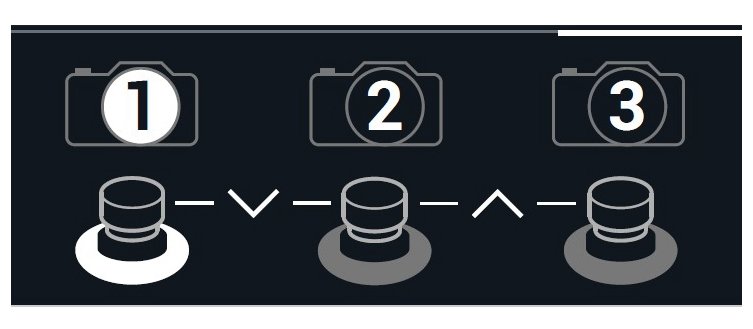
Preset Lists: list of all presets in textual form.

Edit view
The Edit view offers is a representation of the preset using a block diagram.
By selecting a single block it is possible to edit all its parameters that will appear in a sub-view
In the Edit view you can also set the sound path (series / parallel).

SNAPSHOT
The snapshot mechanism allows you to control any parameter present in a patch which can also be very complex. It is designed to avoid having to press one or more buttons to enable / disable / edit a patch while it is playing. All changes to the patch are stored in memory and then recalled by pressing a single switch.
IR block
The IR block ot Impulse Response was a surprise in HX Stomp.
As many will know, an IR allows you to capture the behavior of a system (be it a guitar, the reverb of an environment, a microphone) and subsequently to replicate this behavior on another system.
It is a general concept not only applicable to the audio world, through which a data file is produced (very often encoded as a Wave file) which, loaded on board a "convolver", allows you to play with your guitar (or any other instrument) that system we have "captured".
Among the effects we find an IR block that allows you to select up to 128 IRto load with HX Edit.
Many third party IRs are available as well as free user libraries for microphones, amplifiers, reverbs, etc ...
HX Stomp allows you to charge IR up to 2048 points, a feature often found only on more expensive pedalboards.

I was planning to add a dedicated IR pedal to my setup and the choice was split between Tone Dexter of Audiosprockets and the VSound2, two products with a cost between 400 and 500 euros.
Well, I “saved” this money after carrying out a test with HxStomp, on which I uploaded an acoustic cello IR file which I then tested with my NS Design electric cello.
This need can be typical of those who want to improve the sound of their guitar or simulate the acoustic sound of another instrument (my Ibanez which sounds similar to a Martin wow!).
Conclusions
HX Stomp is a full featured product in a truly mini package and when something like this comes into your setup, everything changes.
It is great as a single pedal, easy to use with its graphical interface, has fantastic effects with realistic amp models.
Its limited footprint allows it to be used even in existing pedalboards, obviously it has only 3 switches, but using a MIDI controller you can access many other functions.
Finally, the possibility of using HX Stomp as a sound card makes this product suitable for both studio and live use.
I thank the Cav. Music House Quinto Fabio (SA), for giving me the opportunity to use the Line 6 HX Stomp, for as long as it takes to do a thorough product test.
Useful Information
Producer: Line6
Distributor: Yamaha guitar group
Model: HX Stomp
Advised price: 500 Euro including VAT
Umberto Sorbo
HX Stomp is the ultra-compact version of Line6's Helix pedalboard and uses the same DSP and effects modeling technology, amplifiers and cabinets.
Personally, I was very interested in this type of format, because I was looking for a versatile pedal with limited overall dimensions. This characteristic makes HX Stomp perfect for integration into a more extended pedalboards. Will this reduced version have the versatility and the sound texture of the Helix version that I usually use for my works?
Will he also be able to compete with alternative products from other manufacturers? Or will he leave us, as often happens in “light” models, with a little bitter taste?
Construction Sector
The overall quality of HX Stomp is of good quality. It has a robust metal casing and the screen has good contrast and good sharpness.
Equally robust and precise are the potentiometers and capacitive switches, each with its own colored ring. It therefore lends itself well to the classic use on the ground or to a “desktop” use (next to a synth for example).
Effects
HX Stomp offers more than 300 effects (including a looper), all coming from the Helix family and the M series, as well as all the Delay DL4 presets.
There are 20 new Helix family delay effects, usable in both mono and stereo, which include simple delay to Multitap variations.
The models they are based on are: TC Electronic 2290, Maestro Echoplex EP-3, Roland RE-201 Space Echo, Boss DM-2 and Electro-Harmonix Deluxe Memory Man.
The 5 new reverbs are very beautiful: Glitz, Ganymede, Searchlights, Plateux and Double Tank that sound really good and are very similar to the Strymon Big Sky and the Boss RV-6.
As a term of comparison I have listed the relative equivalences in a table.
Some considerations on the HX Stomp audio engine:
being based on DSP, some models require more processing power than others and so it may happen that some presets may contain fewer models.
So although it is possible to insert up to 6 simultaneous effects, some models may become unavailable for the preset we are building. This is one of the main differences with Helix, who can boast 2 DSPs!
As I write this review, the HX Stomp firmware has been updated to version 2.81, an important milestone because Line6 has unified the firmware of its pedals, making new features and improvements to the entire Helix product line available. So the audio engine of the HX Stomp now works with the same software as the big sister Helix without having the computing power of the 2 DSPs!
With the latest firmware update 2.81 new amp models have been added:
and new effects:
Fig.3 – New effects
Distortion, Overdrive and Fuzz
We find all the DM4 models, there are also new Helix quality models, which improve some effects. Among these we should mention: Klon Centaur, Xotic EP Booster, Z.Vex Fuzz Factory, Paul Cochrane Timmy and more.
For bass players we find a Microtubes Darkglass Electronics B7K Ultra.
The last update of the firmware includes the King of Tone by Analog Man.
The effect we remember costs more than $300 and requires registration on a waiting list, it was really a surprise and it sounds almost the same as the original pedal.
Historically, this category has always been the most discussed of the Helix effects. Often the sound of the overdrive may not be too full-bodied or may differ slightly from the analogue version, so in general they may not appeal to everyone.
I am not saying that they are not valid and especially live, the differences are not appreciable, however a good remedy is to use an analogue Overdrive coupled to HX Stomp. In this way we also save some DSP slots that we can use for any other effects.
Fig.4 – Table section distortion, overdrive and fuzz
Modulations and more
Really lots of effects: reverbs, modulations, wah, pitch and synth.
In the modulations section there are many Helix quality models that are based on Fender, Vox, Boss CE-1, MXR, Leslie and Electro Harmonix.
The pitch / synth effects showed good tracking and very low latency.
They are usable not only with the guitar, I have also used them with my cello and with a few modifications of the parameters I have managed to find really interesting and usable combinations for my musical productions!
Fig.5 – Table Modulations and more
Amp and Cab
This is the category that makes the HX Stomp really powerful. We have a huge archive of amp and cabs available, with a truly complete choice to play in any situation. The amplifiers have the same name as the model they emulate, just look at the list to get an idea.
In the test I had the impression of a very dynamic, very sensitive touch. Again like overdrive we will not be able to emulate all the micro nuances of the original sound, but find the difference especially to a person who is not a musician, it will be a very challenging task!
Connections
Another strength of Hx Stomp is its connections.
HX Stomp has:
• L / R inputs (mono or stereo)
• L / R outputs (balanced or unbalanced)
• Return (or aux in) L / R
• Stereo send output
• Headphone output
There is an expression pedal input with a jack and with a Y cable you can connect up to 2 pedals or 2 switches (or a switch and a pedal).
It is important to note that there are also 5-pin MIDI INs and OUTs on the unit, which allow you to recall presets and control effect blocks with an external midi controller.
Being so compact, the HX Stomp is inevitably limited in terms of controls, but with these devices these limitations can easily be overcome.
Midi
With the Midi function it is possible to control the HX Stomp with both the USB MIDI and the traditional 5-pin DIN connector.
In particular, it is possible:
• Recall a preset
• Recall a snapshot
• Bypassing a block in the chain of effects
• Check the effects parameters
Note that the Midi management of HX Stomp is much more limited than Helix, so the latter's MIDI Commander is not present.
Audio interface
Hx Stomp can also be used as a sound card and works up to 24bit / 96KHz. It is compatible with Mac, iOS and Windows. It has a “Hardware monitoring”, which allows you to listen to the input signal, regardless of the DAW software.
Fig. 7 - Hardware monitoring
When recording, you can use the USB 5/6 channel as an input to the DAW, in this way we will record the signal with and without effects that we can add later.
Fig.8
Then we can use the track without effects for a “re-amp”, that is we have the HX Stomp reprocess to get the final track with the effects.
Fig. 9 - re-amp
Editor
I will never tire of saying that it is impossible to fully utilize a modern pedal board without a good editor.
Very often we focus (rightly) on the purchase of the pedal board and neglect this aspect, discovering afterward the little practicality of the object.
For two reasons:
the first is for the myriad of parameters available, the second is for the ability to load / save patches or buy them from industry experts.
In this regard, as with all Helix products, Hx Stomp is supported by HxEdit, a powerful editor, librarian and IR manager, which allows you to easily load / save / customize presets.
HxEdit makes it easy to edit patches, everything is visual and we have all the effects parameters under control.
Fig. 10 - Editor
Fig. 11 - HxEdit
The line6.com/customtone page is available to download ready-made patches for free.
I point out the following pages with free and paid patches.
HELIX FREE GUITAR PATCHES
www.choptones.com/line6-patches/line6-hx-stomp
www.3sigmaaudio.com/helix-collection/
Operating modes
Hx Stomp has two operating modes: Play view and Edit View.
The first, as the name implies, to use when playing, the second to create / modify patches
Play View
The view summarizes in the upper part number and name of the preset, in the lower part it is possible to choose between different sub-views: Stomp, Scroll, Preset and Snapshot.
Fig.12
Stomp: an effect of the preset that can be turned on or off, plus a tap tempo and tuner control is shown on each switch.
Fig. 13 - Stomp
Scroll: up and down in the preset list
Fig.14 – HX Stomp – Section Scroll
Preset: selection of the preset from bank A, B and C
Fig.15 – HX Stomp – Section Preset
Snapshot: used for managing snapshots, which we will see shortly.
Fig.16 – HX Stomp – Section Snapshot
Preset List: list of all presets in text mode.
Fig.17 – HX Stomp – Section Preset List
Edit view
The Edit view offers is a representation of the preset using a block diagram.
By selecting a single block it is possible to edit all its parameters which will appear in a sub-view
In Edit view it is also possible to set the sound path (series / parallel).
Fig.18 – HX Stomp – Section View Edit
Snapshot
The snapshot mechanism allows you to check any parameter in a patch that can be very complex. It is designed to avoid having to press one or more buttons to enable / disable / edit a patch while you are playing. It will be enough to memorize all the changes to the patch and then recall them by pressing a single switch.
IR block
The IR or Impulse Response block was a surprise in HX Stomp.
As many will know an IR allows you to capture the behavior of a system (be it a guitar, the reverberation of an environment, a microphone) and then to replicate this behavior on another system.
It is a general concept not only applicable to the audio world, through which a data file is produced (very often encoded as a Wave file) which, loaded on a “convolution”, allows you to play with our guitar (or any other instrument) that system that we “captured”.
Among the effects we find an IR block that allows you to select up to 128 IRs to load with HX Edit.
Many third-party IRs are available as well as free user libraries for microphones, amplifiers, reverbs, etc.
HX Stomp allows you to charge IR up to 2048 points, a feature that is often found only on the most expensive pedalboards.
Fig.19 – HX Stomp – IR Section
I was planning to add a dedicated IR pedal to my setup and the choice was divided between Tone Dexter from Audiosprockets and VSound2, two products with a cost between 400 and 500 euros.
Well I have “saved” this money after having performed a test with HxStomp, on which I loaded an acoustic cello IR file which I then tested with my NS Design electric cello.
This need may be typical of those who want to improve the sound of their guitar or simulate the acoustic sound of another instrument (my Ibanez that sounds similar to a Martin wow!).
Conclusion
HX Stomp is a complete product with all the features in a really mini enclosure and when something like that arrives in your setup, it changes everything.
It is excellent as a single pedal, easy to use with its graphical interface, has fantastic effects with realistic amplification models.
Its limited dimensions allows it to be used even in existing pedalboards, obviously it only has 3 switches, but using a MIDI controller you can access many other functions.
Finally, the possibility of using HX Stomp as a sound card makes this product suitable for both studio and live use.


