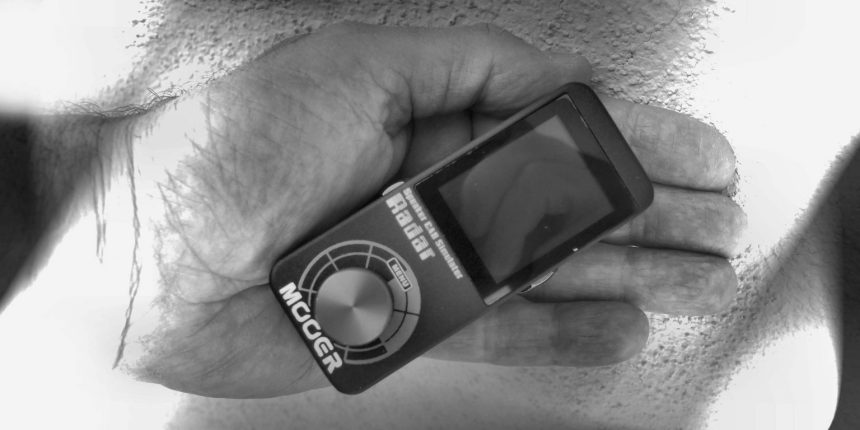
Mooer Radar - probably the “least pedal of all” guitar pedal, at least in the literal sense of the word. In fact, piloting / programming it with your feet would be a rather complicated undertaking and besides, it does not belong to the classic groups of guitar pedals (OD, Fuzz, DLY, Rev…).
Yet, if inserted at the end of a chain of pedals / pedal boards - and not only -, it can make its contribution felt in a decisive way. The Radar, with dimensions such as to be easily contained in the palm of one hand and weighing only 150 grams , lets have, simulated with IR technology , the cabinets in the world, even the heaviest or hard to find (by selecting them from those available in memory, or by importing third-party IRs). Indeed, to be more precise, it allows you to simulate the set of breakage/small/technology ...
Let's proceed in order
Already the simple definition of Speaker CAB Simulator it is a bit "tight" and does not tell the whole truth about the flexibility of the Radar. In fact, to be precise, the "pedal" based on IR technology (Ipulse Response), is a Speaker CAB Simulator / Mic Simulator, with different adjustment possibilities. In addition, it offers a section of Amp Simulator and Equalization. It features proprietary IRs preloaded in memory that allow you to choose between 30 Cabinet Models different e 11 Microphone Models. What, however, is particularly interesting is the ability to upload Third party IR. This makes the system completely open, upgradeable and adaptable to your needs. This possibility is an excellent anti-aging treatment for this type of electronics. Regarding the Speaker CAB Simulator and simplifying, we can describe an IR - Impulse Response - as an "audio photograph" of the response of a given system (speaker / speaker / microphone / environment ...) when it is subjected to a specific impulse / signal. The IR is therefore a recorded audio signal, generally in wav format. Obviously, in order to use the IRs for “musical” purposes, equipment is needed to process everything, as happens in the case of the RADAR.

Connections
The pedal has the following connections: - 1/4 "mono audio jack input. (Impedance: 100kΩ) - 1/4" mono audio jack output (Impedance: 470 Ω) - 1/8 "stereo audio jack headphone output -Input Power Supply (supplied and present in the package) 12V DC -Micro USB socket Through the latter it is possible to connect the Mooer to the computer and, thanks to the Radar Studio software(downloadable for free from the site), have almost total control of the functions of the Radar.
Among the other declared features we find:
Sampling rate: 44.1K
Resolution: 24 bit
Signal to noise ratio: 100dB
Frequency response: 20Hz ~ 20KHz.
For direct pedal control, we have a unique large potentiometer multifunction and the ability to follow operations via the which occupies about the top half of the pedal itself Fig A..
In this case (looking at the display), from the initial screen, we can go through the next 3 screens - Power Amp, CAB and EQ - and for each one, through the specific menus, adjust the various parameters and save them if necessary. Fig.1 . This is probably easier done than said.

For convenience, and given the use I normally make of the Radar (mainly in the home studio), I have fixed the USB connection and I manage everything through the dedicated software Radar Studio downloaded from the site, as indicated in the manual, at the address www.mooeraudio.com
As we said previously, similarly to what can be done directly through the potentiometer and the display, in the case of using the software, with a simple touch of the mouse, we can switch between the three "blocks" - POWER, CAB, Mic - and edit. The frame of the selected page will turn yellow. First of all, through the symbol at the top right of the box, we can turn on or turn off (bypass) that function. So, if you don't want to pass the signal through the Amp or EQ and thus focus all your attention on CAB / MIC, just turn off these two “blocks”. Through the Power Amp screen (Fig.2), from the TUBE drop-down menu, it is possible to choose between four types of tubes that characterize the main amplifiers on the market.

All the other adjustments on the screen of Fig. 2 are easy to understand. On the CAB / MIC screen (Fig.3) probably the most significant, through the two drop-down menus MODEL and MIC we choose respectively, between 30 Cabinet Models for guitar / bass and the 11 microphone models, available in memory.

Furthermore, as you can easily see from Fig. 3, for the microphone it is possible to adjust: MIC VOL - the volume of the C-EDGE microphone - its horizontal position with respect to the center of the cone DISTANCE - the distance from the cabinet (near-far). To be able to upload Third party IR, just press the + symbol, on the side of the cabinet model, the folder screen will open, allowing you to search the computer for the IR to select. If, on the other hand, you want to restore the original sound, click on the - symbol. Again, as they say, it is much easier to do than to say. When a third party IR is loaded parts, the MIC, MIC VOL, C-EDGE and DISTANCE adjustments are no longer active. Therefore, all the choices will be made upstream and contained within the chosen IR.

In the EQ screen (Fig.4), we can choose, again through a drop-down menu, between three types of equalizer, two graphic ones, for Guitar (Graphic.G) or for Bass (Graphic.B) and one parametric.
Using the MOOER RADAR
Obviously, as can be easily understood, the main task of the "pedal" is to replace, by simulating it, the Cabinet / Microphone / Recording system, thus allowing to send the "complete" signal, coming from our effects / preamplifier chain, directly to the mixer. and / or sound card. This will be useful both for any live performances (greatly facilitating transport, adjustments, problems of space, acoustics…), and for recordings.
Purists will probably turn up their noses, but the practicality, the possibilities of choosing the “right speaker for the performance” (among numerous alternatives), as well as the obtainable audio results, could make them “waver” in many practical situations. Of course, if you want and have the possibility, just to give an example, to have at your disposal (perhaps with transport and technician included) a Marshall 4 × 12 speaker, with Celestion Cones (of your favorite model), miked with a Shure SM57 USA Vintage well preserved, a preamp API o NEVE, etc ... (I repeat, just as an example and without wanting to hurt anyone, because the possible combinations are so many and personal), you probably won't be interested in Speaker CAB Simulators, but otherwise you could have some excellent audio and practical surprises. Obviously, for all those who go beyond the simple replacement of the real Cabinet / Mic, infinite possibilities of experimentation open up, with the most disparate couplings and positioning. If we then add the infinite chances of uploading third-party IR, starting from the more standard ones and arriving at the more "strange / artistic" ones, experimentation is served. Furthermore, the Mooer Radar will allow you to “rejuvenate” and / or upgrade your pedalboards which, if anything, despite having an excellent effects / preamp section, do not have the possibility to load IR CAB.
Conclusions
The MOOER RADAR has earned a permanent place in my setups. I placed a Patchbay upstream of the Radar input, to which I connected - various pedals, effects and preamps. This is for bass (because as you have surely already understood, the Radar also loads IR for bass and much more) and for guitar. Thus, with the simple movement of a jack I can, from time to time, choose the preferred signal path for the desired result.

Useful Information
Product: Mooer Radar
Price: € 119