




I open the box and I find this pedal with a very interesting look: a flaming color and an attractive design that mixes analogue and digital: ... I see a valve ... a rotary potentiometer in the center ... an alphanumeric display style old effect processors and three buttons ... mhhhh ... all of which makes me think that we are not dealing with the classic pedal effect for Leslie ...
Burn Programmable Rotary Simulator, this is the writing on the object in question, designed by GSi (Genuine Soundware and Instruments) is a simulator of the "rotary" effect produced by the famous Leslie amplifiers and more exactly the models 122 e 147, dedicated to electromagnetic organs and the like, but can also be used with modern keyboards and electric guitars; for guitarists, in fact, in addition to some patches that simulate the rotary, there is also a very useful multi-effects section. Everything is enclosed in a small box of about 20 cm in length and 15 in width, which compared to the size of a Leslie, already makes us perceive the advantages. Let's see it closely.
Description
The structure of the chassis is that of a classic multi-effects pedal of today: there are from the bottom to the top (Fig. 1), the three buttons: ByPass, Stop, Speed each equipped with green activation LEDs, which are used to respectively bypass the effect, so we will have the output dry sound.

Stop is used to deactivate the leslie effect, very interesting detail is that by activating the button the sound of the effect slows down and goes away slowly, just like it happens in real Leslie, same thing when you reactivate it, this function can allow you to use the Burn in very creative way creating effects of "Morphing”Which help the musician especially live. Speed is the classic button that varies the speed of the rotors. Moving up from left to right there are 3 tactile buttons with respective small activation LED: EXT(alt) is used to activate remote control of the unit from the outside, it lights up when the External function is activated. EXIT(lock) is used to return to the previous page or exit the menu and to activate the Lock function, the LED lights up when the latter is activated. EDIT(enter) to enter the Edit section, confirm an operation, enter the submenus, the LED is activated when you enter the Edit mode, it flashes when you enter values on the parameters. By following a small red LED on the side that indicates the clip of the input signal in the center and on the right side the writing GSi with an orange LED, the latter signals the power on status of the pedal. The top row always closes from the left LCD display alphanumeric with 16 digits on 2 backlit lines, organized as follows: in the upper line there are indicated the number and name of the Preset, in the lower line the value of the Tube Gain and Tube Level parameters relating to the tube preamplifier, the latter if active is signaled on the display by a small valve placed between the 2 parameters Tube Level e Tube Gain. Parameter 1 and Parameter 2 relating to the algorithm being used at that moment defined Real-Time parameters. In total we have 32 Presets. The black rotary knob in the center which is used to change presets when on Home, or enter values to parameters when in Edit. Finally, the valve on display on the right. On the side of the chassis there are air intakes definitely dedicated to cooling the valve.
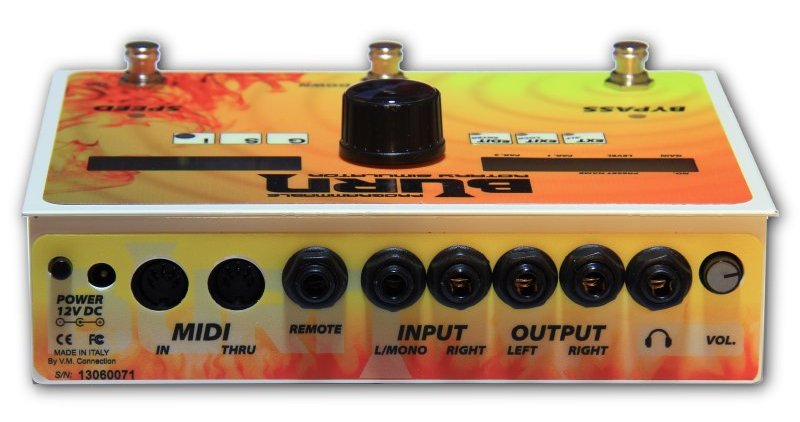
On the back (Fig. 2) we find the following connections, from left to right: power input with power button, doors MIDI In e midi thru (which copies and transmits the messages received by the MIDI In), remote input for expression or activation pedals, stereo inputs, where the Left carries the signal through the Tube Overdrive and then the Leslie, while the right where it is needed for a stereo input can act both in True Bypass Stereo and in "Right In Pass Thru" to copy a stereo signal to the outputs, this function allows you to use any signal from a stereo sound source and send it to the output, so you can use a very common mp3 player with some bases and play on it with the "effect" sound and listen to everything from the headphone output ... congratulations! Stereo outputs, headphone output, for headphones that have a value from 32 ohm upwards, with dedicated volume potentiometer. In the following test we will deal mainly with guitar use.
Burn under the press
Connected the instrument to the Left input I start with the first preset, a simulation of the Leslie 122. I listen with headphones, both from the dedicated headphone output and from my Control Room, the sound is already very nice, round but not mixed, I didn't have to adjust the input signal, with my Strat the level is optimal. In all the positions of the pick-ups the timbre of the instrument is recognized, and at the same time the effect can be heard clearly and defined. Scrolling through the presets immediately you get in tune with the machine, the basic settings are simply found, also given the management of the menu it is easy to immediately create a sound even for a Leslie neophyte. Surely even geeks will find bread for their teeth especially in the Leslie's parameter section, nothing is missing, you can adjust everything you need in the smallest details. Returning to the above discussion of the Real-Time parameters, we have a section of non-Real-Time parameters that, depending on the chosen algorithm, allows us to edit the sound in a very complete way, we move from the settings of the speed of the trumpet and the bass in the Slow and Fast sections with three parameters to choose from, to pass to the "RAMP" section which establishes the average time to pass from Slow to Fast, clearly both for the horn and for the bass, to finish Crossover Cutoff which establishes the frequency of Crossover of the Cutoff and two parameters related to the resonance and the timbre of the trumpet ... nice! Reverb, while very simple in handling, offers convincing results. In a guitar set-up surely it can find space both among those looking for a definitive Leslie, and among those looking for a Leslie with the potential of a multi-effect to be inserted in your pedalboard, in fact both the simulation of the analog delay and the other effects of modulation are really convincing and can be an extra weapon. The tube section also works well as a final boost in an effects chain before going into the delay and then into the amp. Without forgetting theEditor which can be found on the manufacturer's website, in both version PC and Mac, allows you to program the effects comfortably from your computer.
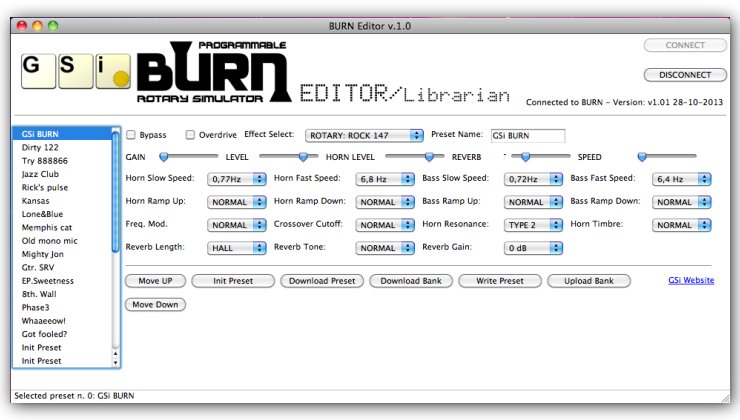
In order to take advantage of this option, the Burn must be connected via MIDI to a sound card or MIDI interface connected to the computer. Since both MIDI In and MIDI Out are used, you need to have an accessory that the company produces, it's nothing more than a Jack to MIDI adapter that plugs into the Remote socket, that's all.
Conclusion
I enjoyed it and also enjoyed fiddling with the Burn, the sound is really good, both live and with an amp. Used alone it is very effective, clearly in an effects chain and with an amp you have to manage more things, but it has never shown a weak link in the chain, indeed. We are dealing with a true Leslie specialist, I do not think there is a product on the market that can offer the same characteristics both in tone and in handling. The simulations offered cover all needs, with various types of shooting: XY in front of the trumpet, AB close and at a distance, standard at 90 ° with respect to the horn of the trumpet… there is everything. The presence and management of the valve, both as a booster and as an overdrive, are a gem both to use with the Leslie and to add gain and dynamics in an effects chain. I recommend placing the Burn after the dynamics / distortion section, and after the modulations, before the tremolo, delay and reverb. Positioned in this way, you can take advantage of all its features, from Leslie to the Booster, without forgetting the other really convincing effects such as the very simple to adjust but effective delay that coupled to the tube allows you to emulate the old analog delays. The phaser, which used in stereo gives the best of itself; L'auto-wah, which depending on where you place the effect can create very, very interesting sounds. The management of the parameters in Real-Time allows the control of other functions, added to the buttons on the pedal. Bypass works correctly, there is no signal loss between input and output. Suggestions: certainly the number of Presets, 32 are a bit few, and also the variety of algorithms to enhance the effects section. The management of the MIDI thru port also as out, so you avoid adapters or various accessories, or a USB port which from my point of view would be the optimal solution to manage the Burn via software.
Audio Demo Giovanni Varone
Burn simulation Leslie by Giovanni Varone. This file was created by connecting the guitar to the Burn in stereo to the inputs of the sound card RME Fireface UCX. The guitar used is one Fender Stratocaster, Alder body, maple neck and fingerboard, seymour duncan texas special pickup.
Burn - auto-wah by Giovanni Varone. The demo was made by connecting the Burn pedal in stereo to the inputs of the RME Fireface UCX sound card.
Burn - Distortion on Marshall plexi by Giovanni Varone. The demo was made by connecting the Burn in mono on the Marshall plexi, excluding the simulation. The shot was done with a Shure microphone
SM 57- PRE- RME Fireface UCX sound card
Burn - Preset 15 Helicopter filter by Giovanni Varone The demo was created by connecting the Burn pedal in stereo to the inputs of the RME Fireface UCX sound card.
Burn - Clean on Fender by Giovanni Varone. The demo was made by connecting the Burn in mono on the Fender, excluding the simulation. The shot was made with a microphone Shure SM57- PRE- sound card RME Fireface UCX.
See you next review
John Varone
Giulio Erra audio demo
In the examples I recorded I will try to highlight the potential of this simulator, both as regards the rotary effect and using the other internal effects and why not, also in combination with other pedals.
For the test I use mine Gibson ES335, the distortion SD-9 of Maxon, the Burn, and a loop station.
The guitar does not go through the amp but goes directly into the sound card and the loop station it is connected to one of the card inputs.

The test
At first I find the arrangement of the three switches (stompbox style) very functional as they allow you to keep under control the main parameters that are used during performance. By entering the menu it is possible to assign to them functions other than the default ones as in the case of the “stop” or “speed” switch; the only flaw is that to scroll through the presets without using your hands you need to have an external accessory and through the menu, by activating the function external, it is possible to assign the preset down and preset up functions to the two switches mentioned above.
All essential parameters of the rotary effects are adjustable through the editing function. For some presets, it is possible to control the speed of the Leslie's rotors in real time by connecting an expression pedal to the remote input.
As indicated by the manufacturer, presets from 10 to 14 are the rotary effects dedicated purely to the guitar but this does not exclude the possibility of experimenting with the previous presets which are instead dedicated mainly to electromagnetic organs as I did in one of the audio examples that you will hear later. .
The headphone input is very useful for practicing at home without giving up the effects, moreover by connecting an mp3 player to the right input on the rear panel and selecting the Rotary pass thru item from the menu it is possible to play on a backing track or on a song. I used a loop station with pre-recorded or pre-existing bases as you can also see from the photo (Fig. 4).
For those like me who work more in the studio, the Burn editing section is very useful because it allows you to calmly edit the sounds and experience the possibilities offered by the multi-effect even in more experimental musical contexts.
Conclusions
In my opinion, the pedal has several strengths: the very small size, the versatility of use that allows you to connect different instruments, the ability to adjust many parameters of the rotary effect, the ability to connect an external player and practice with headphones with the basics or how I used it in the example with a loop station. Finally, on the manufacturer's website, you can check for patch updates and download them if necessary.
The Burn seems to want to distinguish itself from the simple Leslie simulator and does so starting from the design that draws features from both the digital and the analog world. The presence, in addition to the various rotary presets, of other well-made effects contributes to the very captivating final result. Personally I found very effective the combination with the distortion that reminded me a little of the sounds of Scofield or the use alone in Ballad style, or even in style Ray Vaughan.
We look forward to new presets ...
Good listening
Julius Errra
Guitar Dist + Burn - by Julius Erra The Burn is used in tandem with a distortion, the solo is played in the style of an organ with a loop station base.
Burn Autowah - by Julius Erra I exploit the potential of burn as a multi-effect using autowah with a funk rhythm.
Burn back by Julius Erra I use an organ preset while playing a retro-style arpeggio.
USEFUL INFORMATION:
Producer: Genuine Soundware
Model:Burn
Website: www.genuinesoundware.com
Price: Euro 379


