Audio Thing of the Neapolitan Carlo Castellano has presented, a few days ago, a new plug.in dedicated to the aging of an audio signal, being able to make it “vintage”.
Vinyl Strip already bears in the name all the audio characteristics of a plug.in that does not have many competitors in the world.
You can actually count on plug.ins that distort the audio signal to make it similar to the sound of old-time vinyls. The first was Vinyl di iZotope, now abandoned, to trace a path that has been followed only by very few software houses.
Charles Castellano, with VinylStrip, he has given his very personal interpretation of it, combining the usual effects that generate the typical sounds of a vinyl with others of a more digital nature, so that the user can also heavily customize his own sound result.

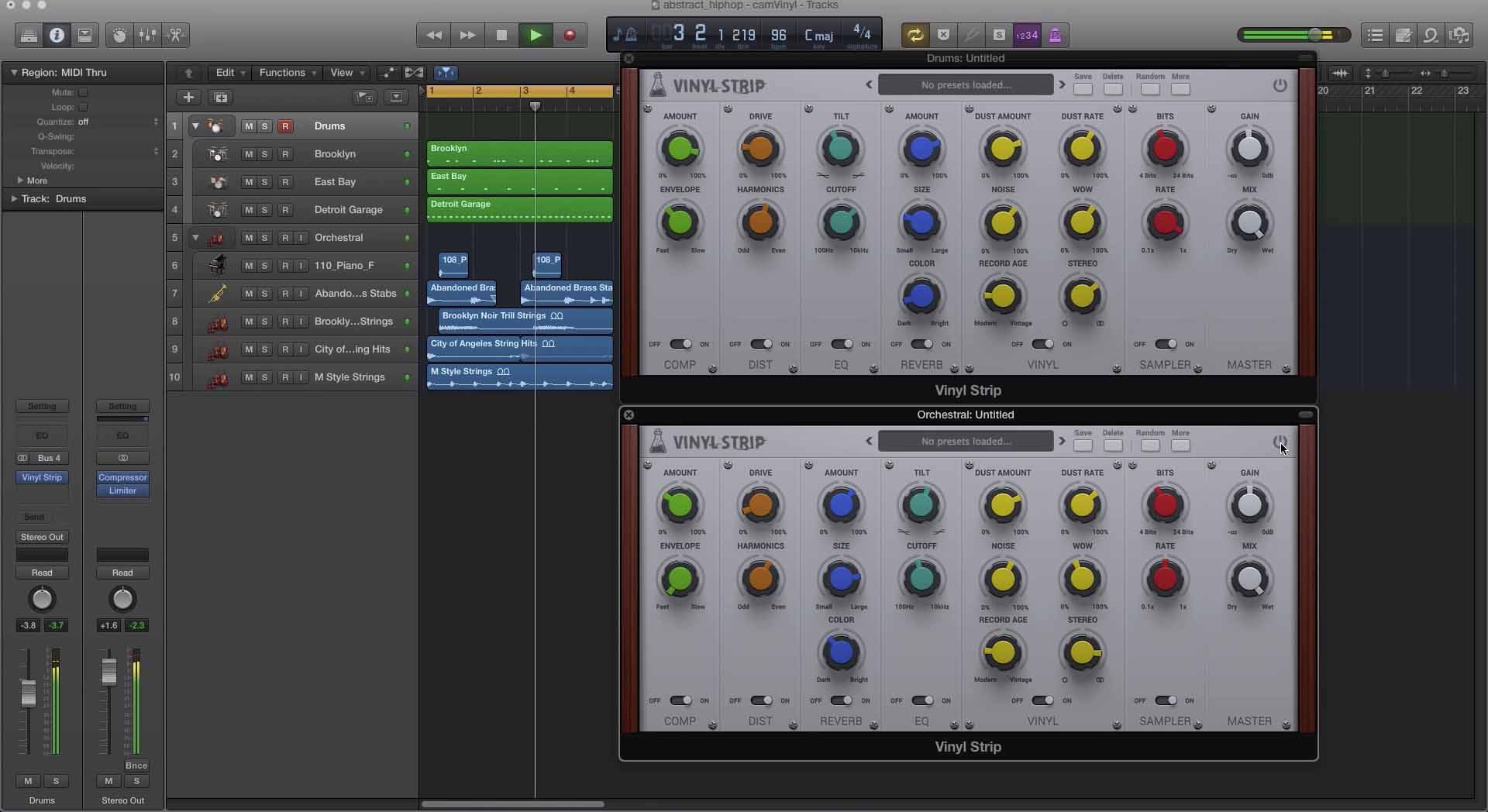
All this mediated by a very simple and intuitive user interface which, composed of 6 sections each corresponding to a specific effect, does not require reading the manual at all, unless you are new to the sector. By the way, the manual, for the moment only in English, consists of only 6 pages of which only two are actually dedicated to the parameters. Incidentally, only the description of the "Master" is missing, but I believe that for parameters such as "Gain" and "Mix Dry / Wet" it is not that it takes an instructor to know how to govern them.
Among the peculiarities of the plug.in we must note:
1) the possibility of exchanging the order of the effects, simply dragging them, knowing that the sound travels from left to right. This is an option that can be disabled by calling up the drop-down menu with the “More” button on the right;
2) the possibility of activating a total or partial randomization of all parameters. For a parameter not to be subjected to randomization, it needs to be "locked". Positioning above, with the right mouse button just open the pop-up menu and click on the “lock random” item.
3) every FX has its own switch of On/off, Including the Master Degrees . The latter is present in the form of a transparent button in the upper right corner.
4) All parameters, tested with Logic Pro X, are automatable.
The Parameters, all clearly described on the video, in English, which you find on the dedicated page, are the essential ones of each effect to which they refer.
The Vinyl section, which features the plug.in presents:
Dust Amount e Dust Rate, for the generation of the creaks that characterize the needle of a turntable. The sounds, in practice, are generated and added to the main signal;
Noise: typical white noise;
Wow: produces a slight pitch-shifting, comparable to a vibrato;
Record Age: simulates the frequency response of the recordings of a time;
stereo: continuously transforms the audio signal from Stereo to Mono.
Compressor section
Amount: controls the impact of the Compressor on the audio signal;
Envelope (in the manual indicated as Speed): determines the speed of action of the compression.
Distortion section
Drive: establishes the incidence of the Distortion;
Harmonics: controls the color of the Distortion, being able to define its even or odd harmonics.
Reverb section
Amount: establishes the incidence of the Reverb;
Size: defines the reverb tail (RT60);
Color: defines the reverb spectrum.
EQ section
Tilt: defines the spectral action of Eq, grading the presence of only low or high frequencies. Everything on the left emphasizes the lows and reduces the high frequencies; on the right, the opposite effect is obtained;
Cutoffs: controls the reference frequency for the shelving action of the Tilt parameter.
Sampler section
Bits: reduces the number of bits from 24 to 4 causing a Crusher effect;
Rate: reduces the sampling rate, generating aliasing.
Final houghts
With the full rebirth of vinyl, it is possible that in the near future the typical sound of this media will return predominantly in playlists all over the world: incidentally, in the last year there has been an increase in record sales that far exceeds the 400 % of sales compared to digital in severe crisis due to the streaming (unofficial sources, but still reliable).
From this perspective, Vinyl Strip has its own sense of presence in its FX park, even more so if you consider it a hybrid plug-in, capable of distorting the original sound even heavily, thanks to the modularity of the internal effects and the simplicity of their use. .
The sound it produces, as always, needs a subjective evaluation and often dictated by the type of music that is produced. For a rough indication, I would like to consider its use in a transversal way: from the soundtracking of old videos to the “forerunner” production of the DJ sound of the future, passing through some distortion processes that would normally take more than one plug. to obtain the same, or almost the same result.
USEFUL NEWS
Producer: Sound Thing
Product Page Vinyl Strip
Vinyl Strip has an introductory cost of € 45,00 (subsequently € 55,00).
Link to access the specific page and also listen to some audio demos.
Audio Thing has released a new multi-effect plugin dedicated to the emulation of vintage signal chains.
Vinyl Strip, as the name suggests, focus on the vinyl effect, and nowadays there are very few commercial plugins dedicated to that effect.
One of the first and probably most used plugin to emulate the vinyl effect was Vinyl by iZotope, which is now discontinued.
AudioThing, with Vinyl Strip, gives a new take on the vinyl emulation, along with other modules to further mangle the audio signal.
Vinyl Strip has got a very clean and simple interface featuring 6 modules with different effects. Given its simplicity, you don't really need to read the manual to tweak the effects.
1) It's possible to swap the order of the effects by simple drag and drop by taking into account that the signal path flows from left to right. You can disable this fear by clicking on the More button
2) It's possible to randomize all or only desired parameters. By right clicking on each parameter you can choose which one to “lock” from the randomization.
3) Each module has it's own bypass switch. The master module can be disabled by clicking the bypass switch in the upper right corner.
The Vinyl section features:
Dust Amount and Dust Rate: for the emulation of crackles made by the record player needle.
Noise: the emulation of the background noise.
WOW: similar to a vibrato effect, will alter the pitch of the signal.
Record Age: emulation of the frequency response of vinyls and record players of different ages.
stereo: transforms the signal from Stereo to Mono.
The Compressor features:
Amount: the amount of compressor on the signal.
Envelope: the actual speed of the compressor.
The Distortion features:
Drive: the amount of distortion on the signal.
Harmonics: controls the color of the distortion.
The Reverb features:
Amount: the amount of reverb applied.
Size: the tail of the reverb (RT60).
Color: changes the spectrum of the reverb.
The EQ features:
Tilt: typical Tilt EQ gain. by moving it clockwise, it will attenuate the lows and boost the highs, counterclockwise will do the opposite
Cutoffs: controls the center frequency of the two shelf filters of the tilt EQ
The Sampler features:
Bits: reduces the bit-depth of the sound causing distortion.
Rate: reduces the sample rate frequency causing aliasing.
Final notes
With the vinyl revival, it's possible that, in the near future, the typical sound of this media will appear more often in the playlists worldwide: it's worth noting that last year alone vinyl album sales rose by 400%.
In this context, Vinyl Strip fits perfectly in every effect chain, also considering its ability to extremely change the incoming sound with all its modules.
The sound of Vinyl Strip, as always, needs a subjective evaluation which is often dictated by the kind of music that is produced. For a guideline, I'd like to consider it in a transversal way: from the sound of old video production, to the typical DJ sound, passing through some distortion processes which, normally, would take more than one plugin to achieve the same result.
LINKS
Developer: Sound Thing
Product Page Vinyl Strip
A few days ago, AudioThing, by Neapolitan Carlo Castellano, presented a new plug-in dedicated to aging an audio signal, effectively making it “vintage”.
Vinyl Strip already has in its name all the audio features of a plug-in that has few competitors in the world.
You can actually count on plug.ins that distort the audio signal to make it similar to the sound of old-time vinyls. The first was Vinyl di iZotope, now abandoned, to trace a path that has been followed only by very few software houses.
Charles Castellano, with VinylStrip, he has given his very personal interpretation of it, combining the usual effects that generate the typical sounds of a vinyl with others of a more digital nature, so that the user can also heavily customize his own sound result.
All this mediated by a very simple and intuitive user interface which, composed of 6 sections each corresponding to a specific effect, does not require reading the manual at all, unless you are new to the sector. By the way, the manual, for the moment only in English, consists of only 6 pages of which only two are actually dedicated to the parameters. Incidentally, only the description of the "Master" is missing, but I believe that for parameters such as "Gain" and "Mix Dry / Wet" it is not that it takes an instructor to know how to govern them.
Among the peculiarities of the plug.in we must note:
1) the possibility of exchanging the order of the effects, simply dragging them, knowing that the sound travels from left to right. This is an option that can be disabled by calling up the drop-down menu with the “More” button on the right;
2) the possibility of activating a total or partial randomization of all parameters. For a parameter not to be subjected to randomization, it needs to be "locked". Positioning above, with the right mouse button just open the pop-up menu and click on the “lock random” item.
3) every FX has its own switch of On/off, Including the Master Degrees . The latter is present in the form of a transparent button in the upper right corner.
4) All parameters, tested with Logic Pro X, are automatable.
The Parameters, all clearly described on the video, in English, which you find on the dedicated page, are the essential ones of each effect to which they refer.
The Vinyl section, which features the plug.in presents:
Dust Amount e Dust Rate, for the generation of the creaks that characterize the needle of a turntable. The sounds, in practice, are generated and added to the main signal;
Noise: typical white noise;
Wow: produces a slight pitch-shifting, comparable to a vibrato;
Record Age: simulates the frequency response of the recordings of a time;
stereo: continuously transforms the audio signal from Stereo to Mono.
Compressor section
Amount: controls the impact of the Compressor on the audio signal;
Envelope (in the manual indicated as Speed): determines the speed of action of the compression.
Distortion section
Drive: establishes the incidence of the Distortion;
Harmonics: controls the color of the Distortion, being able to define its even or odd harmonics.
Reverb section
Amount: establishes the incidence of the Reverb;
Size: defines the reverb tail (RT60);
Color: defines the reverb spectrum.
EQ section
Tilt: defines the spectral action of Eq, grading the presence of only low or high frequencies. Everything on the left emphasizes the lows and reduces the high frequencies; on the right, the opposite effect is obtained;
Cutoffs: controls the reference frequency for the shelving action of the Tilt parameter.
Sampler section
Bits: reduces the number of bits from 24 to 4 causing a Crusher effect;
Rate: reduces the sampling rate, generating aliasing.
Final houghts
With the full rebirth of vinyl, it is possible that in the near future the typical sound of this media will return predominantly in playlists all over the world: incidentally, in the last year there has been an increase in record sales that far exceeds the 400 % of sales compared to digital in severe crisis due to the streaming (unofficial sources, but still reliable).
From this perspective, Vinyl Strip has its own sense of presence in its FX park, even more so if you consider it a hybrid plug-in, capable of distorting the original sound even heavily, thanks to the modularity of the internal effects and the simplicity of their use. .
The sound it produces, as always, needs a subjective evaluation and often dictated by the type of music that is produced. For a rough indication, I would like to consider its use in a transversal way: from the soundtracking of old videos to the “forerunner” production of the DJ sound of the future, passing through some distortion processes that would normally take more than one plug. to obtain the same, or almost the same result.
USEFUL NEWS
Producer: Sound Thing
Product Page Vinyl Strip
Vinyl Strip has an introductory cost of € 45,00 (subsequently € 55,00).
Link to access the specific page and also listen to some audio demos.
AudioThing has released a new multi-effect plugin dedicated to the emulation of vintage signal chains.
Vinyl Strip, as the name suggests, focus on the vinyl effect, and nowadays there are very few commercial plugins dedicated to that effect.
One of the first and probably most used plugin to emulate the vinyl effect was Vinyl by iZotope, which is now discontinued.
AudioThing, with Vinyl Strip, gives a new take on the vinyl emulation, along with other modules to further mangle the audio signal.
Vinyl Strip has got a very clean and simple interface featuring 6 modules with different effects. Given its simplicity, you don't really need to read the manual to tweak the effects.
1) It's possible to swap the order of the effects by simple drag and drop by taking into account that the signal path flows from left to right. You can disable this fear by clicking on the More button
2) It's possible to randomize all or only desired parameters. By right clicking on each parameter you can choose which one to “lock” from the randomization.
3) Each module has it's own bypass switch. The master module can be disabled by clicking the bypass switch in the upper right corner.
The Vinyl section features:
Dust Amount and Dust Rate: for the emulation of crackles made by the record player needle.
Noise: the emulation of the background noise.
WOW: similar to a vibrato effect, will alter the pitch of the signal.
Record Age: emulation of the frequency response of vinyls and record players of different ages.
stereo: transforms the signal from Stereo to Mono.
The Compressor features:
Amount: the amount of compressor on the signal.
Envelope: the actual speed of the compressor.
The Distortion features:
Drive: the amount of distortion on the signal.
Harmonics: controls the color of the distortion.
The Reverb features:
Amount: the amount of reverb applied.
Size: the tail of the reverb (RT60).
Color: changes the spectrum of the reverb.
The EQ features:
Tilt: typical Tilt EQ gain. by moving it clockwise, it will attenuate the lows and boost the highs, counterclockwise will do the opposite
Cutoffs: controls the center frequency of the two shelf filters of the tilt EQ
The Sampler features:
Bits: reduces the bit-depth of the sound causing distortion.
Rate: reduces the sample rate frequency causing aliasing.
Final notes
With the vinyl revival, it's possible that, in the near future, the typical sound of this media will appear more often in the playlists worldwide: it's worth noting that last year alone vinyl album sales rose by 400%.
In this context, Vinyl Strip fits perfectly in every effect chain, also considering its ability to extremely change the incoming sound with all its modules.
The sound of Vinyl Strip, as always, needs a subjective evaluation which is often dictated by the kind of music that is produced. For a guideline, I'd like to consider it in a transversal way: from the sound of old video production, to the typical DJ sound, passing through some distortion processes which, normally, would take more than one plugin to achieve the same result.