AudioThing is an Italian brand founded by Carlo Castellano, which offers audio plugins at competitive prices, which meet the needs of the hobbyist, the professional sound engineer and the producer / composer.
There are software designed for those who want to customize their sound as much as possible, therefore designed for creative people.
One of these is FOG CONVOLVER, a plugin that works with the convolution, so with impulse response generic; I omit here the mathematical and theoretical part relating to this operation, which leaves the time it finds.
Carlo proposes this plugin mainly as convolution reverb, for those who want to create and / or customize their own sound, thus working with their own impulse responses, or with those that he makes available, by default, in the main library.
We can still work (even creatively) with any type of impulse response, for example, those relating to speakers and / or cabinets for bass / guitar, hardware / gear in general, microphones, various objects and so on. However, I will focus mainly on the part relating to reverberation.
In this article I will evaluate the product in question, starting with the general analysis of the interfaces and highlighting the main commands. I will then do an audio test, through which I will analyze the general sound quality and, finally, I will make a final judgment, drawing the appropriate conclusions. So we will understand if this plugin is worth buying, or not.
The main interface

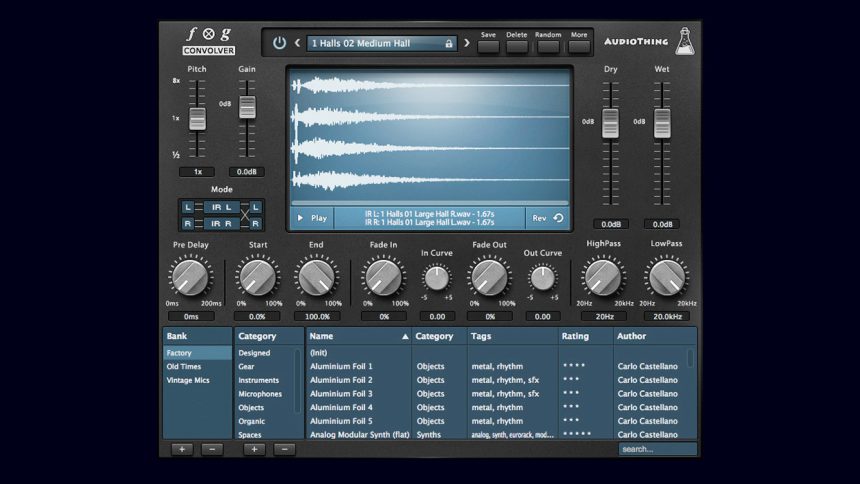
The main interface is resizable, easy to read and understand, and is well organized.
At the bottom we can manage the libraries, adding, for example, the personal ones, while in the center we have the tools with which we can model, as we like, the waveform that we will load (the impulse that you see in the figure).
For example, by acting on the commands start ed end, we can cut out the waveform to our liking, affecting the total duration of the same, therefore of the reverb. By doing this, we are going to create, in fact, a custom impulse response, which we can export in WAV format, if we want, by going to the top right of the menu blackberries, or by right clicking on the displayed waveform and exporting.
Potentially, therefore, we can create new sounds starting from existing ones.
With the commands fade in e fade out we can then better sculpt the attack and the tail of the reverb, while with the classics high pass and low pass filters we can equalize the latter very quickly, and finally we have the classic pre delay, which we now find on all reverbs on the market.
At the top, the command stands out pitch, through which we can carry out operations of time stretching on the reverb, so we can lengthen it, or shorten it, without clearly compromising the sound. Furthermore this plugin can also work in true stereo mode, where you are practically dealing with two stereo impulse responses, working simultaneously.
We can then drag, in the plugin interface, two stereo wave files to our liking, one on the left and another on the right, and then create something experimental and personal, or we can load an impulse response designed to work with this mode, then graphically we should display two stereo waveforms, if we are actually dealing with a real one true stereo impulse response.
We also have the function parameter lock, usable for one or more parameters, by simply clicking with the right button on the parameter that interests us and navigating in the dedicated menu. This function is very useful if you want to test more than one reverb with the same setting, while keeping the parameters that interest us unchanged.
The secondary interface: the “settings"
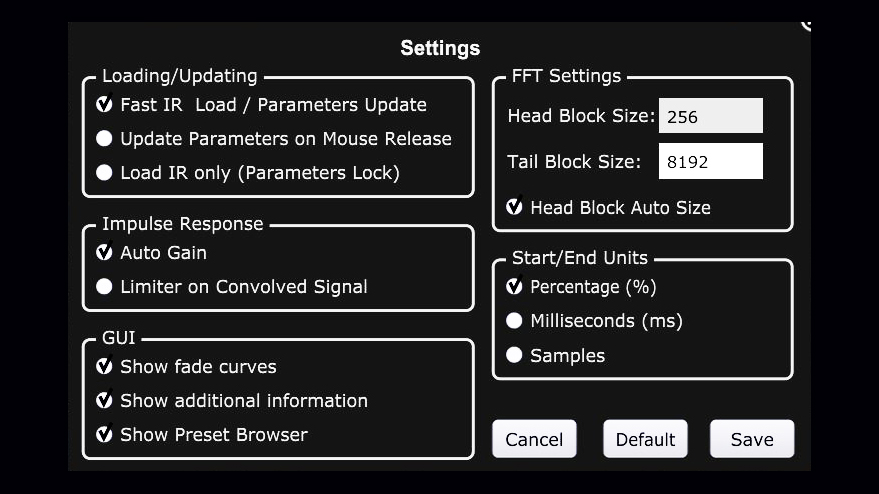
Going up more we can access the menu settings, which contains a whole series of functions that allow the user to be able to further set this plugin.
One parameter that I found interesting is auto gain: by enabling it, we very nicely avoid jumping from the chair and / or harassing our speakers, when dealing with high gain impulse responses, or, if we want, when using files that have different volumes between them, which can happen often. Therefore I advise you not to disable this function, which by default is already enabled.
For the other functions, I refer the user to reading the manual, even if they are all explained quickly if we scroll with the mouse arrow on one of them. In fact, a dedicated window will appear.
Latency and CPU consumption
This plugin is absolutely zero latency, and some adjustments are not in real time, which happens, moreover, also on other convolution reverbs, and even more markedly; but don't worry: you can live with it.
As for the CPU, we are talking about a software that consumes very few resources (0.1 - 0.3% in REAPER) that I put in the category of low CPU consumption plugin.
In my first article I listed various categories of plugins, categorized in relation to CPU consumption; I obviously based on my computer (PC with i7 4790k - 4,7 Ghz and 16 Gb RAM), referring to the DAW mentioned above, working on 44/48Khz and with an average buffer size, in my case 256, corresponding to a latency of 6.3 ms IN and OUT.
As an audio interface I used a antelope audio orion studio 2017.
In case someone hasn't read my first article, I'll (re) list these categories:
- 1) 0 –
0.2% LOW CPU CONSUMPTION - 2) 0.3 –
0.6% MEDIUM-LOW CPU CONSUMPTION - 3) 0-6 –
1% MEDIUM-HIGH CPU CONSUMPTION - 4) over 1% HIGH CPU CONSUMPTION
Remember these values for future reviews.
Ps: I repeat that in other DAWs you may find the same values, multiplied by 10. In the end, the concept and the value are actually the same: simply every DAW internally manages the CPU, as well as the CORE of the same, in a certain way.
The practical test: the audio test
Various insiders have provided me with tracks on which to test this plugin.
These were not processed by me that much, before entering the reverb, that is to say: it did not take much time, in the processing phase relating to the original tracks (dry), more than anything else, I dedicated myself right to the equalization.
Instead, more time was spent shaping the sound of the reverb (wet).
Furthermore I only used the impulse responses contained in the default library (factory), which have been modeled by me, in such a way as to obtain customized sounds.
All of this was done to demonstrate that various reverb sounds can be achieved, starting with known impulse responses, which you will find cited at the end of the article, including details.
I created three audio files, for each sound source treated:
- Track 100% DRY
- DRY + WET track
- 100% WET track
The amount of reverb compared to the DRY signal, in this test, is not indifferent, in reference to the “DRY + WET” track.
We therefore go, in fact, against the "audiophile rule", which "requires" a moderate use of reverberation.
As for me, if a reverb sounds good, or in any case has a strong affinity with the song and / or the sound source considered, I generally tend to emphasize it, until the right feeling is created. This is even more true if our goal is to evaluate the goodness of a reverb, as in this case, also considering the fact that the tracks have been evaluated individually and not in the context of the mix: “better to abound”!
The “100% WET” track can be used to solo reverb analysis.
Final houghts
All in all, the game is worth the candle, as we are talking about a plugin that costs 65 € and which, at times, is also taken for granted. We can certainly say that it is a practical, flexible and intuitive tool, basically consisting of a good library of impulse responses, which we can however modify and / or update to our "image and likeness".
The starting sounds are convincing and, almost always, need cleaning or in any case a modification of the duration of the impulse response, as well as the reverb.
We can do this quite quickly, using the two filters mentioned above (high pass and low pass) and the other tools that the interface offers us.
I therefore recommend this product especially to those people who want to have gods custom sounds, without relying too much on the starting presets, so those people who like to tweak and look for their own sound, perhaps using their own presets, or at least their own impulse responses.
This plugin is available for both WINDOWS and OSX, in formats Vst2, AU ed Aax, both a 32 and 64 bit.
I am attaching the audio files and some useful links, and also I want to specify that the reverb has been equalized using only the filters I mentioned earlier and no third party plugins have been used. So it was processed using only the tools that its interface offers us.
That's all for today, see you next time.
Joseph Marrazzo
Nb: the list of audio files may undergo updates, so if you are interested in listening to this plugin on multiple sound sources, I invite you to consult this article periodically.
Guitar: mono "spring" short, taken from "HOLY G (SPRING)"
- Guitar: short "chamber" stereo, derived from "QUADRA (CHAMBER, SHORT)"
- Guitar: stereo "room", taken from "QUADRA (ROOM, LONG)"
- Guitar: stereo "plate", derived from "QUADRA (PLATE, SHORT)"
- C.guitar: "hall" stereo, taken from "QUADRA (HALL, LONG)"
Links
Official Website: www.audiothing.net
Product: www.audiothing.net/effects/fog-convolver
Reverb by Convolutione: www.maurograziani.org
Wikipedia: wikipedia